Setting a shape on an asymmetric object causes displacement ( accumulated )
-
@Nils Well, this is not really a bug. Objects must have a reference center, and when dragging nodes away on one side, that center will be different than the visual center.
When changing shapes, the reference center is used. -
@vectoradmin But since the bounding box obviously recognizes the change of dragging the node aside and the object rotation center also has been adjusted correctly ( as seen in the gif ), why does the shape application not work with that new object rotation center?
Are reference centers different from object rotation centers? If so, I'd suggest to sync them, since I can't see a use case where this would be the desired outcome...
-
@vectoradmin said in Setting a shape on an asymmetric object causes displacement:
when dragging nodes away on one side, that center will be different than the visual center.seems to answer:
@Nils said in Setting a shape on an asymmetric object causes displacement:
Are reference centers different from object rotation centers?
As to:
If so, I'd suggest to sync them, since I can't see a use case where this would be the desired outcome...
If I replace one shape with another, I would typically want it to occupy the same space as the shape being replaced. This would make the transformation (rotation) center irrelevant to the operation, but what is actually happening here is that the shape is being replaced using its original position center rather than the one that results from it being reshaped.
I suspect this could be seen as desirable under certain conditions, as reshaping one part of the shape could be adding a decoration of some sort to a shape which would still be predominantly viewed as not having moved, with its true center position not necessarily being where someone would think of its effective center as being... but I can also see the case where someone would want the replacement to reflect the actual center position of the modified shape rather than the original one, so there may be room for a preference or option of some sort here, possibly a checkbox item toward the top of that menu (Use Original Center or some such)?
-
@fde101 I add this to the backlog as an option.
-
@fde101 said in Setting a shape on an asymmetric object causes displacement:
the shape is being replaced using its original position center rather than the one that results from it being reshaped
But why is this happening in the first place? If I deform an object and then replace it with another object, I can't possibly see how someone would want the replacement to happen based on the non-deformed position center. This idea seems extremely outlandish to me and seems to be a fringe case that should rather be accomodated by an option.
If I'm sounding offensive I apologize! I'm just rather confused by this behavior.
-
@Nils said in Setting a shape on an asymmetric object causes displacement:
But why is this happening in the first place? If I deform an object and then replace it with another object, I can't possibly see how someone would want the replacement to happen based on the non-deformed position center.
Start with a circle and drag some really small shape out of the side of it (or maybe union a small triangle to it) such that the shape looks like a circle with a small protrusion. Technically the center of that is not the center of the circle, but if you are seeing it as a circle with a protrusion, you might still want to perceive the center of the shape as being the center of the circle itself rather than the center of the shape as a whole.
Or to put it another way: if you have a picture frame and have it hanging on the wall using a string which is visible above the top of the frame, does the presence of the string above the frame change where you think the center of the frame is, even though it is technically attached to the frame?
-
@Nils yes, but one problematic case

- draw a polygon or star with odd sides.
- what should the "replacement center" of that be?
- bounding box center: visually incorrect.
- reference center: it is not exactly at the center.
-
Start with a circle and drag some really small shape out of the side of it (or maybe union a small triangle to it) such that the shape looks like a circle with a small protrusion. Technically the center of that is not the center of the circle, but if you are seeing it as a circle with a protrusion, you might still want to perceive the center of the shape as being the center of the circle itself rather than the center of the shape as a whole.
I see this case, but I still don't see how this should be viewed as the desired default. Again, it seems like a fringe case. One could easily just have the protrusion as another object in a group and then center on the circle for example.
Or to put it another way: if you have a picture frame and have it hanging on the wall using a string which is visible above the top of the frame, does the presence of the string above the frame change where you think the center of the frame is, even though it is technically attached to the frame?
This again seems like the perfect use case for a group with the frame and the string being two differnet shapes.
But the problem of this topic goes beyond node offsets on a shape. I'll comment another gif.
-
@vectoradmin As I answered above to @fde101, I don't see how the case you're describing isn't perfectly met by using a group. You can then have a symmetric and an asymmetric star in the group and choose your object center.
And since this is an edge case, it should be the accomodated by this workaround and not be the default for centering applied shapes imo.
-
@vectoradmin As one can see in the following gif, this displacement happens on asymmetrically created shapes aswell, not just ones later modified.
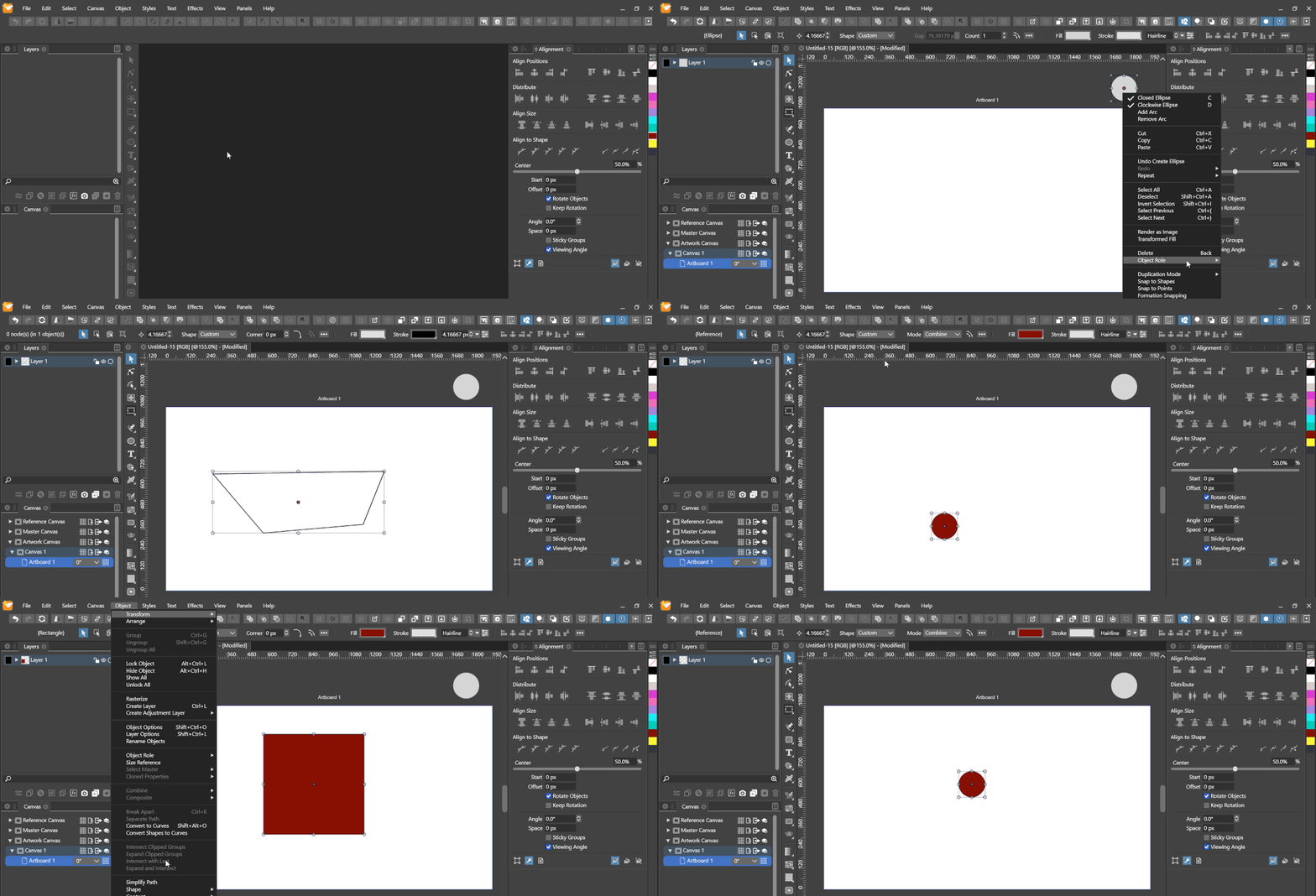
-
@Nils I open an issue on this one to find a better (and maybe configurable) solution.
-
@vectoradmin Ok, thanks. Just to clarify, you do agree that the latest gif I posted showcases a legitimate bug, right? Otherwise I must misunderstand some functionality here.
