Vertical Text Tool - Default text flows right to left in English
-
Hi,
I had an unexpected behaviour when using either of the vertical text tools (Vertical Text Tool or the Vertical Area Text Tool) in Windows 11, VS 1.1.025.The text line flow went from right to left.
The expected behaviour in default, using English, is that the text line flow is from left to right.
Here is what I typed, once upon a time...
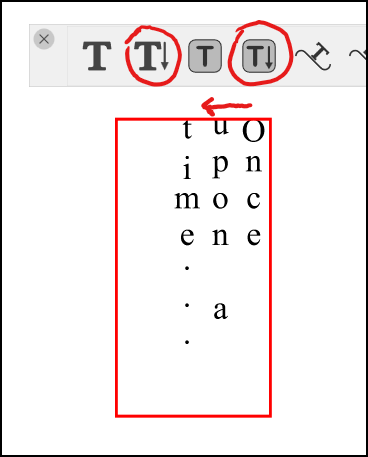
Searching the interface for text directional controls lead me to Text > Paragraph Options (which titles as Paragraph Style). I tried switching it from Default to "Right to Left" and this was the result:
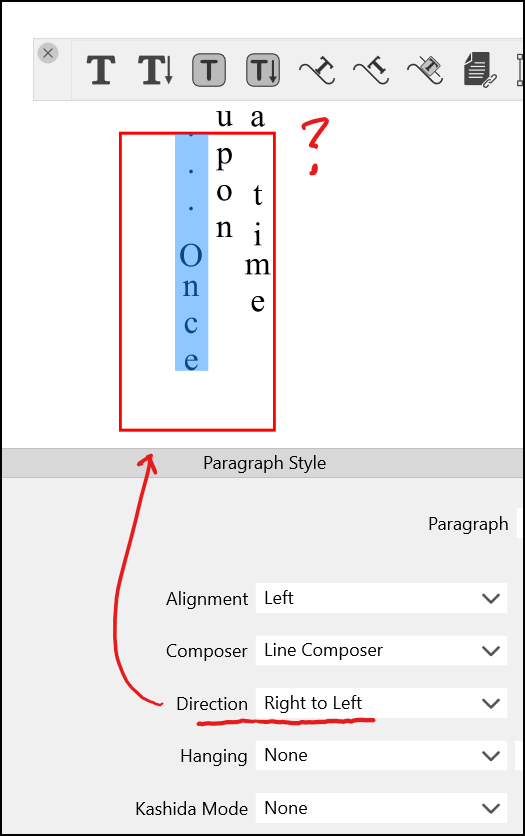
Text went above the frame and punctuation appeared at the start of the sentence.
Let me know if I have accidentally enabled a setting, or if you have any trouble replicating this and I can send a .vstyler file.
Thank you.
-
@Victor-Vector The Right to Left settings does not work for this.
There is a existing task in the backlog to allow configuring the line flow direction also, that will fix this.

