Cannot drag select to add to an existing selection using the shape editor tool
-
I cannot seem to add to an existing selection using a drag selection with the shape editor tool in build 26. If I am using the shape editor tool and I drag select or click on a node or object, it will select, but if I hold shift and try to drag select another node or shape, it will not add to the selection. I can directly click on a node and it will add that way
I checked in the "modifier keys" section of preferences and add/remove selection is still set to "shift"
🍎 macOS Tahoe 26.2, Mac mini (M1, 2020), Chip Apple M1, Memory 16 GB
Cintiq 27QHD Display and LG Ultra HD Display -
Here is a video showing the issue. I tried restarting VS and also tried refreshing and neither fixed the issue.
Is anyone else experiencing this? -
@Boldline As you might know already, the app defaults to letting you use simple click to select nodes from any shape on the canvas, not just the shape that was selected with the Move/Transform tool.
However, once you click-AND-DRAG to select nodes, this limits the nodes that can be selected to the ones of the selected shape.
This is so that you can easily deal with only the nodes of that shape and not drag-to-select nodes from it but select nodes from other shapes unintentionally.
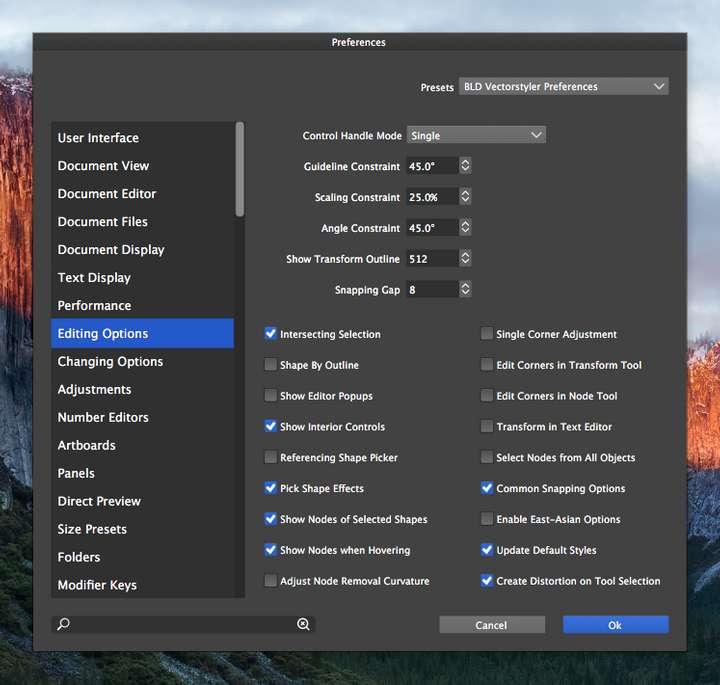
This can be changed if you enable Select Nodes from All Objects in Prefs > Editing Options.
But I don't think it would be practical to change it.
(If it's something else you mean, please explain again).
MacBook Pro (Intel) running Monterey 12.6.4
-
@b77 I appreciate your response though I don't think we're talking about the same exact thing. I have "select nodes from all objects" off and have always had that off because I like the ability to select something generally and then go in with a selection drag and pick specific nodes and such without also selecting other shapes. Affinity has this as well and I always really preferred this method over illustrator, etc.
Something changed not for the better between build 25 and build 26 with this. I switched over to my mac intel computer that still has build 25 on it and was able to easily do what is lacking now in build 26
Here is a video in build 25 doing the same things as I was attempting in build 26
Even within the same initial selection shape, if you then generally grab that shape and then hold shift and try to drag-select a node and then try to again drag-select another node, it will not select ithere are my current relevant settings for build 25 on the mac intel machine:
-
@b77 said in Cannot drag select to add to an existing selection using the shape editor tool:
However, once you click-AND-DRAG to select nodes, this limits the nodes that can be selected to the ones of the selected shape.
Don't forget I'm using the shift modifier with this so it should be able to add to that selection
🍎 macOS Tahoe 26.2, Mac mini (M1, 2020), Chip Apple M1, Memory 16 GB
Cintiq 27QHD Display and LG Ultra HD Display -
Hm… I just tested this with version 1.1.020 which I have on Sierra, and indeed it's different there.
Maybe @vectoradmin made some changes in .026? -
@Boldline Seems to be a regression, as you can't Shift-drag to select nodes from the same selected shape.
-
@b77 yes - from the same shape but also from other added shapes to the selection as shown in the video from build 25
-
@Boldline I think this could be a regression in the node selection method.
EDIT: yes, it is caused by a change in the node selection, I will roll back that for the next build and it will be fixed.


