Gradient tool - bug and usability suggestions
-
Some input I hope can help one way or another :O)
Windows build 208
The gradient editor - bug
- I cannot single click on the line with gradient steps and place a new step. I have to click and drag a bit to the side.
- VS crashed several times during different types of adjustments to position, pulling steps away etc. No obvious pattern.
The gradient editor - usability
- Too many controls. Personally I am initially confused by both a size and a gradient editor - the two parallel lines. It also takes up too much space. I could easily adjust the length and position moving the start- and end point that could work as start and end points, see how simple it looks - and smaller - in Aff. Designer:
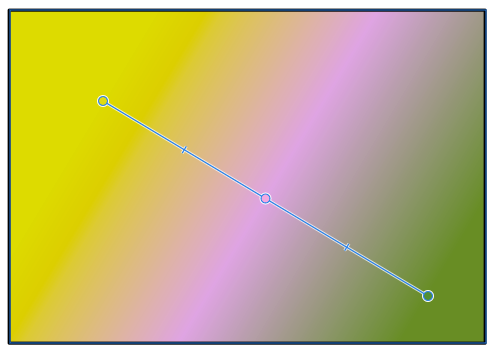
- The lines and controls are a little too big - less is more.
- I edited the shape from the gradient toolbar (middle button) and this control as well as the mask looks interesting, but I could find a way to remove my edits, clear them, reset the edits so I went back to the straight line gradient I started with.
- A lot of tool tips are missing here too.
-
@Ingolf Opened a couple of bugs around this on the backlog.
In bugs: point 1 will be fixed. Point 2 I will have to replicate it somehow, but I got the crash logs, that will help.
In usability:
Point 1 is problematic. The reason for these extra controls is that these are different parameters of the gradient. One scenario that cannot be correctly edited with a single axis is when the colors are repeated (see gradient panel), and they do not start or end at the ending points.
But I can do an option to have a simplified gradient editor variant.
Also: if the gradient has multiple shapes (a complicated scenario), a third axis will show up to position these shapes.Point 2: controls will can be made smaller.
Point 3: the gradient shape changes can be restored to linear (or other basic form) in the gradient panel, by selecting an other shape (inclucing Linear) in the Shape field
Point4: do you refer here to tool tips on the gradient handles shown when the gradient tool is active? currently there are no tool tips on interactive editor handles at all.
-
Gradient tool looks so much better now - and is easier to understand.

