VectorStyler
    • Categories
    • Unread
    • Recent
    • Tags
    • Popular
    • Register
    • Login

    Fonts not being picked up - All text always flagged as 'missing font' and replaced with 14pt Helvetica

    Scheduled Pinned Locked Moved VectorStyler 1.1 Bugs
    5 Posts 2 Posters 6.4k Views
    Loading More Posts
    • Oldest to Newest
    • Newest to Oldest
    • Most Votes
    Reply
    • Reply as topic
    Log in to reply
    This topic has been deleted. Only users with topic management privileges can see it.
    • ambrosA Offline
      ambros
      last edited by

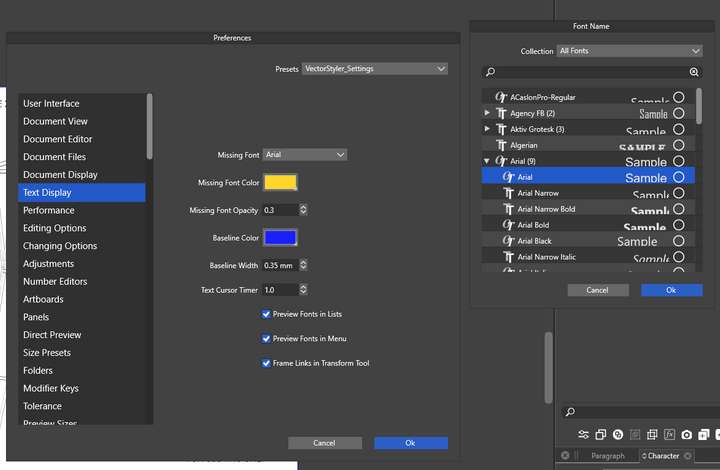
      .. even if I change the 'missing font' in options.. and even if I change all of the text on the document being imported to Arial, It flags ALL text as 'missing font' and replaces all with Helvetica no matter what options I select and no matter what 'replacement font' I select when the missing font dialogue presents itself

      Windows 11 Home 21H2

      • 11th Gen Intel(R) Core(TM) i9-11900H @ 2.50GHz 2.50 GHz
      • 16Ghz RAM
      • Nvidia GeForce 3060TX
      1 Reply Last reply Reply Quote 0
      • ambrosA Offline
        ambros
        last edited by

        I wonder if it is linked to font manager.. the 'default' list is entirely unpopulated..

        Windows 11 Home 21H2

        • 11th Gen Intel(R) Core(TM) i9-11900H @ 2.50GHz 2.50 GHz
        • 16Ghz RAM
        • Nvidia GeForce 3060TX
        BoldlineB 1 Reply Last reply Reply Quote 0
        • BoldlineB Offline
          Boldline @ambros
          last edited by

          @ambros Did you try switching over to "all fonts" and see if that makes a difference?

          🍎 macOS Sequoia 15.3, Mac mini (M1, 2020), Chip Apple M1, Memory 16 GB
          Cintiq 27QHD Display and LG Ultra HD Display

          1 Reply Last reply Reply Quote 0
          • ambrosA Offline
            ambros
            last edited by

            Here you mean ? (0_1636402813745_Screenshot 2021-11-08 201949.png image url)

            Windows 11 Home 21H2

            • 11th Gen Intel(R) Core(TM) i9-11900H @ 2.50GHz 2.50 GHz
            • 16Ghz RAM
            • Nvidia GeForce 3060TX
            1 Reply Last reply Reply Quote 0
            • ambrosA Offline
              ambros
              last edited by ambros

              Ah OK.. if at point of import I change to 'all fonts' it picks up on the 'global' rule I created earlier. so although it's not recognising the font at point of import i can set up a rule that automatically changes t point of import - which is fine.. (thank you @Boldline )
              I can then select all text using the select 'text on path' command and change the point size (As it imports at the wrong size)
              It's strange though.. I am not sure if this is the intended behaviour ? (it's obviously the setup is designed to cater for some complex setups with specific fonts being allocated to specific documents - but I think the 'import routine' isn't as straightforward as it could be as a result maybe ?

              Windows 11 Home 21H2

              • 11th Gen Intel(R) Core(TM) i9-11900H @ 2.50GHz 2.50 GHz
              • 16Ghz RAM
              • Nvidia GeForce 3060TX
              1 Reply Last reply Reply Quote 0
              • First post
                Last post