VectorStyler
    • Categories
    • Unread
    • Recent
    • Tags
    • Popular
    • Register
    • Login

    Resize the "Navigator" panel

    Scheduled Pinned Locked Moved Resolved Issues
    10 Posts 2 Posters 10.1k Views 2 Watching
    Loading More Posts
    • Oldest to Newest
    • Newest to Oldest
    • Most Votes
    Reply
    • Reply as topic
    Log in to reply
    This topic has been deleted. Only users with topic management privileges can see it.
    • B Offline
      B-Vs-V
      last edited by

      Hello,
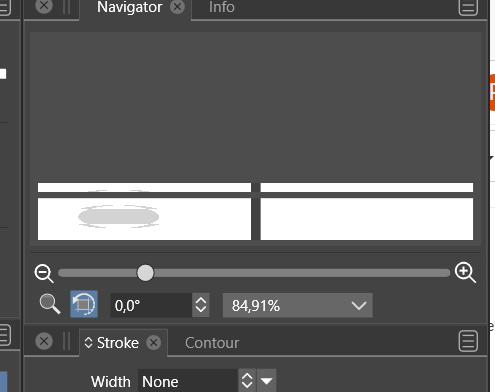
      I am new to VS. I like to use the 'navigator' panel but I find that I can't resize it beyond a certain value without creating artefacts in the window (I create a 2 artboards file).
      0_1636623637606_42ee6fd6-2a00-47c1-a3db-b86b4ca03773-image.png
      Cheers
      Patrick

      W11 Pro 25H2 - 12th Gen Intel(R) i7-12700K 3.61 GHz - RAM 64 Go - NVIDIA GF GTX 4070 Ti - Intuos - Dell UP3216Q / Eizo ColorEdge
      W11 Pro 25H2 - 12th Gen Intel(R) i7-12700KF 3.60 GHz -RAM 64 Go - NVIDIA GF GTX 3080 - IntuosPro- ProArt PA329C

      VectorStylerV 2 Replies Last reply Reply Quote 0
      • VectorStylerV Offline
        VectorStyler @B-Vs-V
        last edited by

        @PatrickM This can be replicated. Looks like the issue occurs on Windows only (could not replicate on Mac).
        Will be fixed ASAP.

        1 Reply Last reply Reply Quote 0
        • B Offline
          B-Vs-V
          last edited by

          Sorry, I forgot to precise that it is indeed on W10.
          Thank you.

          W11 Pro 25H2 - 12th Gen Intel(R) i7-12700K 3.61 GHz - RAM 64 Go - NVIDIA GF GTX 4070 Ti - Intuos - Dell UP3216Q / Eizo ColorEdge
          W11 Pro 25H2 - 12th Gen Intel(R) i7-12700KF 3.60 GHz -RAM 64 Go - NVIDIA GF GTX 3080 - IntuosPro- ProArt PA329C

          1 Reply Last reply Reply Quote 1
          • B Offline
            B-Vs-V
            last edited by

            Wth a file of two artboards, today, I do not see any artboard in the navigator panel but I can move around by clicking within the panel. Moreover, I can not resize the panel.

            W11 Pro 25H2 - 12th Gen Intel(R) i7-12700K 3.61 GHz - RAM 64 Go - NVIDIA GF GTX 4070 Ti - Intuos - Dell UP3216Q / Eizo ColorEdge
            W11 Pro 25H2 - 12th Gen Intel(R) i7-12700KF 3.60 GHz -RAM 64 Go - NVIDIA GF GTX 3080 - IntuosPro- ProArt PA329C

            VectorStylerV 2 Replies Last reply Reply Quote 0
            • VectorStylerV Offline
              VectorStyler @B-Vs-V
              last edited by

              @PatrickM Fix will be in the next build!

              1 Reply Last reply Reply Quote 2
              • VectorStylerV Offline
                VectorStyler @B-Vs-V
                last edited by

                @PatrickM This issue should be fixed in the new build 1.1.002 (beta)

                B 1 Reply Last reply Reply Quote 1
                • B Offline
                  B-Vs-V @VectorStyler
                  last edited by

                  @vectoradmin said in Resize the "Navigator" panel:

                  @PatrickM This issue should be fixed in the new build 1.1.002 (beta)

                  Thank you. I'll test asap 🙂

                  W11 Pro 25H2 - 12th Gen Intel(R) i7-12700K 3.61 GHz - RAM 64 Go - NVIDIA GF GTX 4070 Ti - Intuos - Dell UP3216Q / Eizo ColorEdge
                  W11 Pro 25H2 - 12th Gen Intel(R) i7-12700KF 3.60 GHz -RAM 64 Go - NVIDIA GF GTX 3080 - IntuosPro- ProArt PA329C

                  1 Reply Last reply Reply Quote 0
                  • B Offline
                    B-Vs-V
                    last edited by

                    @vectoradmin Now, I can see the artboard/canvas in the navigator panel and i've discovered the rotation marks.
                    Would it be possible to zoom with the mouse wheel directly in the navigator panel (I know I can do it in the workspace)?
                    Also:

                    • if I rotate the artboard in the navigator panel, the angles values in the "canvas" panel remains 0,0;
                    • if I I rotate the artboard in the navigator panel and then click in the "canvas" panel, the value is again 0,0.
                      Thanks,
                      Patrick

                    W11 Pro 25H2 - 12th Gen Intel(R) i7-12700K 3.61 GHz - RAM 64 Go - NVIDIA GF GTX 4070 Ti - Intuos - Dell UP3216Q / Eizo ColorEdge
                    W11 Pro 25H2 - 12th Gen Intel(R) i7-12700KF 3.60 GHz -RAM 64 Go - NVIDIA GF GTX 3080 - IntuosPro- ProArt PA329C

                    VectorStylerV 1 Reply Last reply Reply Quote 0
                    • VectorStylerV Offline
                      VectorStyler @B-Vs-V
                      last edited by

                      @PatrickM I add the mouse wheel zooming to the backlog.

                      About the rotation: the navigator panel contains the view rotation, this is similar to panning/zooming, it just changes the point of view, and does not modify the document (although it is retained when saved).

                      The canvas panel contains the artboard rotation (not sure if this exists outside of VS), this rotates the actual artboard (not the view). It is also possible to rotate the artboard using the artboard tool.

                      1 Reply Last reply Reply Quote 0
                      • VectorStylerV Offline
                        VectorStyler @B-Vs-V
                        last edited by

                        @PatrickM This problem should be fixed now.

                        1 Reply Last reply Reply Quote 1
                        • First post
                          Last post