VectorStyler
    • Categories
    • Unread
    • Recent
    • Tags
    • Popular
    • Register
    • Login

    Garbled images on import
    Scheduled Pinned Locked Moved Resolved Issues
    4 Posts 2 Posters 4.4k Views 1 Watching
    Loading More Posts
    • Oldest to Newest
    • Newest to Oldest
    • Most Votes
    Reply
    • Reply as topic
    Log in to reply
    This topic has been deleted. Only users with topic management privileges can see it.
    • W Offline
      William Kansepa
      last edited by

      I sometimes get garbled results when importing certain images into a VS document. The first attempt at importing produces an undefined mess. On a good day I do get the desired results on my second attempt but other times I am not so lucky.

      Refer to attached images. Notice the images at the top.
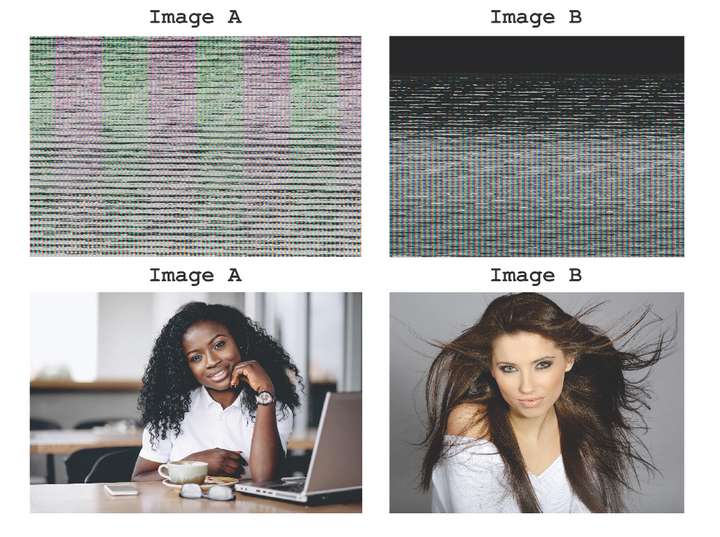
      0_1636826522000_garbled Images.jpg

      Dell D11S Core i5
      Processor: Intel(R) Core(TM) 15-8400 CPU @ 2.8GHz 2.81 GHz
      Installed Memory (RAM) 12.0 GB
      Windows 10 Pro

      HP•Windows 11 Pro•11th Gen Intel(R) Core(TM) i7-1165G7 @ 2.80GHz 2.70 GHz• RAM: 16.0 GB (DDR4)

      VectorStylerV 2 Replies Last reply Reply Quote 0
      • VectorStylerV Offline
        VectorStyler @William Kansepa
        last edited by

        @William-Kansepa Can you send me one image with such issue by email to csraba at vectorstyler.com, what is the image format? (JPEG, PNG, TIFF?)

        W 1 Reply Last reply Reply Quote 0
        • W Offline
          William Kansepa @VectorStyler
          last edited by

          @vectoradmin It happens randomly either with jpegs, png or tif.
          Will email some of the images.

          HP•Windows 11 Pro•11th Gen Intel(R) Core(TM) i7-1165G7 @ 2.80GHz 2.70 GHz• RAM: 16.0 GB (DDR4)

          1 Reply Last reply Reply Quote 0
          • VectorStylerV Offline
            VectorStyler @William Kansepa
            last edited by

            @William-Kansepa This issue should be fixed in the new build 1.1.002 (beta)

            1 Reply Last reply Reply Quote 0
            • First post
              Last post