VectorStyler
    • Categories
    • Unread
    • Recent
    • Tags
    • Popular
    • Register
    • Login

    TIP - Halftone Generator - Bitmap to Vector graphics (.SVG)
    Scheduled Pinned Locked Moved Features and Ideas
    20 Posts 5 Posters 29.4k Views 4 Watching
    Loading More Posts
    • Oldest to Newest
    • Newest to Oldest
    • Most Votes
    Reply
    • Reply as topic
    Log in to reply
    This topic has been deleted. Only users with topic management privileges can see it.
    • BoldlineB Offline
      Boldline @Subpath
      last edited by

      @Subpath What method are you using to create this? Are they actual halftones or just display as such within VS? I assume I could print it as halftones natively within VS. If I need it to be pure vector halftones that could be opened and used in another vector app, I would still need to convert them to vector

      🍎 macOS Tahoe 26.2, Mac mini (M1, 2020), Chip Apple M1, Memory 16 GB
      Cintiq 27QHD Display and LG Ultra HD Display

      1 Reply Last reply Reply Quote 0
      • S Offline
        Subpath
        last edited by Subpath

        Hi @Boldline

        1
        I created the grayscale gradient in Affinity Designer.
        Then exported it as a .PNG and uploaded it to the Halftone Generator page.

        halftone generator

        2
        On the left side above at Shapes various settings can be made.
        Choose there what you like. Also try Shape Distances.

        3
        And then on the top right side it says "Download".
        Click on it, a menu appears and choose Download .SVG.
        Then you can download the whole thing as a pure vector graphic.
        ( The File is call halftone.svg )
        ( The Rasters are Vector Objects! No need to vectorize. )

        Experiment a little with different gradients.

        Win 11
        CPU: AMD Ryzen 5 9600X, 6-core.
        GPU: Nvidia Geforce RTX 5070.

        1 Reply Last reply Reply Quote 1
        • BoldlineB Offline
          Boldline
          last edited by

          @Subpath said in TIP - Halftone Generator - Bitmap to Vector graphics (.SVG):

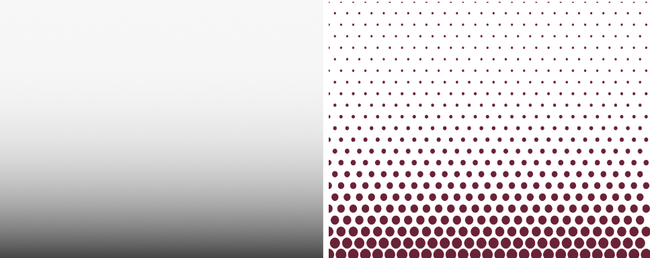
          By the way, you can also control the halftone grid
          with a simple color gradient.
          0_1637569430116_Halftone-Test.png
          @Subpath Ok - thanks for explaining the steps. I initially was not sure when you mentioned being able to control the halftone grid, if this was something inside VS or you were elaborating on the Halftone generator from Adobe. I get it now.

          🍎 macOS Tahoe 26.2, Mac mini (M1, 2020), Chip Apple M1, Memory 16 GB
          Cintiq 27QHD Display and LG Ultra HD Display

          1 Reply Last reply Reply Quote 0
          • S Offline
            Subpath
            last edited by Subpath

            Found another Trick, this time with blurred Text.
            This Tip whas originaly from a Inkscape Video
            but i decide to try it with Affinity Designer.
            ( for the Video look at my Post below )

            1. Type Text in Affinity Designer
              convert it to Curves.

            2. Put a Gaussian Blur Effect over the Text
              and export it as .PNG.

            3. Upload the .PNG File to the Halftone Generator
              and play with Shapes and Shape Distance.

            4. Download and save the Result as .SVG

            Here my Examples

            0_1637660517609_Text-Halftone-2.png

            Win 11
            CPU: AMD Ryzen 5 9600X, 6-core.
            GPU: Nvidia Geforce RTX 5070.

            1 Reply Last reply Reply Quote 0
            • S Offline
              Subpath
              last edited by

              Here is the original Inkscape video for anyone interested.
              Its from Logos By Nick.

              Halftone Text in Inkscape

              Win 11
              CPU: AMD Ryzen 5 9600X, 6-core.
              GPU: Nvidia Geforce RTX 5070.

              b77B 1 Reply Last reply Reply Quote 0
              • b77B Offline
                b77 @Subpath
                last edited by b77

                You guys do know that VectorStyler has plenty of effects, including Gaussian Blur? Not really needed to prepare the image for Vectoraster in another app β€” just…

                • write the text in VS with the Text tool (shortcut: T);
                • apply the effect (Effects menu > Blur > Gaussian Blur);
                • with the text still selected, choose File > Export;
                • choose 'Selected Objects' from the 'Source' menu;
                • choose PNG from the Format menu;
                • click 'OK' to export.

                Then upload the generated image to the online Halftone Generator, or import it in Vectoraster.

                Here's a quick video: https://recordit.co/wKajO3Yk1s

                MacBook Pro (Intel) running Monterey 12.6.4

                S 1 Reply Last reply Reply Quote 0
                • S Offline
                  Subpath @b77
                  last edited by Subpath

                  @b77

                  Yes, I know that, so I don't really need that explanation.
                  But i choose for my Example to go with Affinity Designer
                  for different Reasons to make this post.

                  But thank you for your Info.

                  Win 11
                  CPU: AMD Ryzen 5 9600X, 6-core.
                  GPU: Nvidia Geforce RTX 5070.

                  b77B BoldlineB 2 Replies Last reply Reply Quote 0
                  • b77B Offline
                    b77 @Subpath
                    last edited by

                    @Subpath said in TIP - Halftone Generator - Bitmap to Vector graphics (.SVG):

                    @b77

                    Yes, I know that, so I don't really need that explanation.

                    Maybe beginners will. πŸ™‚

                    MacBook Pro (Intel) running Monterey 12.6.4

                    1 Reply Last reply Reply Quote 0
                    • BoldlineB Offline
                      Boldline @Subpath
                      last edited by

                      @Subpath I appreciate the tips and ideas and want to see more of them for sure. I am glad that you are sharing them and I am going to try that one out. I own AD as well and it's nice to have options.
                      I do agree with @b77 that tips and tutorials on the VS forum should prioritize using VS as much as possible to achieve the result or if not, be an workaround to something VS lacks.
                      My excitement about a tips section inside the VS forum would be to better explore and use VS. That said, I wouldn't mind if you mentioned in the tip that the task could also be accomplished in Designer, etc.

                      🍎 macOS Tahoe 26.2, Mac mini (M1, 2020), Chip Apple M1, Memory 16 GB
                      Cintiq 27QHD Display and LG Ultra HD Display

                      1 Reply Last reply Reply Quote 0
                      • S Offline
                        Subpath
                        last edited by Subpath

                        As I said above, I used Affinity Designer only to create this post.
                        Ok, I could have mentioned this can also be done in VS or vice versa.

                        My intention was only to show the method. No matter what
                        program you then use to achieve these effects

                        Win 11
                        CPU: AMD Ryzen 5 9600X, 6-core.
                        GPU: Nvidia Geforce RTX 5070.

                        BoldlineB 1 Reply Last reply Reply Quote 0
                        • BoldlineB Offline
                          Boldline @Subpath
                          last edited by

                          @Subpath Keep sharing cool tips!

                          🍎 macOS Tahoe 26.2, Mac mini (M1, 2020), Chip Apple M1, Memory 16 GB
                          Cintiq 27QHD Display and LG Ultra HD Display

                          S 1 Reply Last reply Reply Quote 0
                          • S Offline
                            Subpath @Boldline
                            last edited by

                            @Boldline

                            will do it πŸ™‚

                            Win 11
                            CPU: AMD Ryzen 5 9600X, 6-core.
                            GPU: Nvidia Geforce RTX 5070.

                            1 Reply Last reply Reply Quote 1
                            • VectorStylerV Offline
                              VectorStyler @Subpath
                              last edited by

                              @Subpath Repeaters in 1.1.002 can be used to create many of these halftone types.

                              S 1 Reply Last reply Reply Quote 1
                              • S Offline
                                Subpath @VectorStyler
                                last edited by

                                @vectoradmin

                                I know it allready πŸ™‚
                                play a bit with the Repeater, like it πŸ‘

                                Win 11
                                CPU: AMD Ryzen 5 9600X, 6-core.
                                GPU: Nvidia Geforce RTX 5070.

                                1 Reply Last reply Reply Quote 0
                                • First post
                                  Last post
