Monitor profile not working
-
I give up. I cannot use my monitor profile with VS in Windows 10 and no combination of settings results in correct color.
- Eizo wide gamut screen (the expensive kind)
- Calibrated with colorimeter -> resulting monitor profile installed correctly in Windows and used automatically and correctly in every professional program I use
- Calibrated color in UI enabled in preferences
- Styles - color settings - I cannot select the profile from the list
- If I select Apple 1998 colors I get something roughtly similar to correct colors - but not correct anyway, pale, wrong
- If I load the ICC file generated by my Eizo Colorimeter as display profile nothing happens - its name is not even visible in the dialog
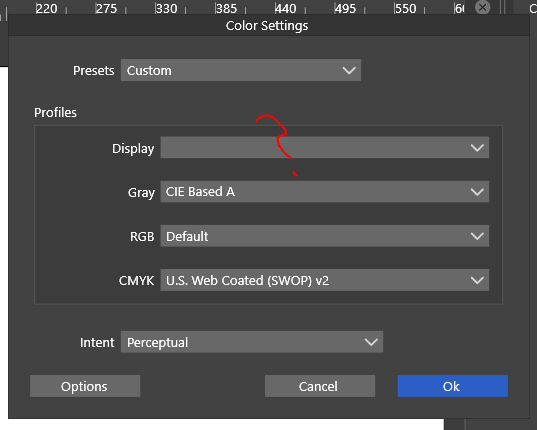
Until this is resolved I cannot use VS for actual projects.
🍏 macOS Sequoia Apple Silicon
-
@Ingolf It sounds like your monitor while very cool, is not a standard monitor and that is probably why it's lacking a profile option. Does the monitor company have a website with applicable driver you can download and install?
-
@Boldline Eizo makes top of the line professional monitors. I assume Ingolf doesn’t have one of the cheaper Eizos.
@Ingolf Can you write the model here?
MacBook Pro (Intel) running Monterey 12.6.4
-
It doesn't lack a profile option. I generated one. The color space in Wide Gamut Mode almost covers Adobe 1998. Very similar. But not identical. Thus the profile - which is the standard way of configuring a monitor with a system.
Everything works automatically in every other program I have from all major browsers to Photoshop, DxO Photolab, Capture One Pro 2.1, Adobe Illustrator, Adobe InDesign, CorelDRAW, Affinity, even Inkscape and Scribus works with it using LittleCMS like Serif does, (all uninstalled), Nikon Capture NX etc. etc. using the standard monitor profile, configured in Windows 10 using the standard there for setting up monitor profiles.
Drivers are not used for this monitor. VS needs to recognize and support the generated monitor profile and operating system setup that is specific to this particular monitor. I calibrate it monthly. Colors drift over time as the hardware ages.
Professional software once had an option to specify this monitor file - not anymore. They all pick it up from Windows once it is configured correctly in Windows and it is.
With that in mind, I am giving up. My system config is honky dory.

-
@b77 I had not heard of that brand of monitors, but that doesn’t mean anything, lol. I would think they would have a profile
https://www.eizoglobal.com/support/db/products/software -
@Boldline said in Monitor profile not working:
@b77 I had not heard of that brand of monitors, but that doesn’t mean anything, lol. I would think they would have a profile
https://www.eizoglobal.com/support/db/products/softwareGeneric profiles are ... generic. Mine is specific to the hardware I own reflecting its current state.
The arrow points at VS.
-
@Ingolf ok. Hopefully it gets resolved
-
The only clue I can give is that if I use the Adobe RGB (1998) in VS in the Styles -> Display and default in RGB, the colors I see are exactly the same I get if I open an image in Photoshop and assign it an Apple RGB profile: duller colors, less contrast.
Sounds to me like if my monitor profile (almost identical to Adobe RGB 998) was actually used, colors would be correct. The ICC files are both quite small.
-
@Ingolf Can you send me the ICC profile you are trying to use by email? It could be some compatibility issue.
-
@vectoradmin said in Monitor profile not working:
@Ingolf Can you send me the ICC profile you are trying to use by email? It could be some compatibility issue.
Sure, coming soon
-
As my signature suggests, I moved Vectorstyler to macOS and M1 hardware which solved the problem for me: macOS actually comes with a generic monitor color profile for this Eizo monitor, but of course I should use a custom made instead, if available. Which I have.
The monitor profile I mentioned above could be imported in macOS Monterey and work flawlessly here as well.
So probably a bit of color management support for Windows in the pipeline for VS.



