VectorStyler
    • Categories
    • Unread
    • Recent
    • Tags
    • Popular
    • Register
    • Login

    Merging/Union Causes Offset path result to disappear in part
    Scheduled Pinned Locked Moved VectorStyler 1.1 Bugs
    3 Posts 2 Posters 4.5k Views 1 Watching
    Loading More Posts
    • Oldest to Newest
    • Newest to Oldest
    • Most Votes
    Reply
    • Reply as topic
    Log in to reply
    This topic has been deleted. Only users with topic management privileges can see it.
    • BoldlineB Offline
      Boldline
      last edited by Boldline

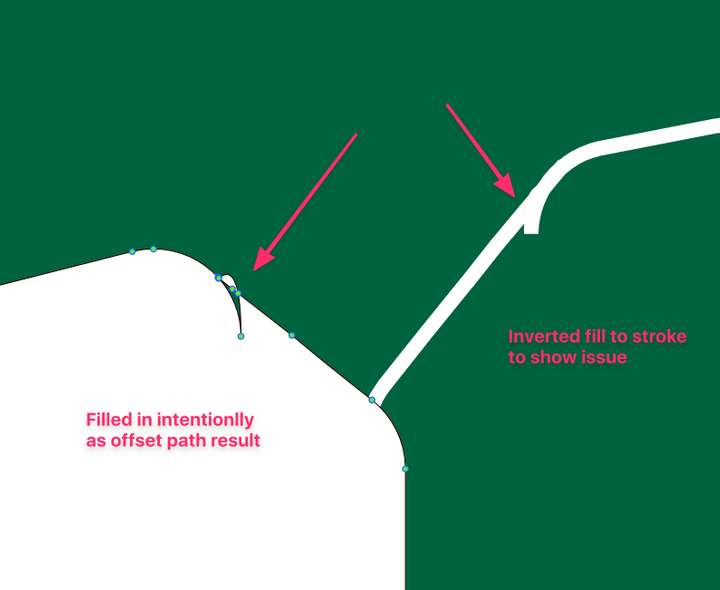
      In this attached example, I had taken the original wording and gave it an offset path. I removed the original words temporarily while I selected the offset path I just made and tried to merge/union it into two separate main shapes (top and bottom shapes)
      Each time I attempted to merge or union, parts of the offset path shapes would disappear.

      The issue may be with the initial font used, but even still, VS needs a solution for troubled expanded fonts lol. I zoomed in on the result of the offset path and noticed some odd results (see pic below) I do know ofr a fact the font is not perfect in it's construction.
      0_1637633303578_BLD 2021-11-22 at 21.06.12.png

      File is attached here:
      0_1637632565862_Boonville Wrestling2021 Green Shirt2.vstyler

      🍎 macOS Sequoia 15.3, Mac mini (M1, 2020), Chip Apple M1, Memory 16 GB
      Cintiq 27QHD Display and LG Ultra HD Display

      VectorStylerV 1 Reply Last reply Reply Quote 0
      • VectorStylerV Offline
        VectorStyler @Boldline
        last edited by

        @Boldline I got the file (found the font also). This one will take some time to figure out.

        BoldlineB 1 Reply Last reply Reply Quote 0
        • BoldlineB Offline
          Boldline @VectorStyler
          last edited by

          @vectoradmin You mentioned you found the font - but for the sake of being sure on it's name, it's called "Sports Headline". I can email you an otf file if that helps


          🍎 macOS Sequoia 15.3, Mac mini (M1, 2020), Chip Apple M1, Memory 16 GB
          Cintiq 27QHD Display and LG Ultra HD Display

          1 Reply Last reply Reply Quote 1
          • First post
            Last post