Control end caps and arrows of strokes together by linking
-
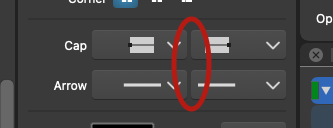
Forgive me if I missed it - is there a way within the stroke panel to link the endcaps/arrow of a stroke so both can be set to the same thing with one action instead of two? Perhaps a chain link icon that show "linked" and "unlinked"?
🍎 macOS Tahoe 26.2, Mac mini (M1, 2020), Chip Apple M1, Memory 16 GB
Cintiq 27QHD Display and LG Ultra HD Display -
@Boldline There is no option to link these for now. But Shift+Clicking on either of them will set the other to the same cap (or arrow).
-
@vectoradmin said in Control end caps and arrows of strokes together by linking:
@Boldline There is no option to link these for now. But Shift+Clicking on either of them will set the other to the same cap (or arrow).
Great! A shame that keyboard shortcuts are so hard to remember for users and hard to communicate discretlely in the user interface - few programs does it right. Statusline hints (when hovering user interface elements) is a desperate attempt that works in some programs. Other active hints are often annoying ("Don't show this again" info boxes).
I often miss great shortcuts in long lists of program shortcuts - I just don't visit or re-visit them that often.
Including them in tooltips is another way - but keyboard shortcut hints in a statusline or whatever line is probably the best method I have seen. Problably the only thing that worked for me in Inkscape in my younger days. And today.
-
Would special buttons be a solution?
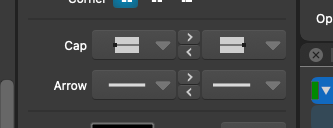
Btw, the triangle buttons could be filled and a bit darker than the white of the actual caps and arrows (and lighter when in Light UI mode).
-
@b77 thanks for mocking that up - helps to see it for sure. With the two arrows per set were you thinking you'd press the arrow pointing to or away from the end cap you want in order to make the other the same? I had been thinking just one button for the arrow set and one button for the encap set with the standard chain/broken link chain icons - but that might not work if the two end are already different things - which one takes precedence?
-
@Boldline Yes, the button pointing to the right should "transfer" the left cap or arrow type to the right, and the one pointing to the left should do the opposite.
@Boldline said:
[…] if the two end are already different things - which one takes precedence?
Exactly — the problem with a 'lock' button is when you have two different caps (or arrows) which one should be applied to both ends?
-
@b77 said in Control end caps and arrows of strokes together by linking:
@Boldline Yes, the button pointing to the right should "transfer" the left cap or arrow type to the right, and the one pointing to the left should the opposite.
Yep - this is also a control I have seen in many programs typically for adding items from one list (column of items) to another column. The arrow makes sense and is pretty much a standard. After one click it should really make total sense once you see the result.
The SHIFT click is a nice feature - but your suggestion @b77 probably easier to remember - it's right there - and understand. And most of all it is tiny plus faster in use than mouse selection plus keyboard combo. More streamlined workflow with the mouse only.
The alternative is a more complex selector. Brrr. So nice work and suggestion.
-
@vectoradmin Shift-clicking should not be ditched however — on the contrary, I would improve all this by letting the user Shift-click any of the cap or arrow presets in the list so it gets directly assigned to the other end.
-



