VectorStyler
    • Categories
    • Unread
    • Recent
    • Tags
    • Popular
    • Register
    • Login

    Traditional Mongolian is not shown properly

    Scheduled Pinned Locked Moved VectorStyler 1.1 Bugs
    8 Posts 2 Posters 8.8k Views 2 Watching
    Loading More Posts
    • Oldest to Newest
    • Newest to Oldest
    • Most Votes
    Reply
    • Reply as topic
    Log in to reply
    This topic has been deleted. Only users with topic management privileges can see it.
    • A Offline
      ash-f
      last edited by ash-f

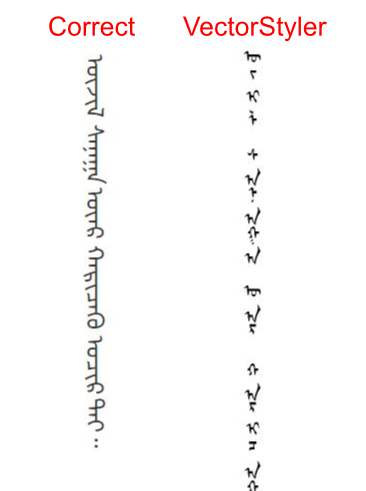
      The orientation of characters should be upright. (and should be continuous in the same sentence.)
      Also the traditional Mongolian is the only language that lines flow from left to right in vertical writing.
      0_1638999196647_mogolian.png

      1 Reply Last reply Reply Quote 0
      • A Offline
        ash-f
        last edited by ash-f

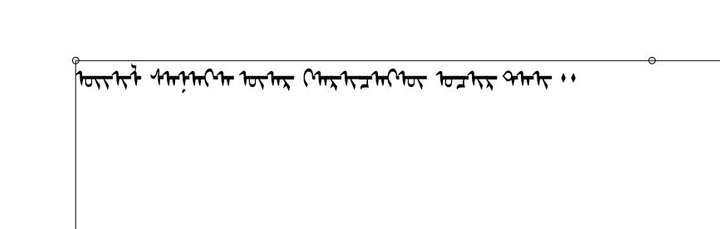
        Horizontal text with OpenType>Initial Forms enabled seems to work as a workaround.
        (But partially incorrect. some characters seems to have different shape if they are not at the first in the sentence.)
        Then rotating the text box can make it look like a vertical text.
        Now, the problem remains is the flow direction of lines...
        0_1639003096558_vs-mongolian-horizontal.jpeg

        1 Reply Last reply Reply Quote 0
        • A Offline
          ash-f
          last edited by ash-f

          I think these OpenType's character position attribute in traditional Mongolian have to be set automatically.
          (Can be judged by simple rules for which form should be used I guess)

          Initial Forms
          Medial Forms
          Final Forms
          Isolated Forms

          P.S.
          VectorStyler shows "Medial Forms #2" in the OpenType menu and Final Forms is missing.
          In Affinity Designer, it's the opposite - there's Final Forms and Medial Forms #2 is missing.

          VectorStylerV 1 Reply Last reply Reply Quote 0
          • VectorStylerV Offline
            VectorStyler @ash-f
            last edited by

            @ash-f I open a bug on this one. But the fix will not make it into the next release.

            A 1 Reply Last reply Reply Quote 1
            • A Offline
              ash-f @VectorStyler
              last edited by ash-f

              @vectoradmin Yes, this isn't necessary right away.
              But I noticed that transitional Mongolian is being requested in other graphic apps.
              And not even Adobe can handle it properly.

              I think MS Word and LibreOffice could be the only app that can handle transitional Mongolian.

              1 Reply Last reply Reply Quote 1
              • A Offline
                ash-f
                last edited by ash-f

                Here's the OpenType features for West-Asian(and I think traditional Mongolian is included)
                https://en.wikipedia.org/wiki/List_of_typographic_features#Features_primarily_intended_for_or_exclusively_required_by_West-Asian_(Semitic,_Arabic)_and_other_cursive_scripts_or_fonts

                1 Reply Last reply Reply Quote 1
                • A Offline
                  ash-f
                  last edited by ash-f

                  These are the Open Type features Illustrator recognizes on the transitional Mongolian font.

                  Initial Forms
                  Isolated Forms
                  Medial Forms
                  Required Ligatures
                  Terminal Forms
                  Vertical Writing

                  1 Reply Last reply Reply Quote 1
                  • A Offline
                    ash-f
                    last edited by ash-f

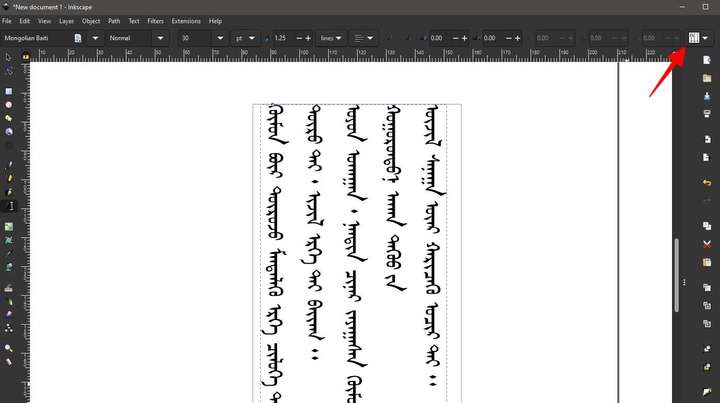
                    @vectoradmin Inkscape seems to handle traditional Mogolian properly.
                    It has left to right mode in vertical writing. also it handles continuous character(cursive) automatically by using the OpenType feature.
                    You may be able to refer their code/logic since it's a opensource.

                    0_1639082290406_Image 2021-12-09 at 12.32.34 PM.jpeg

                    1 Reply Last reply Reply Quote 1
                    • First post
                      Last post