VectorStyler
    • Categories
    • Unread
    • Recent
    • Tags
    • Popular
    • Register
    • Login

    Apply a pattern to a shape without the shape cutting off the edges of the pattern?
    Scheduled Pinned Locked Moved Features and Ideas
    16 Posts 6 Posters 14.6k Views 5 Watching
    Loading More Posts
    • Oldest to Newest
    • Newest to Oldest
    • Most Votes
    Reply
    • Reply as topic
    Log in to reply
    This topic has been deleted. Only users with topic management privileges can see it.
    • VectorStylerV Offline
      VectorStyler @Boldline
      last edited by

      @Boldline I add this to the backlog.

      BoldlineB 1 Reply Last reply Reply Quote 0
      • BoldlineB Offline
        Boldline @VectorStyler
        last edited by

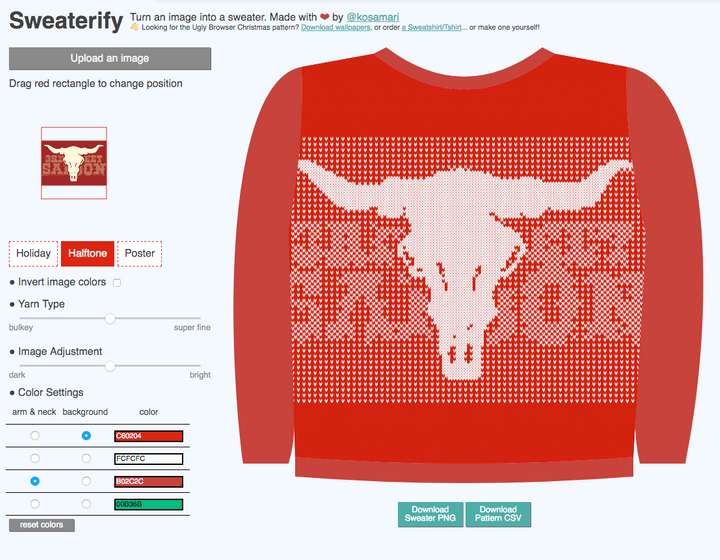
        @vectoradmin I found this website online that was really interesting.
        It basically converts your raster image into an ugly sweater. Of course, the results here are raster and the feature I am looking for in VS would not be only used for replicating an ugly Christmas sweater, but the concept is neat - and that is what I'm hoping can be added in VS
        0_1639341016306_6d6d7b84-1361-461a-a00e-b68f118e8fa5-image.png

        🍎 macOS Tahoe 26.2, Mac mini (M1, 2020), Chip Apple M1, Memory 16 GB
        Cintiq 27QHD Display and LG Ultra HD Display

        1 Reply Last reply Reply Quote 0
        • F Offline
          fde101 Global Moderator
          last edited by

          Vectoraster can get very close to this. You can provide a custom SVG file for the shape the pattern is formed from, then use a raster export of whatever you want to apply the pattern to. The raster image serves to guide placement of the SVG "points" and the final results can be exported as fully vector in PDF, EPS or SVG.

          1 Reply Last reply Reply Quote 0
          • S Offline
            Subpath
            last edited by Subpath

            @Boldline

            Hi, maybe a simple solution.

            But why don't create an array of your pattern, put it over
            the letters of the font and delete all the objects that overlap
            by hand ? So nothing is cut off like with the clipping mask.

            Here is an attempt of mine.
            0_1639399220406_Pattern-Array.png

            Win 11
            CPU: AMD Ryzen 5 9600X, 6-core.
            GPU: Nvidia Geforce RTX 5070.

            BoldlineB 1 Reply Last reply Reply Quote 1
            • S Offline
              Subpath
              last edited by

              By the way, there is a method in Inkscape to replace one
              object with another Object. Might be a little tedious though.

              But with this you can create a vector point array over your text
              in "Vectoraster" and later replace the points with the desired pattern
              you want in Inkscape? Doesn't seem sooo very practical, but possible.

              Here the Link to the Video:
              replace Objects in Inkscape

              Win 11
              CPU: AMD Ryzen 5 9600X, 6-core.
              GPU: Nvidia Geforce RTX 5070.

              1 Reply Last reply Reply Quote 0
              • BoldlineB Offline
                Boldline @Subpath
                last edited by

                @Subpath thanks for the ideas and suggestions. I will try them out. I know I can find workarounds to get what I want and that will get me through for now. I'm hoping an option can be added in VS that allows for this like an internal command option to not cut off any part of the pattern that somehow touches a selected shape, etc.

                🍎 macOS Tahoe 26.2, Mac mini (M1, 2020), Chip Apple M1, Memory 16 GB
                Cintiq 27QHD Display and LG Ultra HD Display

                VectorStylerV 1 Reply Last reply Reply Quote 0
                • VectorStylerV Offline
                  VectorStyler @Boldline
                  last edited by

                  @Boldline It is doable with Repeaters. Still a bit slow, but it can be expanded once all attributes are set:
                  0_1639482524952_pattern1.vstyler

                  b77B 1 Reply Last reply Reply Quote 0
                  • b77B Offline
                    b77 @VectorStyler
                    last edited by b77

                    @vectoradmin Interesting! But I would disable font preview on the canvas with this — it froze the app here and I had to force-quit.

                    MacBook Pro (Intel) running Monterey 12.6.4

                    encartE VectorStylerV 2 Replies Last reply Reply Quote 1
                    • encartE Offline
                      encart @b77
                      last edited by

                      @b77 said in Apply a pattern to a shape without the shape cutting off the edges of the pattern?:

                      @vectoradmin Interesting! But I would disable font preview on the canvas with this — it froze the app here and I had to force-quit.

                      Same here.

                      MacBook Air M4 24Gb, Tahoe 26.2

                      1 Reply Last reply Reply Quote 0
                      • encartE Offline
                        encart
                        last edited by

                        @Boldline Personally, I can see a lot of uses of Pixelate effects for images. It would be great if they had vector equivalents.
                        I used to play with these functions for a while. You can apply an effect and then try tracing. Unfortunately, I can't set up the tracing well in VS but I used then AI for tracing and the effect was pretty good.
                        https://recordit.co/kv5MwlHEck

                        MacBook Air M4 24Gb, Tahoe 26.2

                        1 Reply Last reply Reply Quote 1
                        • VectorStylerV Offline
                          VectorStyler @b77
                          last edited by

                          @b77 Any specific steps on how to replicate the freeze?

                          b77B 1 Reply Last reply Reply Quote 0
                          • b77B Offline
                            b77 @VectorStyler
                            last edited by b77

                            @vectoradmin Trying to change the font of the object at the bottom works the first or second time, then the app can freeze. I replicated the freeze but now when trying to record the screen it didn't freeze, but you can see that I have to wait for the app to catch up: https://recordit.co/QMbNX0ZOYW

                            MacBook Pro (Intel) running Monterey 12.6.4

                            VectorStylerV 2 Replies Last reply Reply Quote 0
                            • VectorStylerV Offline
                              VectorStyler @b77
                              last edited by

                              @b77 said in Apply a pattern to a shape without the shape cutting off the edges of the pattern?:

                              @vectoradmin Trying to change the font of the object at the bottom works the first or second time, then the app can freeze. I replicated the freeze but now when trying to record the screen it didn't freeze, but you can see thatI I have to wait for the app to catch up: https://recordit.co/QMbNX0ZOYW

                              Yes, this one is very slow currently. I will try to find a way to make it faster.

                              1 Reply Last reply Reply Quote 1
                              • S Offline
                                Subpath
                                last edited by Subpath

                                Like the repeater.

                                Could not resist 🙂
                                Have use the File from vectoradmin.

                                To make this picture, i had to combine
                                three VS-Files for the Text.

                                But that the text remains editable, even
                                with this pattern on it, leaves me
                                speechless!

                                The Picture was build from
                                three Bitmap Files.

                                0_1639494458629_VS-Fun-small.png

                                Win 11
                                CPU: AMD Ryzen 5 9600X, 6-core.
                                GPU: Nvidia Geforce RTX 5070.

                                1 Reply Last reply Reply Quote 1
                                • VectorStylerV Offline
                                  VectorStyler @b77
                                  last edited by

                                  @b77 Repeater performance has improved in build 1.1.024

                                  1 Reply Last reply Reply Quote 2
                                  • First post
                                    Last post