Text not scaling for me
-
It scales correctly in another file... so I am wondering what is causing the issue with the current one?
UPDATE: After saving the file with the text issue, I tried to reopen it and iut shit down VS entirely. I moved the file over to my intel mac running VS 1.1 there and it also immediately crashed VS there when attempting to open it.
On both the M1 and the Intel machine - both running VS 1.1, I was able to still open new files and existing files - edit them and save without issue. Only this file in my attached video is problematic.
@vectoradmin - I just emailed you the problematic file and the crash report from the intel machine. I am about to email you the crash reports from the M1 as well in hopes they help reveal what specifically about the file causes the crash. There are elements copied and pasted from illustrator files that I working with in this problematic file if that was a factor in this crash. thanks! -
I had the text not scaling issue happen again and this time I was able to save the file and not lose it with a messed up file.
I took a screen shot to show where the text is that is acting up. The file itself is attached below.
Any time I try to grab a corner of the live text, it does not scale, it only moves across the art board or up and down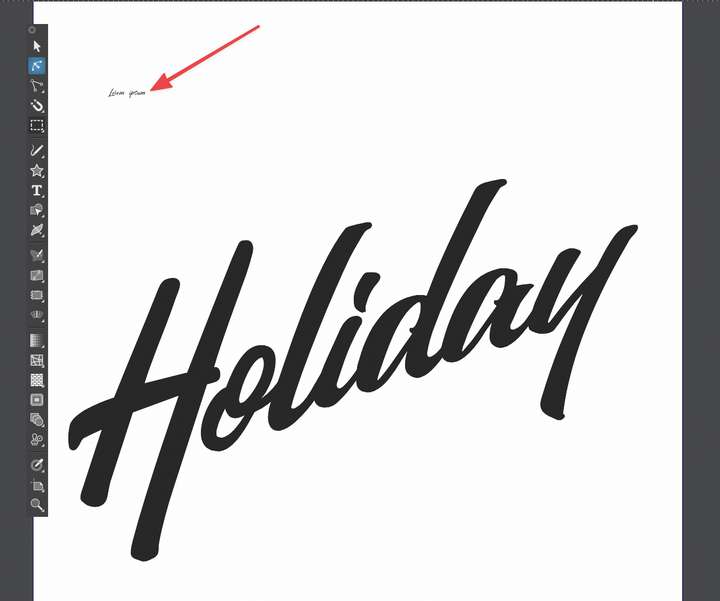
🍎 macOS Tahoe 26.2, Mac mini (M1, 2020), Chip Apple M1, Memory 16 GB
Cintiq 27QHD Display and LG Ultra HD Display -
@Boldline could not replicate this with the attached file.
One thing to try: change the font size of the newly created text, and try scaling afterwards. -
@vectoradmin ok that did not work immediately, but I tried again a few more times and eventually the text was scaling again properly. I'll keep an eye out to see if it happens again and I can't fix it using your suggestion. thanks!
-
@Boldline I will try to replicate the issue and work out a solution.
it seems that for some reason the font size is not adjusted while scaling. -
@Boldline This may be related to the spacebar issue, and it is fixed in 1.1.002

