VectorStyler
    • Categories
    • Unread
    • Recent
    • Tags
    • Popular
    • Register
    • Login

    TIP - Simple Opensource Text/SGVs to 3D-Object Generator

    Scheduled Pinned Locked Moved General Discussion
    25 Posts 5 Posters 44.1k Views 3 Watching
    Loading More Posts
    • Oldest to Newest
    • Newest to Oldest
    • Most Votes
    Reply
    • Reply as topic
    Log in to reply
    This topic has been deleted. Only users with topic management privileges can see it.
    • S Offline
      Subpath
      last edited by Subpath

      Its call "Pomelo", was made as a Tool
      for Blender. As far as I know, Windows only.

      This little 3D generator converts your
      Text (and/or a SVG file) into a 3D object.

      You can bevel it, change colors (background,
      3D object) and load a matcap.

      Usage:
      In Skeleton:
      Write your text
      choose your font
      and press Build

      then in 3D Profile:
      Set the values for the bevel
      and the extrude height.
      Then press Build.

      Below you will see your result.
      Then save it as an .STL file, e.g. for
      rendering in Blender.

      Here the Github Site:
      https://github.com/dov/pomelo/releases/tag/v0.0.6
      x
      x
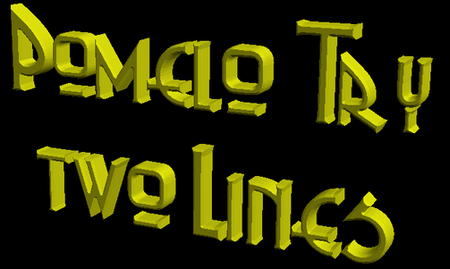
      two Attemps of mine:
      two lines of Text
      0_1639671628321_Text-small.png
      x
      x
      a SVG-File
      0_1639671771889_SVG-small.png

      Win 11
      CPU: AMD Ryzen 5 9600X, 6-core.
      GPU: Nvidia Geforce RTX 5070.

      BoldlineB 1 Reply Last reply Reply Quote 1
      • S Offline
        Subpath
        last edited by Subpath

        For anyone who is interested.
        Here is the original thread from the "Blenderartist Forum".
        In this thread there are more examples of what is possible
        with "Polemo".

        Here the Link:
        Polemo Thread

        Win 11
        CPU: AMD Ryzen 5 9600X, 6-core.
        GPU: Nvidia Geforce RTX 5070.

        1 Reply Last reply Reply Quote 0
        • BoldlineB Offline
          Boldline @Subpath
          last edited by

          @Subpath is the SVG file a vector?

          🍎 macOS Tahoe 26.2, Mac mini (M1, 2020), Chip Apple M1, Memory 16 GB
          Cintiq 27QHD Display and LG Ultra HD Display

          S 1 Reply Last reply Reply Quote 0
          • S Offline
            Subpath @Boldline
            last edited by Subpath

            @Boldline

            Maybe you mißunderstand something.
            Polemos Output is no Vectorformat
            only 3D Formats.
            .STL for later use in e.g. Blender
            . gltf (glb) export support could be load in Microsoft Paint3D
            There is even no Bitmap Output, i make Screenshots
            to show the Examples.

            Only the Input could be an .SVG or Text
            ( as for Input .SVG this use vector )
            But in my knowledge .SVG is generally only vector.

            Btw. i dont know maybe a .stl to vector converter
            will exist anywhere ?

            Above i post also the Link to the original
            Thread in the Blenderartist Forum. In this
            Thread are more Infos and also more Examples.

            Win 11
            CPU: AMD Ryzen 5 9600X, 6-core.
            GPU: Nvidia Geforce RTX 5070.

            BoldlineB b77B 3 Replies Last reply Reply Quote 0
            • BoldlineB Offline
              Boldline @Subpath
              last edited by

              @Subpath I think it's a cool program and gets cool results but I would expect any tips and such on a vector-app forum to be applicable to vectors and tie in somehow with VS.
              I admire and appreciate your willingness to share cool programs and all but it would make sense to me that the shared programs and tips be vector based

              🍎 macOS Tahoe 26.2, Mac mini (M1, 2020), Chip Apple M1, Memory 16 GB
              Cintiq 27QHD Display and LG Ultra HD Display

              S 1 Reply Last reply Reply Quote 0
              • b77B Offline
                b77 @Subpath
                last edited by

                @Subpath Thanks for posting this — it's a great little tool because it does an excellent job with beveling text, something at which Blender is bunk, I can confirm. (The developer of Pomelo is totally right when he says "Blender is a fantastic amazing program! It just doesn’t do text meshes very well").

                Hopefully somebody will compile it for Mac, or even better, integrate in in Blender.

                @Boldline VectorStyler can get involved in the action by exporting any vector shapes as SVG, which then gets open in Pomelo, where you get extrude and quality bevel, export as STL (a 3D format) which you can them import into Blender or any other 3D app, apply materials and render awesome text and stuff.

                MacBook Pro (Intel) running Monterey 12.6.4

                BoldlineB 1 Reply Last reply Reply Quote 1
                • b77B Offline
                  b77 @Subpath
                  last edited by b77

                  @Subpath Blender includes a vector-based renderer — more info about 'Freestyle SVG Exporter' here: https://docs.blender.org/manual/en/latest/addons/render/render_freestyle_svg.html

                  But "converting' an STL file (a 3D format) to a 2D format is possible if you open it in some CAD app, choose one of the views (front, back, left, right, top, bottom, perspective) and export it as PDF.

                  MacBook Pro (Intel) running Monterey 12.6.4

                  S 1 Reply Last reply Reply Quote 1
                  • S Offline
                    Subpath @b77
                    last edited by

                    @b77

                    Interesting Tip, thanks

                    Win 11
                    CPU: AMD Ryzen 5 9600X, 6-core.
                    GPU: Nvidia Geforce RTX 5070.

                    1 Reply Last reply Reply Quote 0
                    • BoldlineB Offline
                      Boldline @b77
                      last edited by

                      @b77 said in TIP - Simple Opensource Text/SGVs to 3D-Object Generator:

                      VectorStyler can get involved in the action by exporting any vector shapes as SVG, which then gets open in Pomelo, where you get extrude and quality bevel, export as STL (a 3D format) which you can them import into Blender or any other 3D app, apply materials and render awesome text and stuff.

                      @Subpath I stand corrected! Would you mind sharing this kind of info in the tip if it might not be understood by the average viewer?

                      🍎 macOS Tahoe 26.2, Mac mini (M1, 2020), Chip Apple M1, Memory 16 GB
                      Cintiq 27QHD Display and LG Ultra HD Display

                      S 1 Reply Last reply Reply Quote 1
                      • S Offline
                        Subpath @Boldline
                        last edited by Subpath

                        @Boldline

                        "...but I would expect any tips and such on a vector-app forum to be applicable to vectors and tie in somehow with VS....."

                        Is a bit of a difficult issue.
                        For one thing, "Pomelo" has points for me that are
                        vector related. You can import an SVG file and
                        extrude it into 3D.

                        For another, how strictly should the rules
                        be interpreted? My posts are made out of good
                        will and not because I am collecting Likes.
                        What doesn't interest one person may help another.

                        By the way, I have no problem to stop these tips.

                        Win 11
                        CPU: AMD Ryzen 5 9600X, 6-core.
                        GPU: Nvidia Geforce RTX 5070.

                        BoldlineB 1 Reply Last reply Reply Quote 0
                        • S Offline
                          Subpath @Boldline
                          last edited by

                          @Boldline said in TIP - Simple Opensource Text/SGVs to 3D-Object Generator:

                          @b77 said in TIP - Simple Opensource Text/SGVs to 3D-Object Generator:

                          VectorStyler can get involved in the action by exporting any vector shapes as SVG, which then gets open in Pomelo, where you get extrude and quality bevel, export as STL (a 3D format) which you can them import into Blender or any other 3D app, apply materials and render awesome text and stuff.

                          @Subpath I stand corrected! Would you mind sharing this kind of info in the tip if it might not be understood by the average viewer?

                          That would be too difficult for me sometimes.
                          @b77 has more knowledge than me in this area and english is not my first language.

                          Win 11
                          CPU: AMD Ryzen 5 9600X, 6-core.
                          GPU: Nvidia Geforce RTX 5070.

                          1 Reply Last reply Reply Quote 0
                          • BoldlineB Offline
                            Boldline @Subpath
                            last edited by Boldline

                            @Subpath Did you see the post above your last comment? @b77 explained the way VS could be used alongside Polemo and I mentioned I stood corrected on your tip. I just asked that if it might not be obvious how VS ties in with the added program mentioned or the process, if that could be shared as well for those not familiar with it.
                            No one accused you of collecting likes or doing anything out of ill-will
                            Like I had said before - as long as the tips tie in somehow to VS/can be done in VS/ or are vector related I appreciate them on here. I'm not the boss and I don't make the rules! 🙂

                            🍎 macOS Tahoe 26.2, Mac mini (M1, 2020), Chip Apple M1, Memory 16 GB
                            Cintiq 27QHD Display and LG Ultra HD Display

                            b77B 1 Reply Last reply Reply Quote 0
                            • b77B Offline
                              b77 @Boldline
                              last edited by b77

                              @Boldline I'm sure Subpath will do better with the next tip.

                              @Subpath Forcing yourself to write in English is the only way to improve. 🙂

                              And it's 'Pomelo', guys! 😆

                              MacBook Pro (Intel) running Monterey 12.6.4

                              S 1 Reply Last reply Reply Quote 3
                              • S Offline
                                Subpath @b77
                                last edited by

                                @b77

                                "Forcing yourself to write in English is the only way to improve."

                                thats my mission 🙂

                                Win 11
                                CPU: AMD Ryzen 5 9600X, 6-core.
                                GPU: Nvidia Geforce RTX 5070.

                                1 Reply Last reply Reply Quote 2
                                • encartE Offline
                                  encart
                                  last edited by

                                  @Subpath @Boldline I think it's not the first time when we are talking about 3d here. This thread pushed me to check what can we achive now without using any external apps. It's a kind of fake 3D, but for some projects may be enough .I used the blend tool for this and I think it works pretty well. https://recordit.co/wWWM6Apph7

                                  MacBook Air M4 24Gb, Tahoe 26.2

                                  S 1 Reply Last reply Reply Quote 0
                                  • IngolfI Offline
                                    Ingolf
                                    last edited by

                                    @vectoradmin I think we need another forum section: General discussion

                                    For knowledge sharing and tips, whatever forum members wants to share

                                    🍏 macOS Sequoia Apple Silicon

                                    S 1 Reply Last reply Reply Quote 2
                                    • S Offline
                                      Subpath @encart
                                      last edited by Subpath

                                      @encart

                                      Thanks for the info, I know the possibility
                                      to solve this with a Blend.

                                      But this way it will be difficult to get
                                      beveled Text. And real 3D-Text offers
                                      yet more possibilities.

                                      Win 11
                                      CPU: AMD Ryzen 5 9600X, 6-core.
                                      GPU: Nvidia Geforce RTX 5070.

                                      1 Reply Last reply Reply Quote 0
                                      • S Offline
                                        Subpath @Ingolf
                                        last edited by

                                        @Ingolf

                                        I also like this idea

                                        Win 11
                                        CPU: AMD Ryzen 5 9600X, 6-core.
                                        GPU: Nvidia Geforce RTX 5070.

                                        1 Reply Last reply Reply Quote 0
                                        • S Offline
                                          Subpath
                                          last edited by Subpath

                                          I managed to create my first SVG-File using Blender's
                                          FreeStyle Render/Exporter. Kept things simple for the
                                          first try.

                                          The resulting SVG-File (its pure Vectordata) can be loaded
                                          into VectorStyler for further editing. Where you can use Object >
                                          "Symplify Path" to reduce the nodes that are created
                                          too much.

                                          For anyone know is interested here a Dropbox Link
                                          to the "FreeStyler.vstyler" File to load into VectorStyler.
                                          https://www.dropbox.com/s/vry0b8fj55b19vl/FreeStyler.vstyler?dl=0

                                          The FreeStyle.vstyler File is the unedited SVG output
                                          of Blender's FreeStyle SVG Exporter.

                                          x
                                          x
                                          Here is a Screenshot from the Result.

                                          0_1639753965934_FreeStyle-Result.png

                                          x
                                          Btw. Big Thanks to b77 for the Tip with the
                                          Blender FreeStyle Exporter Addon.

                                          Win 11
                                          CPU: AMD Ryzen 5 9600X, 6-core.
                                          GPU: Nvidia Geforce RTX 5070.

                                          b77B 1 Reply Last reply Reply Quote 0
                                          • b77B Offline
                                            b77 @Subpath
                                            last edited by

                                            @Subpath Cool! Posting the .vstyler file should work (with the last button labeled 'Upload File'), unless it's too big?

                                            MacBook Pro (Intel) running Monterey 12.6.4

                                            S 1 Reply Last reply Reply Quote 0
                                            • First post
                                              Last post