VectorStyler
    • Categories
    • Unread
    • Recent
    • Tags
    • Popular
    • Register
    • Login

    Option to expand panels such as stroke panel for additional tools not always needed

    Scheduled Pinned Locked Moved Questions and Support
    3 Posts 2 Posters 3.6k Views 1 Watching
    Loading More Posts
    • Oldest to Newest
    • Newest to Oldest
    • Most Votes
    Reply
    • Reply as topic
    Log in to reply
    This topic has been deleted. Only users with topic management privileges can see it.
    • BoldlineB Online
      Boldline
      last edited by

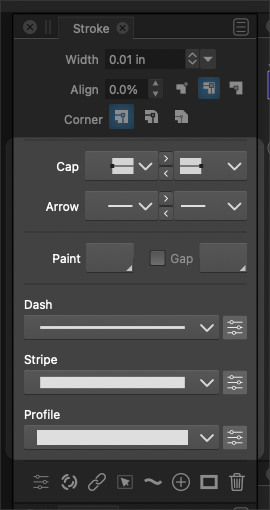
      Speaking only for myself, I am not frequently swapping between dash/stripe/profile (usually "profile" much more than dash or stripe)
      Could the items I highlighted in the screen capture below be in an extended option of the strokes panel? Perhaps similar to Illustrator offers with a drop-down option on the upper right side? Even an arrow that can be clicked and goes to a down pointing position?

      I'd love to be able to save screen real estate and toggling the lesser used features in panels like stroke panel could help.
      0_1640713847699_5da4940d-4d75-4884-9470-205adc02dc9f-image.png

      🍎 macOS Tahoe 26.2, Mac mini (M1, 2020), Chip Apple M1, Memory 16 GB
      Cintiq 27QHD Display and LG Ultra HD Display

      VectorStylerV 1 Reply Last reply Reply Quote 0
      • VectorStylerV Offline
        VectorStyler @Boldline
        last edited by

        @Boldline There is a small up/down arrow button just before the panel title.
        This will rotate several states of the panel.

        I will add the above state also.

        BoldlineB 1 Reply Last reply Reply Quote 1
        • BoldlineB Online
          Boldline @VectorStyler
          last edited by

          @vectoradmin said in Option to expand panels such as stroke panel for additional tools not always needed:

          I will add the above state also.

          Thanks for showing me that arrow feature! Yes if you can add the option for just the top info above what I highlighted, that would be a great addition


          🍎 macOS Tahoe 26.2, Mac mini (M1, 2020), Chip Apple M1, Memory 16 GB
          Cintiq 27QHD Display and LG Ultra HD Display

          1 Reply Last reply Reply Quote 0
          • First post
            Last post