VectorStyler
    • Categories
    • Unread
    • Recent
    • Tags
    • Popular
    • Register
    • Login

    Center up this part of the stroke panel?

    Scheduled Pinned Locked Moved Implemented Features
    6 Posts 3 Posters 10.4k Views 2 Watching
    Loading More Posts
    • Oldest to Newest
    • Newest to Oldest
    • Most Votes
    Reply
    • Reply as topic
    Log in to reply
    This topic has been deleted. Only users with topic management privileges can see it.
    • BoldlineB Online
      Boldline
      last edited by

      Would it look better aesthetically, to have the top portion of the strokes panel be centered? And actually, the middle section as well?
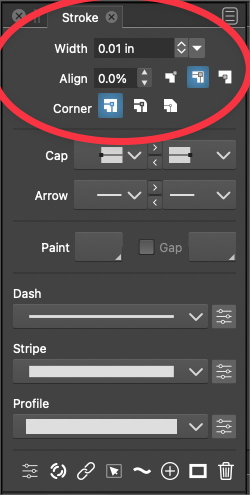
      0_1640714231637_4221dda1-807e-408f-aa1a-9d2aabbe624e-image.png

      🍎 macOS Tahoe 26.2, Mac mini (M1, 2020), Chip Apple M1, Memory 16 GB
      Cintiq 27QHD Display and LG Ultra HD Display

      VectorStylerV 1 Reply Last reply Reply Quote 1
      • VectorStylerV Offline
        VectorStyler @Boldline
        last edited by

        @Boldline I will try

        BoldlineB 1 Reply Last reply Reply Quote 0
        • BoldlineB Online
          Boldline @VectorStyler
          last edited by

          @vectoradmin It's not crucial - just an idea

          🍎 macOS Tahoe 26.2, Mac mini (M1, 2020), Chip Apple M1, Memory 16 GB
          Cintiq 27QHD Display and LG Ultra HD Display

          b77B 1 Reply Last reply Reply Quote 0
          • b77B Offline
            b77 @Boldline
            last edited by b77

            @Boldline Here I also have the 'Miter Limit' checkbox and its angle value:
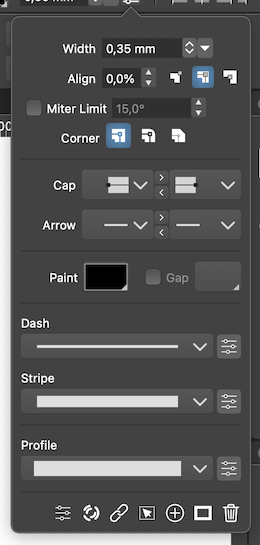
            0_1640714812678_ml.png

            …
            Would aligning the input fields like this while moving the Corner buttons after Miter Limit be better?
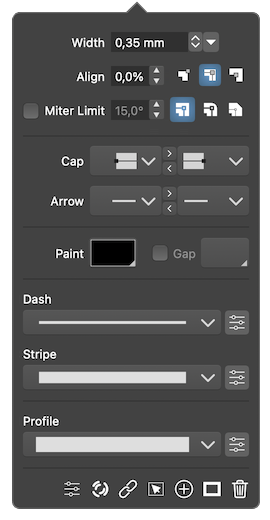
            0_1640775887656_ml - copie.png

            (The 'Corner' label might not be necessary, since the buttons are self-explanatory, and I just needed to make the panel slightly wider so the Miter Limit label and checkbox would fit).

            MacBook Pro (Intel) running Monterey 12.6.4

            BoldlineB 1 Reply Last reply Reply Quote 1
            • BoldlineB Online
              Boldline @b77
              last edited by

              @b77 I appreciate the mock ups -I agree it would be nice to have the width, align miter limit and stroke alignment and corners in a smaller panel together... the goal is to save space, but the doubling up of the settings seems to add confusion in my opinion...

              🍎 macOS Tahoe 26.2, Mac mini (M1, 2020), Chip Apple M1, Memory 16 GB
              Cintiq 27QHD Display and LG Ultra HD Display

              b77B 1 Reply Last reply Reply Quote 0
              • b77B Offline
                b77 @Boldline
                last edited by

                @Boldline Which 'doubling up of the settings' do you mean?

                MacBook Pro (Intel) running Monterey 12.6.4

                1 Reply Last reply Reply Quote 0
                • First post
                  Last post
