VectorStyler
    • Categories
    • Unread
    • Recent
    • Tags
    • Popular
    • Register
    • Login

    Selected Live Text just have an underline in the layer color?

    Scheduled Pinned Locked Moved Implemented Features
    2 Posts 2 Posters 5.6k Views 1 Watching
    Loading More Posts
    • Oldest to Newest
    • Newest to Oldest
    • Most Votes
    Reply
    • Reply as topic
    Log in to reply
    This topic has been deleted. Only users with topic management privileges can see it.
    • BoldlineB Offline
      Boldline
      last edited by Boldline

      Would it make more sense to have selected live text with the transform tool show a bounding box and just an outline below the letters in the same color as the layer color?
      Right now it's showing certain nodes - but I don't think that makes it clear what tool is in use and makes the text harder to read based on what size it is on the artboard

      I like the option for selecting text with the shape editor tool - it gives the option to alter the direction

      0_1640799242799_ae4aed81-c0ac-421c-b727-ed169f793898-BLD 2021-12-29 at 12.30.51.png

      In Illustrator, using the equivalent to the shape editor tool, text has a simple bounding box and an underline - both in the layer color. Would this be a better more legible option in VS?
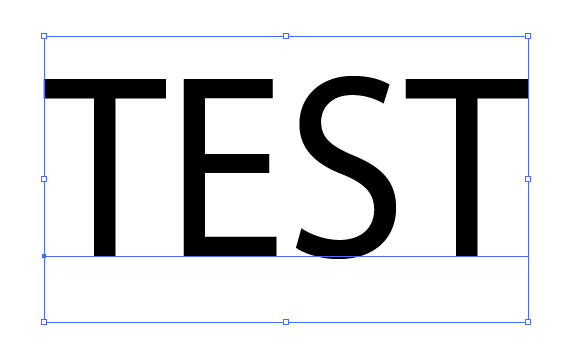
      0_1640799473389_ede06b0c-fc34-45db-8154-c5cb8233cae3-image.png

      🍎 macOS Sequoia 15.3, Mac mini (M1, 2020), Chip Apple M1, Memory 16 GB
      Cintiq 27QHD Display and LG Ultra HD Display

      VectorStylerV 1 Reply Last reply Reply Quote 1
      • VectorStylerV Offline
        VectorStyler @Boldline
        last edited by

        @Boldline This should be available in build 1.1.024

        1 Reply Last reply Reply Quote 0
        • First post
          Last post
