VectorStyler
    • Categories
    • Unread
    • Recent
    • Tags
    • Popular
    • Register
    • Login

    Can I add custom keyboard shortcuts to Boolean operations?

    Scheduled Pinned Locked Moved Questions and Support
    7 Posts 3 Posters 9.1k Views 2 Watching
    Loading More Posts
    • Oldest to Newest
    • Newest to Oldest
    • Most Votes
    Reply
    • Reply as topic
    Log in to reply
    This topic has been deleted. Only users with topic management privileges can see it.
    • BoldlineB Online
      Boldline
      last edited by

      What would be the easiest way to add custom keyboard shortcuts to some of the boolean operations?

      🍎 macOS Tahoe 26.2, Mac mini (M1, 2020), Chip Apple M1, Memory 16 GB
      Cintiq 27QHD Display and LG Ultra HD Display

      encartE b77B 2 Replies Last reply Reply Quote 0
      • encartE Offline
        encart @Boldline
        last edited by

        @Boldline
        View > Customize > Keyboard Shortcuts
        Then, In 'Actions' section go to Object> Combine. Select an operation and add it to shortcuts.
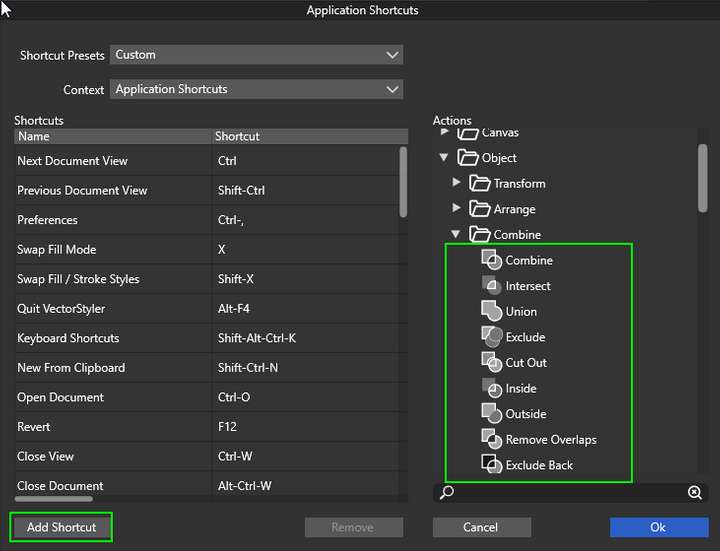
        0_1641247859471_screenshot_20220103_231045.png

        MacBook Air M4 24Gb, Tahoe 26.2

        1 Reply Last reply Reply Quote 2
        • b77B Offline
          b77 @Boldline
          last edited by b77

          @Boldline Here's how:

          • choose 'Keyboard Shortcuts' from the VectorStyler menu;
          • choose 'Multiple Selected Objects' from the Context menu;
          • expand the 'Object' folder in the column on the right, then its 'Combine' subfolder;
          • choose let's say 'Union';
          • click the 'Add Shortcut' button;
          • click the right side of the new entry, under the 'Shortcut' column;
          • press the key combination you want to assign;
          • click 'OK'.

          Quick video here: https://recordit.co/GoCw7pAMx4

          MacBook Pro (Intel) running Monterey 12.6.4

          b77B 1 Reply Last reply Reply Quote 3
          • b77B Offline
            b77 @b77
            last edited by b77

            @encart shows where to find keyboard shortcuts customization on Windows and I show where to find it on the Mac. πŸ™‚

            MacBook Pro (Intel) running Monterey 12.6.4

            encartE 1 Reply Last reply Reply Quote 0
            • encartE Offline
              encart @b77
              last edited by

              @b77 Oh I forgot @Boldline is on a Mac and there can be differences. Apart from that, your way is better because it relates directly to the context.

              MacBook Air M4 24Gb, Tahoe 26.2

              BoldlineB 1 Reply Last reply Reply Quote 1
              • BoldlineB Online
                Boldline @encart
                last edited by

                @encart @b77 Thank you to both of you! I appreciate the help. I was having trouble tracking them down for some reason

                🍎 macOS Tahoe 26.2, Mac mini (M1, 2020), Chip Apple M1, Memory 16 GB
                Cintiq 27QHD Display and LG Ultra HD Display

                b77B 1 Reply Last reply Reply Quote 0
                • b77B Offline
                  b77 @Boldline
                  last edited by b77

                  @Boldline It looks like if you add a shortcut with Option, you’ll get a composite object instead, so don’t use that if you want normal combine operation.

                  MacBook Pro (Intel) running Monterey 12.6.4

                  1 Reply Last reply Reply Quote 2
                  • First post
                    Last post