VectorStyler
    • Categories
    • Unread
    • Recent
    • Tags
    • Popular
    • Register
    • Login

    Change filling

    Scheduled Pinned Locked Moved Resolved Issues
    6 Posts 3 Posters 6.1k Views 3 Watching
    Loading More Posts
    • Oldest to Newest
    • Newest to Oldest
    • Most Votes
    Reply
    • Reply as topic
    Log in to reply
    This topic has been deleted. Only users with topic management privileges can see it.
    • F Offline
      freggern
      last edited by

      1. When I change the fill from color to for example gradient. It only changes the filling, when I change a parameter of the gradient. I expected to change it when I switch to the gradient mode
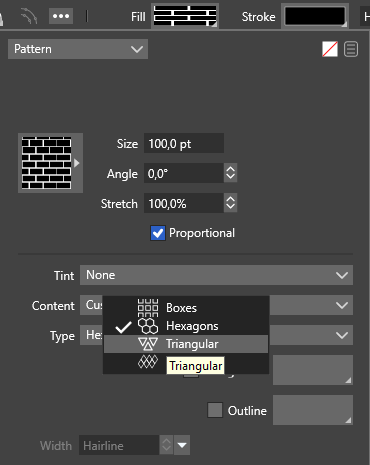
      2. When I change the content of a fill pattern to another option, like hexagons, it doesn't change. It always shows boxes
        0_1641407603562_pattern.png
      VectorStylerV 2 Replies Last reply Reply Quote 0
      • VectorStylerV Offline
        VectorStyler @freggern
        last edited by

        @freggern Both can be replicated.

        1. this is by design, the actual gradient must be selected also. This can be done in the box place left to the Scale / Angle fields.
        2. this is a bug.
        1 Reply Last reply Reply Quote 0
        • VectorStylerV Offline
          VectorStyler @freggern
          last edited by

          @freggern The 2nd problem should be fixed in build 1.1.008

          1 Reply Last reply Reply Quote 0
          • F Offline
            freggern
            last edited by

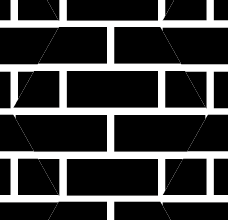
            Is it correct that when I change it to hexagons it looks like this: I expected it more that the boxes are now hexagons. And not boxes + hexagons with boxes background. But maybe I expect something other.
            0_1642634304255_Unbenannt.png

            b77B 1 Reply Last reply Reply Quote 0
            • b77B Offline
              b77 @freggern
              last edited by b77

              @freggern Yes, this is correct — you just changed the tiling type (from Boxes to Hexagonal), not the pattern itself.
              When you change the tiling of any pattern, the pattern itself stays the same but is just tiled differently.
              In this case, rectangles arranged to look like bricks are centered inside a hexagonal tile.

              MacBook Pro (Intel) running Monterey 12.6.4

              1 Reply Last reply Reply Quote 2
              • F Offline
                freggern
                last edited by

                @b77 Ok, I understand. Thanks for clarify! @vectoradmin The 2nd problem is fixed!

                1 Reply Last reply Reply Quote 1
                • First post
                  Last post