VectorStyler
    • Categories
    • Unread
    • Recent
    • Tags
    • Popular
    • Register
    • Login

    Font size in points

    Scheduled Pinned Locked Moved Questions and Support
    5 Posts 2 Posters 5.4k Views 2 Watching
    Loading More Posts
    • Oldest to Newest
    • Newest to Oldest
    • Most Votes
    Reply
    • Reply as topic
    Log in to reply
    This topic has been deleted. Only users with topic management privileges can see it.
    • M Offline
      mickrose
      last edited by

      I don't know if this is a bug or if it's me. I normally work in mm units but I prefer pts for stroke width and font sizes. I can use Preferences to enable line widths to be set and displayed in point sizes. When I use Preferences to try to use point sizes for text sizes, it stays as mm. The setting "Convert .... to unit" doesn't help.

      VectorStylerV 1 Reply Last reply Reply Quote 0
      • VectorStylerV Offline
        VectorStyler @mickrose
        last edited by

        @mickrose Try writing in a font size field for example: "12 pt" (important to write pt also, the first time).
        This should switch it to points.

        1 Reply Last reply Reply Quote 0
        • M Offline
          mickrose
          last edited by

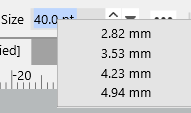
          The text in the font size selector does show in pts. It is the list under the down arrow which stays as millimetres.
          0_1642153044910_c1469d33-d0df-41cd-8a10-5a60f579ba6b-image.png

          VectorStylerV 1 Reply Last reply Reply Quote 0
          • VectorStylerV Offline
            VectorStyler @mickrose
            last edited by

            @mickrose Yes, this could be caused by having mm in the document units (Document Setup -> General).

            By default the font size list is shown in document units.

            This can be changed in Preferences -> Number Editors -> Font Size Units drop down. (VS may need to be restarted after this preference change).

            1 Reply Last reply Reply Quote 0
            • M Offline
              mickrose
              last edited by

              Thanks @vectoradmin. That works now.

              1 Reply Last reply Reply Quote 1
              • First post
                Last post
