VectorStyler
    • Categories
    • Unread
    • Recent
    • Tags
    • Popular
    • Register
    • Login

    System fonts taking over lists

    Scheduled Pinned Locked Moved Questions and Support
    7 Posts 3 Posters 7.1k Views 2 Watching
    Loading More Posts
    • Oldest to Newest
    • Newest to Oldest
    • Most Votes
    Reply
    • Reply as topic
    Log in to reply
    This topic has been deleted. Only users with topic management privileges can see it.
    • BoldlineB Online
      Boldline
      last edited by

      Can something be done in VS to group these related fonts? I know this is not your fault @vectoradmin. I think these are all fonts that came pre-installed with the Mac OS. I never use most of these in my daily work but also feel I can't just remove them as they are part of the OS.
      Is there a way in VS we could select them and put them in a drown down folder or something? just to get them out of the way?
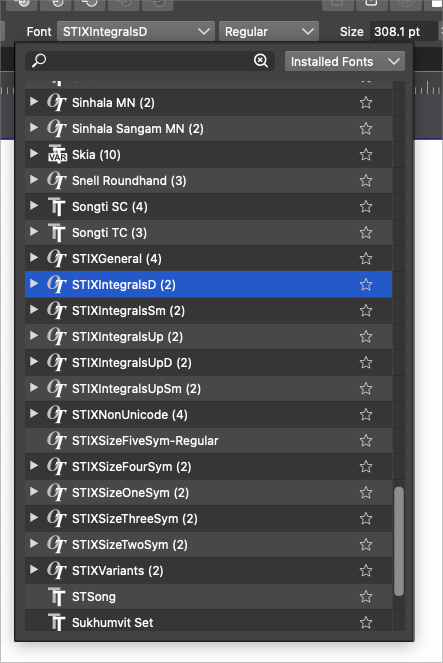
      0_1642601834139_27cb2b08-53c4-4bd2-996d-0bcc31c7fc99-BLD 2022-01-19 at 09.17.04.png

      🍎 macOS Tahoe 26.2, Mac mini (M1, 2020), Chip Apple M1, Memory 16 GB
      Cintiq 27QHD Display and LG Ultra HD Display

      b77B 1 Reply Last reply Reply Quote 2
      • b77B Offline
        b77 @Boldline
        last edited by b77

        @Boldline Yep, STIX and the even longer Noto collection reminds me of this: https://www.youtube.com/watch?v=5iABNDvZ8IA πŸ™‚

        Not sure how the developer can "shorten" these and not other font families, but it would be an improvement if it's doable.

        MacBook Pro (Intel) running Monterey 12.6.4

        BoldlineB 1 Reply Last reply Reply Quote 0
        • BoldlineB Online
          Boldline @b77
          last edited by Boldline

          @b77 LOL that video was crazy. thanks for sharing.
          Yes the Noto is also ridiculous. I know it's not the fault of the VS developer, just was hoping and wishing for a way to hide them...
          what about an option to hide from list view? That way VS could still control the way it looks and not mess with the actual fonts

          🍎 macOS Tahoe 26.2, Mac mini (M1, 2020), Chip Apple M1, Memory 16 GB
          Cintiq 27QHD Display and LG Ultra HD Display

          b77B 1 Reply Last reply Reply Quote 0
          • b77B Offline
            b77 @Boldline
            last edited by

            @Boldline said in System fonts taking over lists:

            @b77 LOL that video was crazy. thanks for sharing.

            It's Alva Noto… πŸ˜†

            MacBook Pro (Intel) running Monterey 12.6.4

            1 Reply Last reply Reply Quote 1
            • b77B Offline
              b77
              last edited by

              @vectoradmin Maybe create a limit for any font with the same first word in the name β€” if it's more than 10(?), display it in a folder.

              MacBook Pro (Intel) running Monterey 12.6.4

              BoldlineB VectorStylerV 2 Replies Last reply Reply Quote 1
              • BoldlineB Online
                Boldline @b77
                last edited by

                @b77 that's also a good idea... even a max of 5 would work for me!

                Going back to the "hide" idea, to clarify, anything that was hidden would only be hidden in the VS font manager and any font could be typed in and made visible again if activated. Maybe even an option to temporarily "show hidden fonts" I just know fonts like 'Noto" and "Stix and many others, I will NEVER use in my design work and if they were hidden from view by my choice in VS, it would not bother me one bit!

                🍎 macOS Tahoe 26.2, Mac mini (M1, 2020), Chip Apple M1, Memory 16 GB
                Cintiq 27QHD Display and LG Ultra HD Display

                1 Reply Last reply Reply Quote 0
                • VectorStylerV Offline
                  VectorStyler @b77
                  last edited by

                  @b77 said in System fonts taking over lists:

                  @vectoradmin Maybe create a limit for any font with the same first word in the name β€” if it's more than 10(?), display it in a folder.

                  I add this to the backlog.

                  1 Reply Last reply Reply Quote 1
                  • First post
                    Last post
