VectorStyler
    • Categories
    • Unread
    • Recent
    • Tags
    • Popular
    • Register
    • Login

    Cannot adjust spacing between to letters with Option key

    Scheduled Pinned Locked Moved Resolved Issues
    3 Posts 2 Posters 5.4k Views 2 Watching
    Loading More Posts
    • Oldest to Newest
    • Newest to Oldest
    • Most Votes
    Reply
    • Reply as topic
    Log in to reply
    This topic has been deleted. Only users with topic management privileges can see it.
    • IngolfI Offline
      Ingolf
      last edited by Ingolf

      Hi @vectoradmin

      In the most recent build I can use the ALT key on Windows to adjust the spacing between to letters (only tried in Shape Text object).

      I cannot do this in the macOS build? Tried other key combos to no avail.

      🍏 macOS Sequoia Apple Silicon

      VectorStylerV 1 Reply Last reply Reply Quote 0
      • IngolfI Offline
        Ingolf
        last edited by

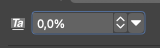
        Ah, the correct wording would be the tracking between to characters - this value:
        0_1642763302260_Skærmbillede 2022-01-21 kl. 12.07.38.png

        🍏 macOS Sequoia Apple Silicon

        1 Reply Last reply Reply Quote 0
        • VectorStylerV Offline
          VectorStyler @Ingolf
          last edited by

          @Ingolf Seems that in macOS the Alt+Arrow keys are used to jump between words in the text editing mode. This is a standard macOS thing.

          Try Control+Alt+Comma / Period to decrease / increase tracking in the editor.

          1 Reply Last reply Reply Quote 1
          • First post
            Last post
