VectorStyler
    • Categories
    • Unread
    • Recent
    • Tags
    • Popular
    • Register
    • Login

    Broken color editor section

    Scheduled Pinned Locked Moved Resolved Issues
    8 Posts 3 Posters 7.9k Views 3 Watching
    Loading More Posts
    • Oldest to Newest
    • Newest to Oldest
    • Most Votes
    Reply
    • Reply as topic
    Log in to reply
    This topic has been deleted. Only users with topic management privileges can see it.
    • IngolfI Offline
      Ingolf
      last edited by Ingolf

      Hi @vectoradmin

      A bug I have forgotten to report for some time now:

      Video from macOS

      🍏 macOS Sequoia Apple Silicon

      VectorStylerV 2 Replies Last reply Reply Quote 0
      • IngolfI Offline
        Ingolf
        last edited by Ingolf

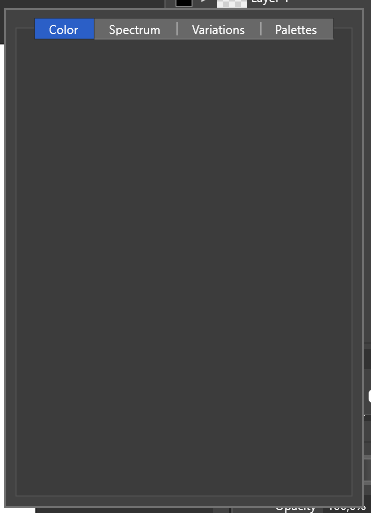
        Same issue on Windows but now with no buttons:
        0_1643346491885_0dd80813-6014-4085-a828-362decfd163b-image.png

        🍏 macOS Sequoia Apple Silicon

        1 Reply Last reply Reply Quote 0
        • VectorStylerV Offline
          VectorStyler @Ingolf
          last edited by

          @Ingolf I tried the steps in the video, but here it is working fine.
          It could be that something is broken in the workspace.

          The workspace.xml file can be located in ~/Libfrary/Application Subpport/NumericPath/VectorStyler1.0/vector/data/resources/ folder.
          This contains current positions / sizes /dockings and other info on the UI.
          If you could send it to me I will try to find out what is the issue.

          1 Reply Last reply Reply Quote 1
          • encartE Offline
            encart
            last edited by

            Have no issues on Windows.

            MacBook Air M4 24Gb, Tahoe 26.2

            1 Reply Last reply Reply Quote 0
            • IngolfI Offline
              Ingolf
              last edited by

              I see the issue on a macOS and a test Windows installation (Both Windows and VS in almost out of the box configs) - but not on a third massively tweaked Windows and VS installation. Three different machines. I will mail @vectoradmin all three workspaces for comparison.

              🍏 macOS Sequoia Apple Silicon

              1 Reply Last reply Reply Quote 1
              • IngolfI Offline
                Ingolf
                last edited by Ingolf

                Found the root cause, @vectoradmin 🙂

                Hide spectrum in Color panel hides it in preferences, artboard fill and perhaps elsewhere too.

                Hide spectrum - impact in preferences

                Hide spectrum - impact in artboard options, fill color

                🍏 macOS Sequoia Apple Silicon

                VectorStylerV 1 Reply Last reply Reply Quote 1
                • VectorStylerV Offline
                  VectorStyler @Ingolf
                  last edited by

                  @Ingolf said in Broken color editor section:

                  Hide spectrum in Color panel hides it in preferences, artboard fill and perhaps elsewhere too.

                  @Ingolf Thanks for the info! Will get fixed ASAP (but after the next build, which is being prepared now).

                  1 Reply Last reply Reply Quote 0
                  • VectorStylerV Offline
                    VectorStyler @Ingolf
                    last edited by

                    @Ingolf This problem should be fixed now.

                    1 Reply Last reply Reply Quote 1
                    • First post
                      Last post
