VectorStyler
    • Categories
    • Unread
    • Recent
    • Tags
    • Popular
    • Register
    • Login

    palette menu option to select all unused colors does not seem to be working - it selects all
    Scheduled Pinned Locked Moved Resolved Issues
    3 Posts 2 Posters 4.7k Views 1 Watching
    Loading More Posts
    • Oldest to Newest
    • Newest to Oldest
    • Most Votes
    Reply
    • Reply as topic
    Log in to reply
    This topic has been deleted. Only users with topic management privileges can see it.
    • BoldlineB Offline
      Boldline
      last edited by

      I was trying to remove colors from the default palette in a new file I had made and had object with the reg mark color set and a square shape with a spot color black I had made. both colors register in the palette when I click on them (they are highlighting correctly)
      When I go to to palette panel menu and select either option to select unused colors, it still selects all of them for some reason
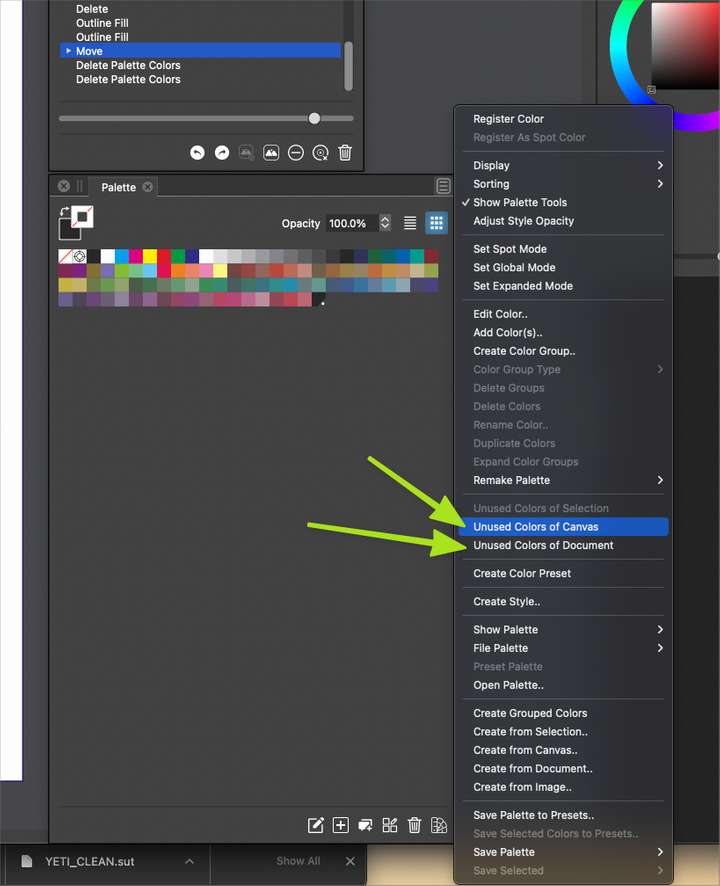
      0_1643825115748_9ed90b8e-24db-498b-9616-b48d4dfaef40-BLD 2022-02-02 at 13.02.20.png

      🍎 macOS Tahoe 26.2, Mac mini (M1, 2020), Chip Apple M1, Memory 16 GB
      Cintiq 27QHD Display and LG Ultra HD Display

      VectorStylerV 2 Replies Last reply Reply Quote 0
      • VectorStylerV Offline
        VectorStyler @Boldline
        last edited by

        @Boldline Looks like a bug, with CMYK documents.

        1 Reply Last reply Reply Quote 0
        • VectorStylerV Offline
          VectorStyler @Boldline
          last edited by

          @Boldline This problem should be fixed in build 1.1.024

          1 Reply Last reply Reply Quote 0
          • First post
            Last post
