update 1.1.016
-
VectorStyler 1.1.016 release notes
Improvements
- Added option (preferences) to create distortion on tool selection.
- Do not adjust effect when releasing mouse.
- Always snap to original when duplicating.
- Color selector popover should not overlap button or gradient editor knob.
- Allow editing gradients on groups.
- Option to enable / disable selection of locked objects, when using select by attribute
Fixes
- General stability fixes.
- Better handling of touching shapes in shape builder.
- Possible freeze in shape builder.
- Faster rendering of aligned outlines.
- Exporting drop shadow image effect at large resolutions.
- Selecting objects while using the warp tools.
- Handling shape centers inside single object reference.
- Printing variable fonts to PDF or Postscript to convert to curves.
- Issue with importing certain JPEG files.
- Drawing lines with pen tool while Show Segment in Pen Tool is enabled.
- Copying artboard names from Canvas panel.
- Constraining angle (with Shift) in pen tool, while drawing lines.
- Possible crash after editing shape drawing options.
- Handling empty groups with shapes in Merge operation.
- Expanding stroke in blend objects.
- Canvas grid may get hidden when switching between documents.
- Selecting searched text using the find replace panel.
- Importing spot color fills from AI files.
- Some black and white BMP files may open in inverted mode.
- Do not allow docking of the toolbox next to the tool bar.
- Vertical text should not overflow the frame.
- Regression in rotating images at certain angles.
- Expanding brushes with the rigid shapes option enabled.
- In place editing of size lists in preferences.
- Resizing shortcuts on Windows.
- File creation time should not be erased.
- Pasting a copy of a closed path should copy the closing node also.
- Text frame content should be visible in outline mode also.
- Regression in pixel preview mode.
-
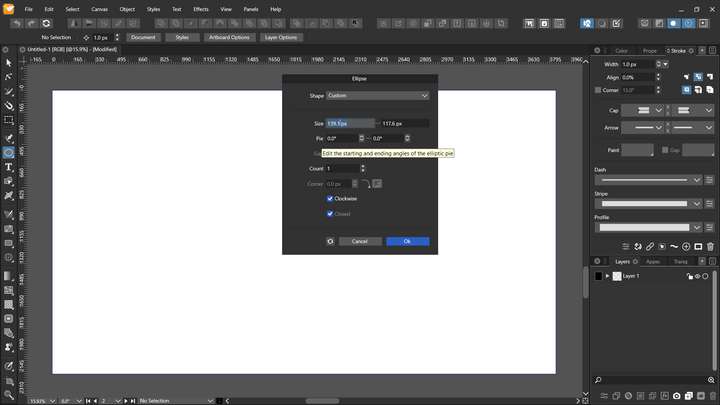
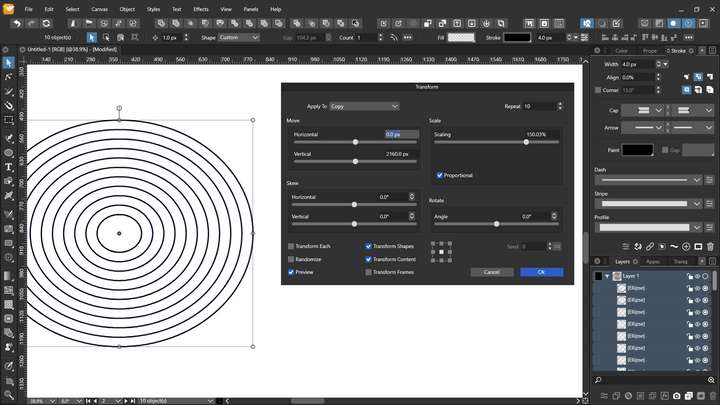
Nice to see so many fixes and improvements. Just install the update. One issue I see in this build is like in transform panel I can't input the value with number key. Also in tool like elipse I cant input the size with number key.
-
@Jayanta-Das Did this occur in previous versions also?
-
@vectoradmin No. It was ok in prev build
Mac Mini M4 Pro | 24Gb
WIndows 11 | Intel i5 11Gen
Wacom Intuos Pro -
@Jayanta-Das It is a regression in the new build. I will upload a fix ASAP.
-
Uploaded a fix for the regression in the Windows version. Use "Check for Updates" to update.
-
@vectoradmin Thank you. Fixed.
-
@vectoradmin said in update 1.1.016:
Selecting objects while using the warp tools.
This is much better now thank you!
-
- File creation time should not be erased.
Just in case anybody needs to manually fix the creation date of an old file so it matches the correct one in the app's Document Info panel, this can be done in the Terminal app (Mac > Applications > Utilities).
So start the Terminal app and type:
touch -t followed by the correct date and the path to the file (just drag the file from the Finder in the terminal';s window and you get the path to it).
The date has the following format YYYYMMDDhhmm:
YYYY - the four digits of the year.
MM - the month of the year, from 01 to 12.
DD - the day of the month, from 01 to 31.
hh - the hour of the day, from 00 to 23.
mm - the minute of the hour, from 00 to 59…… . .
So for example, to change the creation date of the file XYZ.vstyler to 16:15 23rd of October 2021 type this:
touch -t 202110231615
…then drag the .vstyler file from the Finder in the Terminal window, and press Enter/Return.
You can check the result in the Finder, by right-clicking the file and choosing Get Info.


