VectorStyler
    • Categories
    • Unread
    • Recent
    • Tags
    • Popular
    • Register
    • Login

    Failing to access Windows taskbar

    Scheduled Pinned Locked Moved Resolved Issues
    24 Posts 8 Posters 46.8k Views 6 Watching
    Loading More Posts
    • Oldest to Newest
    • Newest to Oldest
    • Most Votes
    Reply
    • Reply as topic
    Log in to reply
    This topic has been deleted. Only users with topic management privileges can see it.
    • VectorStylerV Offline
      VectorStyler @Gremriel
      last edited by

      @Gremriel I'm trying to replicate the taskbar issue on Windows, but could not so far.
      Are the panels reappear when VS is focused?

      G 1 Reply Last reply Reply Quote 0
      • G Offline
        Gremriel @VectorStyler
        last edited by

        @vectoradmin I will try to take a more in-depth look at the panels today, I didn't have much time to test things out when I noticed the panels issue.

        WIndows 11

        1 Reply Last reply Reply Quote 0
        • IngolfI Offline
          Ingolf
          last edited by Ingolf

          I believe Google Chrome had this problem once in Windows. Wasn't popular.

          I see the problem on two very different Windows 10 computers. Task bar (configured to auto hide) pops up in all programs, also programs running in full screen mode, when mouse button is lovered to the bottom of the screen.

          VS however runs in exclusive full screen, moving the mouse button to the bottom of the screen doesn't result in the taskbar popping up. Switching to other programs I see the task bar auto showing again, returning to VS = taskbar doesn't pop up.

          With horrific colors because of no support for my wide gamut monitor profile (also a VS exclusive) I only run VS on macOS though 😉

          🍏 macOS Sequoia Apple Silicon

          1 Reply Last reply Reply Quote 0
          • G Offline
            Gremriel
            last edited by

            Ok, so far I can't replicate the disappearing panels, but I do get that grey border when VS is not maximized. I have no problems with the taskbar, though.

            WIndows 11

            VectorStylerV 1 Reply Last reply Reply Quote 0
            • VectorStylerV Offline
              VectorStyler @Gremriel
              last edited by

              @Gremriel I got the grey border, and the autohide taskbar is not shown when maximized. Working on a solution.

              BoldlineB 1 Reply Last reply Reply Quote 0
              • BoldlineB Online
                Boldline @VectorStyler
                last edited by

                People are mentioning panels disappearing. I don't know if this is related because I'm on a mac, but the color panel keeps going away - I open it and use it and when I restart VS or make a new document, it does not carry over, I have to reopen it again.

                🍎 macOS Tahoe 26.2, Mac mini (M1, 2020), Chip Apple M1, Memory 16 GB
                Cintiq 27QHD Display and LG Ultra HD Display

                G 1 Reply Last reply Reply Quote 0
                • G Offline
                  Gremriel @Boldline
                  last edited by

                  @Boldline When I said panels disappearing, I meant it more like parts of a panel were gone until I moved them around again, so more a glitch than a panel actual disappearing.

                  WIndows 11

                  1 Reply Last reply Reply Quote 1
                  • VectorStylerV Offline
                    VectorStyler @William Kansepa
                    last edited by

                    @William-Kansepa I uploaded a fix for the taskbar issues with VS.
                    Please use "Help - Check for Updates" (Windows only) to update for the new version.

                    W 1 Reply Last reply Reply Quote 2
                    • W Offline
                      William Kansepa @VectorStyler
                      last edited by

                      @vectoradmin said in Failing to access Windows taskbar:

                      @William-Kansepa I uploaded a fix for the taskbar issues with VS.
                      Please use "Help - Check for Updates" (Windows only) to update for the new version.

                      @vectoradmin that was a swift response!
                      I can confirm that the issues are now sorted out. Thank you.

                      HP•Windows 11 Pro•11th Gen Intel(R) Core(TM) i7-1165G7 @ 2.80GHz 2.70 GHz• RAM: 16.0 GB (DDR4)

                      1 Reply Last reply Reply Quote 1
                      • encartE Offline
                        encart
                        last edited by

                        @vectoradmin From what I can see the fix worked.

                        Aside from that. I have an update bug if there are any documents open in the program.

                        • I search for an update using 'Check for updates'
                        • the update is downloaded
                        • a popup appears about saving or closing the file without saving.
                        • I choose 'Don't save'
                        • VS freezes and I need to restart it.

                        After rebooting, the update process works fine.
                        It happened in previous builds as well.

                        MacBook Air M4 24Gb, Tahoe 26.2

                        G VectorStylerV 2 Replies Last reply Reply Quote 1
                        • G Offline
                          Gremriel @encart
                          last edited by

                          @encart I reported that a few days ago.

                          WIndows 11

                          1 Reply Last reply Reply Quote 1
                          • VectorStylerV Offline
                            VectorStyler @encart
                            last edited by

                            @encart said in Failing to access Windows taskbar:

                            I have an update bug if there are any documents open in the program.

                            yes, this issue is still open.

                            1 Reply Last reply Reply Quote 0
                            • M Offline
                              Mongeuse
                              last edited by Mongeuse

                              I am also having this problem, but, interestingly, it depends on which monitor the program is fullscreen. On my computer's primary #1 monitor, I do not have this problem at all, though for some reason the very top of the monitor is not filled by the program (2160x1440 resolution & 27" if that matters). 0_1649046986429_2022-04-03_22-28-45.png
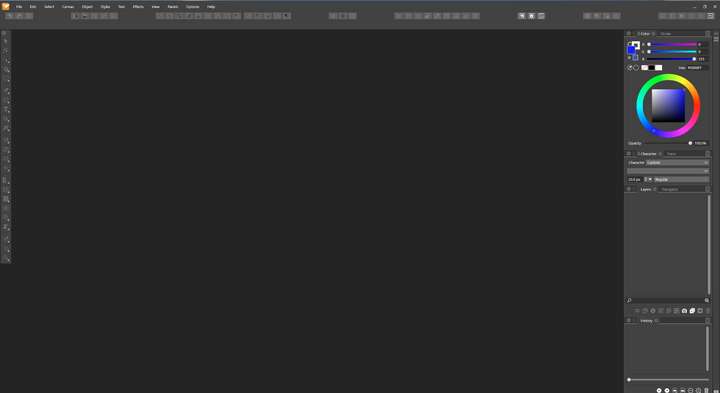
                              On monitors #2 & #3, the taskbar is hidden when fullscreen. Windows 10

                              VectorStylerV 1 Reply Last reply Reply Quote 1
                              • VectorStylerV Offline
                                VectorStyler @Mongeuse
                                last edited by

                                @Mongeuse I will try to replicate this with a dual monitor setup.

                                1 Reply Last reply Reply Quote 1
                                • M Offline
                                  Mongeuse
                                  last edited by

                                  Very small addition to this problem, but it seems the very top of monitor #1 not being filled by the program only occurs when monitor #3, a display tablet positioned below monitor #1, is connected. When it is disconnected, restarting the program and using fullscreen then properly fills the very top.

                                  This doesn't help with the main hidden taskbar when fullscreen on monitors #2 or #3 problem, of course, but it at least clarifies the cause of this other problem.

                                  1 Reply Last reply Reply Quote 1
                                  • VectorStylerV Offline
                                    VectorStyler @William Kansepa
                                    last edited by

                                    @William-Kansepa This problem should be fixed in 1.1.048

                                    1 Reply Last reply Reply Quote 0
                                    • First post
                                      Last post