VectorStyler
    • Categories
    • Unread
    • Recent
    • Tags
    • Popular
    • Register
    • Login

    Gradient can't be applied to brush stroke
    Scheduled Pinned Locked Moved VectorStyler 1.1 Bugs
    9 Posts 4 Posters 9.1k Views 4 Watching
    Loading More Posts
    • Oldest to Newest
    • Newest to Oldest
    • Most Votes
    Reply
    • Reply as topic
    Log in to reply
    This topic has been deleted. Only users with topic management privileges can see it.
    • J Offline
      Jayanta Das
      last edited by

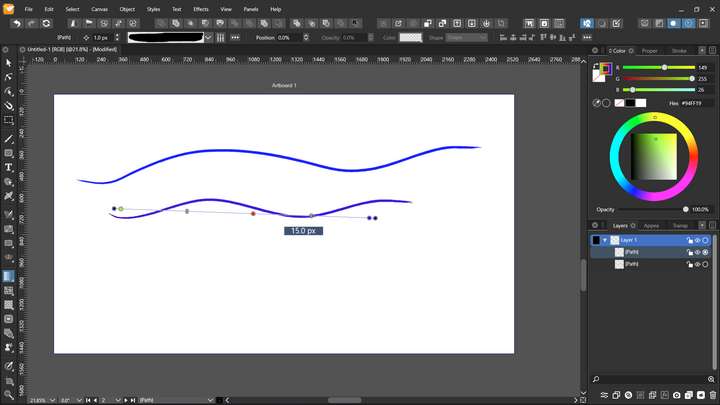
      I can't apply gradient to a brush stroke. There is no issue with the pen tool, gradient can be apply.
      0_1646198120452_Screenshot (37).png

      Mac Mini M4 Pro | 24Gb
      WIndows 11 | Intel i5 11Gen
      Wacom Intuos Pro

      VectorStylerV 1 Reply Last reply Reply Quote 0
      • VectorStylerV Offline
        VectorStyler @Jayanta Das
        last edited by

        @Jayanta-Das Gradients (or pattern, or noise) cannot be used on vector brushes. Only solid colors are supported.
        Vector brushes contain vector objects that are stretched along the shape.
        These objects inside the brush may contain gradients, but the overall vector brush can be styled with solid colors only.

        I add this to the backlog as a feature request.

        1 Reply Last reply Reply Quote 1
        • F Offline
          fde101 Global Moderator
          last edited by

          @Jayanta-Das, Just to point it out as I am not sure if you are aware or not, but if you select the brush stroke and choose Styles -> Expand Stroke, it will convert the brush stroke into a path (as if created using the pen tool) which you can then apply a gradient to.

          J 1 Reply Last reply Reply Quote 2
          • J Offline
            Jayanta Das @fde101
            last edited by

            @fde101 Yes I know that.

            Mac Mini M4 Pro | 24Gb
            WIndows 11 | Intel i5 11Gen
            Wacom Intuos Pro

            1 Reply Last reply Reply Quote 0
            • Victor VectorV Offline
              Victor Vector
              last edited by

              @vectoradmin , @Jayanta-Das ,
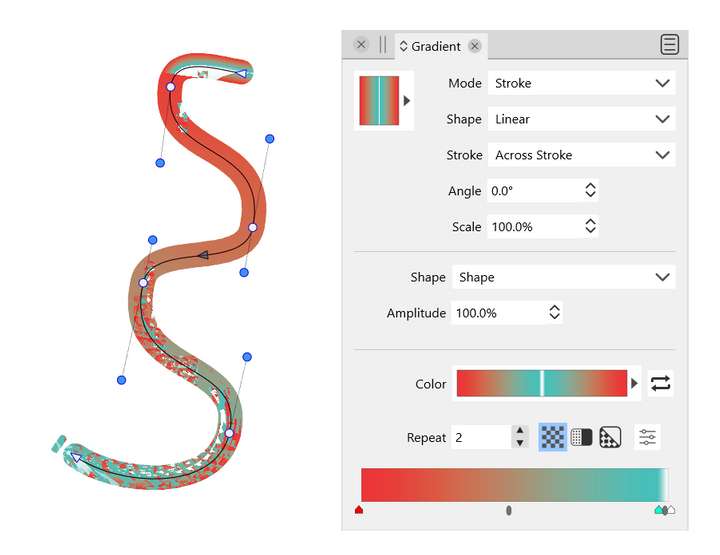
              I think this is a bug and somewhat related. But it helped me troubleshoot the a problem with gradients on strokes, for both "Across Stroke" and "Along Stroke".
              I have the *.vstyler source file generated on a Windows 11 machine, but I was unable to upload it here due to my lack of privileges, so I posted an image illustrating the issue.

              I got this garbled gradient. I was able to make it behave by switching from the "no brush" brush style to any other brush style, then back again. So thanks to this forum post for the hint on how to temporarily fix it.
              0_1646674057454_Gradient across stroke.png

              VectorStylerV 2 Replies Last reply Reply Quote 2
              • VectorStylerV Offline
                VectorStyler @Victor Vector
                last edited by

                @Victor-Vector Send me the .vstyler file by email. This looks like a bug.

                Victor VectorV 1 Reply Last reply Reply Quote 0
                • Victor VectorV Offline
                  Victor Vector @VectorStyler
                  last edited by

                  @vectoradmin Okay I sent it to contact@vectorstyler.com
                  Thanks!

                  1 Reply Last reply Reply Quote 0
                  • VectorStylerV Offline
                    VectorStyler @Victor Vector
                    last edited by

                    @Victor-Vector Temporary workaround for the gradient on stroke error: remove the stroke cap, by selecting Flat for both ends.

                    Victor VectorV 1 Reply Last reply Reply Quote 1
                    • Victor VectorV Offline
                      Victor Vector @VectorStyler
                      last edited by

                      @vectoradmin oh lovely! Thanks. It even works with just one end set to flat, if that helps with troubleshooting...

                      1 Reply Last reply Reply Quote 0
                      • First post
                        Last post