Pattern fills do not export
-
I run into the problem that the patterns I create and use are not being exported to the PDF. They are simply not there. This is a problem if I would want to send my work to someone or have it printed. Everything else seems to work OK, except that I cannot set a color profile for the PDF from the export settings. Also advanced settings like bleed are still missing.
-
For a workaround: uncheck "Tiling Patterns" in the export options:
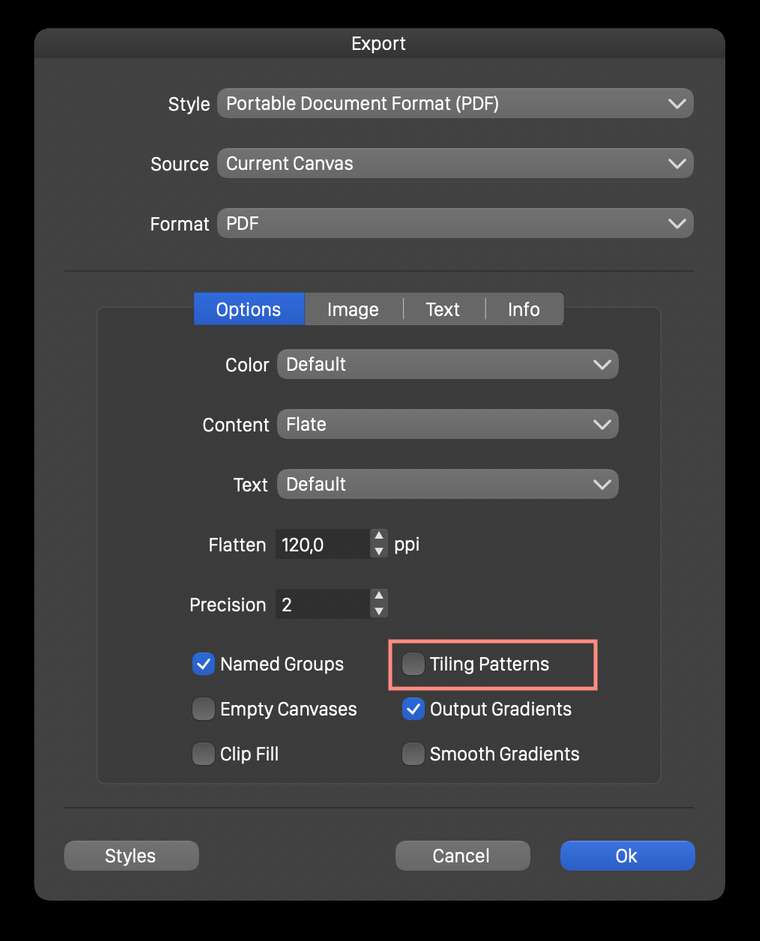
Seems to be a bug, in converting the pattern to PDF patterns.
I add this to the backlog as a bug. -
There have been improvements on the tiling pattern export to PDF.
Let me know if it works for you also. -
It seems to work better now, I can create a pattern preset and apply it to a shape and export this correctly to PDF. This now also works with the built-in patterns. Great work, thanks for this!
One thing that irritates me with pattern fills, is that they show up in the context toolbar at the top, but when I click on this, I get the color dialog box, not an option to change the pattern setting. It would make sense to me if this were available here.
-
About the fill style popover: the top right corner of it contains a drop down menu where the fill type is selected. Should be pattern automatically in this case but seems to be a bug.
Select Pattern in that menu. -
@vectoradmin Oh yes, now I see, I did not look at this option, thanks!
