VectorStyler
    • Categories
    • Unread
    • Recent
    • Tags
    • Popular
    • Register
    • Login

    Making different instances for the same panel less confusing ( accumulated )

    Scheduled Pinned Locked Moved Features and Ideas
    5 Posts 2 Posters 5.3k Views 2 Watching
    Loading More Posts
    • Oldest to Newest
    • Newest to Oldest
    • Most Votes
    Reply
    • Reply as topic
    Log in to reply
    This topic has been deleted. Only users with topic management privileges can see it.
    • N Offline
      Nils
      last edited by Nils

      Notice: Accumulated into mega-topic.

      Take for example the "Brushes panel". It has two different appearances afaik, one where you can set the width, profile etc. and one with a search field. A VS user can't know which is which, when choosing a panel via the arrow next to the stacked panels, since they're both named the same. I suggest semantic augmentation via parantheses for example.

      VectorStylerV 1 Reply Last reply Reply Quote 0
      • VectorStylerV Offline
        VectorStyler @Nils
        last edited by

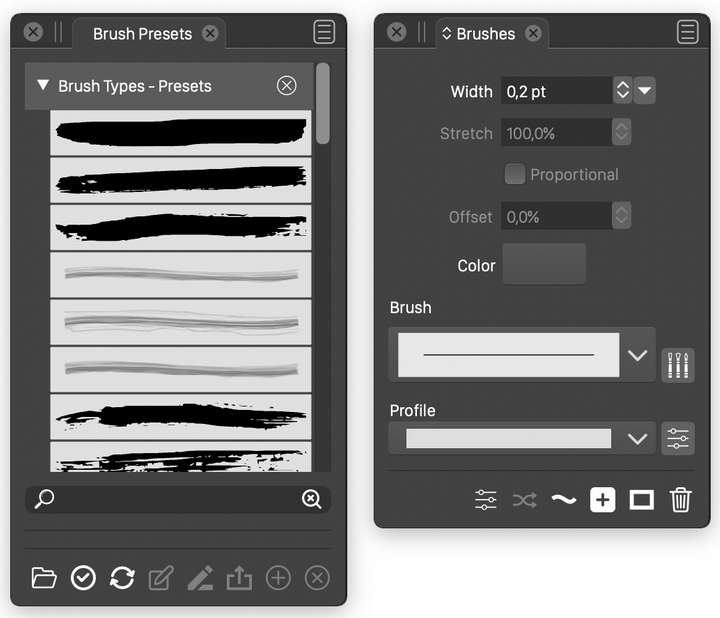
        @Nils If are referring to these:
        one is a preset ("Brush Presets" title) panel, the other is the main Brushes panel.
        The titles are different, but if there is little space, then of course can be mixed.

        Please clarify how to make this better with an example 🙂

        0_1647873302702_brushes.png

        N 2 Replies Last reply Reply Quote 0
        • N Offline
          Nils @VectorStyler
          last edited by

          @vectoradmin I wasn't referring to the brush presets panel as the second one. I'll post a gif.

          1 Reply Last reply Reply Quote 0
          • N Offline
            Nils @VectorStyler
            last edited by

            @vectoradmin Here's the gif.

            alt text

            VectorStylerV 1 Reply Last reply Reply Quote 0
            • VectorStylerV Offline
              VectorStyler @Nils
              last edited by

              @Nils Got it. That is the Brush Styles panel, I will fix the panel title.
              It is empty because there are no brush styles in the document (styles and presets are different).

              1 Reply Last reply Reply Quote 0
              • First post
                Last post