VectorStyler
    • Categories
    • Unread
    • Recent
    • Tags
    • Popular
    • Register
    • Login

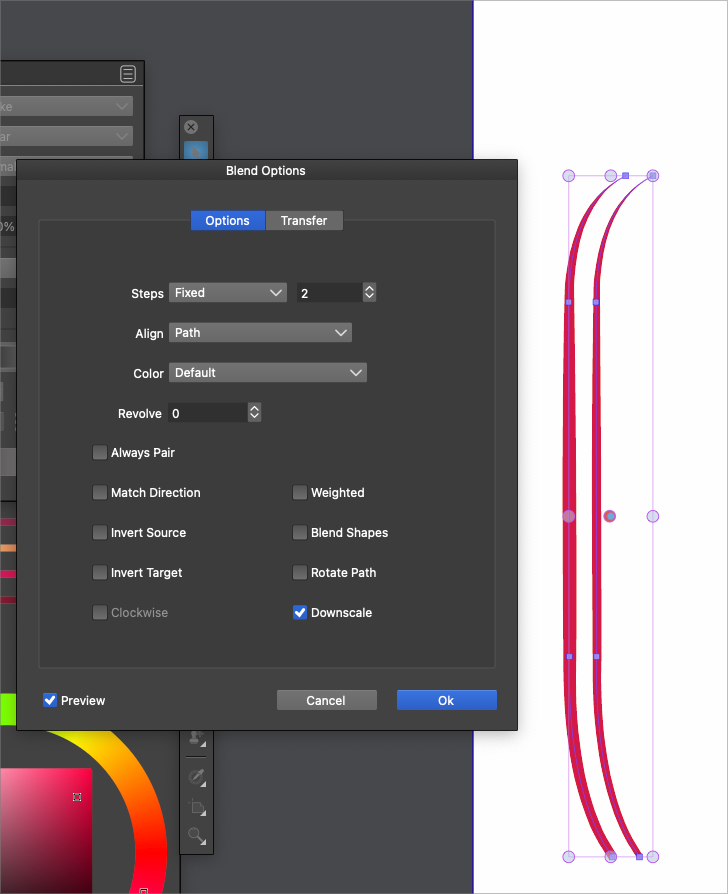
    Can strokes with width adjustments be blended?
    Scheduled Pinned Locked Moved Questions and Support
    15 Posts 4 Posters 11.8k Views 3 Watching
    Loading More Posts
    • Oldest to Newest
    • Newest to Oldest
    • Most Votes
    Reply
    • Reply as topic
    Log in to reply
    This topic has been deleted. Only users with topic management privileges can see it.
    • S Offline
      Subpath @Boldline
      last edited by

      @Boldline

      no, made a similar Stroke like yours.
      but will also try your file now, just a moment 🙂

      Win 11
      CPU: AMD Ryzen 5 9600X, 6-core.
      GPU: Nvidia Geforce RTX 5070.

      BoldlineB 1 Reply Last reply Reply Quote 0
      • BoldlineB Offline
        Boldline @Subpath
        last edited by

        @Subpath ok thanks - the reason I ask is because with those strokes, I had used the path width tool and that was where it seemed to give me issues trying to blend it properly afterward

        🍎 macOS Tahoe 26.2, Mac mini (M1, 2020), Chip Apple M1, Memory 16 GB
        Cintiq 27QHD Display and LG Ultra HD Display

        S 1 Reply Last reply Reply Quote 0
        • S Offline
          Subpath @Boldline
          last edited by

          @Boldline

          first observation
          the two strokes seems some how connected
          if i hover over the left one both get selected

          • no regluar blend visible

          as i copy and paste both the connection seems gone
          also no regular blend, and if i expand the blend
          i get only lines

          also no regular blend i copy the your strokes to new file

          Here the video
          attemp with your file
          in the video the left one is already blended
          and expanded

          Win 11
          CPU: AMD Ryzen 5 9600X, 6-core.
          GPU: Nvidia Geforce RTX 5070.

          BoldlineB 1 Reply Last reply Reply Quote 0
          • BoldlineB Offline
            Boldline @Subpath
            last edited by

            @Subpath said in Can strokes with width adjustments be blended?:

            the two strokes seems some how connected
            if i hover over the left one both get selected

            This is not happening with the strokes here - they are not grouped or connected

            🍎 macOS Tahoe 26.2, Mac mini (M1, 2020), Chip Apple M1, Memory 16 GB
            Cintiq 27QHD Display and LG Ultra HD Display

            S 1 Reply Last reply Reply Quote 0
            • S Offline
              Subpath @Boldline
              last edited by Subpath

              @Boldline

              yes there is no group an i also found no combine

              here is the video where i restarted VS
              and only load your file, seems sometimes
              connected and other not
              just your file

              Win 11
              CPU: AMD Ryzen 5 9600X, 6-core.
              GPU: Nvidia Geforce RTX 5070.

              BoldlineB 1 Reply Last reply Reply Quote 1
              • BoldlineB Offline
                Boldline @Subpath
                last edited by

                @Subpath thanks for checking that - it may just be an odd obscure situation that @vectoradmin can figure out why it is occurring that way..

                🍎 macOS Tahoe 26.2, Mac mini (M1, 2020), Chip Apple M1, Memory 16 GB
                Cintiq 27QHD Display and LG Ultra HD Display

                b77B VectorStylerV 2 Replies Last reply Reply Quote 1
                • b77B Offline
                  b77
                  last edited by b77

                  @Subpath They are connected because they form a blend object already. But since they are so close to each other, the first object is more difficult to select separately (hover the cursor on its left and click).

                  MacBook Pro (Intel) running Monterey 12.6.4

                  S 1 Reply Last reply Reply Quote 1
                  • b77B Offline
                    b77 @Boldline
                    last edited by

                    @Boldline Indeed this seems to be a bug — if you get rid of the brush contour of both red lines the interpolation works.

                    MacBook Pro (Intel) running Monterey 12.6.4

                    1 Reply Last reply Reply Quote 0
                    • S Offline
                      Subpath @b77
                      last edited by Subpath

                      @b77

                      ah, interesting good to know
                      but curious

                      Win 11
                      CPU: AMD Ryzen 5 9600X, 6-core.
                      GPU: Nvidia Geforce RTX 5070.

                      1 Reply Last reply Reply Quote 0
                      • VectorStylerV Offline
                        VectorStyler @Boldline
                        last edited by

                        @Boldline I think the issue is that these two shapes contain brushes, and it seems that the brush content is not blended.

                        1 Reply Last reply Reply Quote 0
                        • First post
                          Last post
