update 1.1.026
-
VectorStyler 1.1.026 release notes
Fixed
- Using pure spot color gradients and exporting to PDF.
- Allow line constraining with Shift+ before pressign the mouse in the eraser, knife and path brush tools.
- Regression in repeater expand.
- Regression in symbol tools.
- Hide selection when holding space key.
- Deselect node in Node editor when clicking away.
- Refresh issues when moving or transforming groups containing composite groups.
- Color palette panel tool tips on Windows.
- Clicking on sub menu names should not exit the menu.
- Shortcut editor view may freeze when clicking away from an active shortcut field.
- Select corner size from context panel, only for selected corners.
- Control backspace to delete word on Windows in name editors.
- Select all in Layers panel opened name editor should select text.
- Path closing indicator in Pen tool.
- Selecting the clipping shape of a group nested inside a transformed group.
- Selecting a font did not add it to the recent font list.
- Canvas role for Object Style was not applied correctly.
- Opened Styles panel may break other panel updating (for example: Layers panel).
- Changing object style using object role did not propagate in some cases.
- Move inside last in transformed groups did not position and transform correctly.
- Undoing moving inside did not refresh correctly.
- Combine operations inside transformed group did not consider parent transforms.
- Crash when selecting cusp node corner for open path ending nodes.
- Pasting screen shot image from clipboard on Windows.
- Code page for tool tips was wrong on Windows.
- Selecting object shape to keep the visual center of objects.
- Setting the snapshot name to setup default name from current time.
- Using both canvas and object roles may create conflicts in the Styles panel.
- Using multiple roles on a single object to list them correctly in the Styles panel.
- Changes to shape style override did not propagate correctly.
- Shape styles list did not open in override panel for shape styles.
- Undo and redo after merging certain transformed groups of complex shapes.
- Copy and paste to keep object position if object is visible inside the current view.
- Snapping restriction button to be checkable, clearing restriction when unchecked.
- Add null and registration color to selected document palette.
- Adding symbols with the symbol spray tool inside transformed symbol sets placed them in wrong positions.
- Symbol tinting brush did not expand symbols correctly.
- Possible crash when opening AI files with embedded images.
-
@vectoradmin After update when I click taskbar shortcut I created earlier before the update shows this message
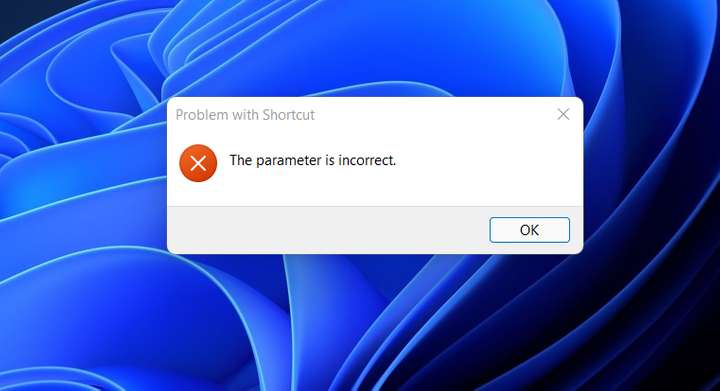
Update: after restart pc Shortcut completely removed
-
@Jayanta-Das I just updated here on a Windows 10, and the previous taskbar shortcut is working.
Could it be that VS ended up in a different folder?I think the quick fix now is to recreate the taskbar shortcut.
-
@vectoradmin On my Windows machines the shortcut I manually add to the taskbar is removed when I update VS. I have seen other apps do the same. I don't use Windows much anymore so I start it from the start menu instead and forgot to report it.
I remember some instances (other programs) where the shortcut used a more technical reference to the program rather than the file path and thus was removed when the updated program got a new technical reference during setup.
Looks like the same is happening there: "wrong parameter" means the reference is no longer valid.

