VectorStyler
    • Categories
    • Unread
    • Recent
    • Tags
    • Popular
    • Register
    • Login

    Blend misbehavior

    Scheduled Pinned Locked Moved VectorStyler 1.1 Bugs
    4 Posts 2 Posters 4.5k Views 2 Watching
    Loading More Posts
    • Oldest to Newest
    • Newest to Oldest
    • Most Votes
    Reply
    • Reply as topic
    Log in to reply
    This topic has been deleted. Only users with topic management privileges can see it.
    • S Offline
      Subpath
      last edited by Subpath

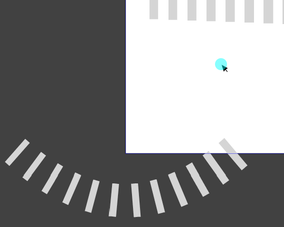
      if I create a straight blend and then align it to a curve,
      then I can't create straight blends after that

      All subsequent blends will always follow this path
      and the blend created will always end up in the lower
      left corner of the canvas

      only a restart of VS changes this behavior

      some observation:
      this seems connected to "Rotate Path"

      Video
      Blend bevavior

      0_1648546620213_Blend.png

      Win 11
      CPU: AMD Ryzen 5 9600X, 6-core.
      GPU: Nvidia Geforce RTX 5070.

      VectorStylerV 1 Reply Last reply Reply Quote 0
      • S Offline
        Subpath
        last edited by Subpath

        yet another observation

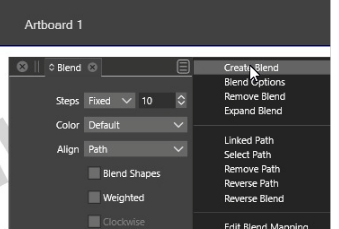
        if i create the Blend from the Blend Panel Menu
        it works es expected. But if i use the Blend Tool
        for that it put the Blend on the latest Path.

        Video
        Blend Panel Menu

        0_1648549400129_Blend Panel Menu.png

        Win 11
        CPU: AMD Ryzen 5 9600X, 6-core.
        GPU: Nvidia Geforce RTX 5070.

        1 Reply Last reply Reply Quote 0
        • VectorStylerV Offline
          VectorStyler @Subpath
          last edited by

          @Subpath This looks like a bug. Does selecting "Remove Path" from the menu fixes this?

          S 1 Reply Last reply Reply Quote 0
          • S Offline
            Subpath @VectorStyler
            last edited by Subpath

            @vectoradmin

            no, it does nothing.

            my workaround is, to use Blend from
            the Panel Menu, or i convert the Curve
            to straight line with the Shape Editor Tool.

            Win 11
            CPU: AMD Ryzen 5 9600X, 6-core.
            GPU: Nvidia Geforce RTX 5070.

            1 Reply Last reply Reply Quote 0
            • First post
              Last post