update 1.1.028
-
@vectoradmin said in update 1.1.028:
Stroke style role on solid stroke did not work.
Nice to have this one fixed! So nice to be able to use the solid stroke properly and not have it convert to another brush each time.
-
@Ingolf said in update 1.1.028:
Unexpected and unwanted color mode changes
Looks like a some cases were not tested properly. I keep these issues open.
-
@Ingolf said in update 1.1.028:
Control + backspace deactivated object name editor in Layers panel on MacOS.
Still does?? (Unless the object name is an active selection)
Here it only deactivates after everything was deleted and was pressed again on an empty field. Is that the case?
-
@Ingolf said in update 1.1.028:
And sometimes doesn't draw still. You forgot to include some of these fixes in the build?

The fix is in, but it looks like only partial. When clicking with the pen tool on an existing object it will change the selection and that causes to draw on top of that object (this will be fixed).
I could not replicate the the case when it is not drawing.
-
@vectoradmin said in update 1.1.028:
@Ingolf said in update 1.1.028:
And sometimes doesn't draw still. You forgot to include some of these fixes in the build?
The fix is in, but it looks like only partial. When clicking with the pen tool on an existing object it will change the selection and that causes to draw on top of that object (this will be fixed).
I described my findings here to move it to the appropriate section of the forum
https://vectorstyler.com/forum/topic/1843/draw-above-bugI could not replicate the the case when it is not drawing.
I will try to establish a pattern. I experienced it once, I believe the issue was somewhat mitigated in build 28, at least.
-
@vectoradmin said in update 1.1.028:
@Ingolf said in update 1.1.028:
Control + backspace deactivated object name editor in Layers panel on MacOS.
Still does?? (Unless the object name is an active selection)
Here it only deactivates after everything was deleted and was pressed again on an empty field. Is that the case?
I see two weird behaviors:
A) Deactivated cursor
- Object name Vector
- No active selection in field
- Place cursor behind the letter r
- Press Control + backspace
- Input field is now blank
- Cursor not active and nothing happens when typing something
B) Leftover letter
- Object name {Path}
- No active selection in field
- Place cursor behind the char }
- Press Control + backspace
- Cursor blinking in the beginning of the input field
- ... in front of a surviving { char
-
@vectoradmin said in update 1.1.028:
@Ingolf said in update 1.1.028:
Unexpected and unwanted color mode changes
Looks like a some cases were not tested properly. I keep these issues open.Nailed this down as well
Below a discovery that may point to a possible root cause:It always happens when I create an object with the pen tool and swap fill and outline styles (Shift+X) which is what I always do after drawing an object. That is why it bothers me so much and often.
Steps to reproduce
- Enable keep color mode and HSB mode
- New document
- Activate pen tool (fill is now empty, stroke is black)
- Draw a simple closed shape
- Swap swap fill and outline styles (HSB still active color mode)
- Click on fill to bring it on top
- RGB is now active color mode
Observation that perhaps points to a root cause
- Enable keep color mode and HSB mode
- New document
- Activate pen tool (fill is now empty, stroke is black)
- Draw a simple closed shape
- Make a single tiny adjustment to the stroke color (ie +1 in saturation)
- Swap swap fill and outline styles (HSB still active color mode)
- Click on fill to bring it on top
- HSB is still active color mode
- Looks like RGB is carried over from the stroke color initially (although HSB or something else is displayed) unless I make an adjustment?
-
@Ingolf All 3 non-fixed problems can be replicated.
-
@vectoradmin, thanks for all the fixes and i found one thing is working now:
"Select and move multiple node handles". GreatVideo:
Multiple Handles selection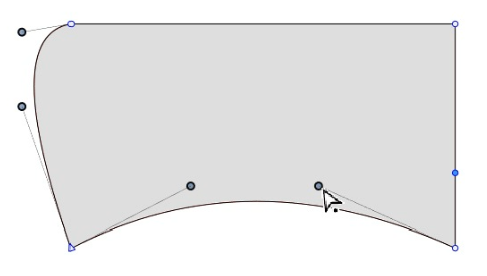
-
@vectoradmin Is this about the app not reading the embedded fonts in a PDF on import?
- Disable automatic scanning of fonts from PDF files.
-
@b77 said in update 1.1.028:
@vectoradmin Is this about the app not reading the embedded fonts in a PDF on import?
- Disable automatic scanning of fonts from PDF files.
No. It is about the font manager. The VS font manager can scan PDF (and PS) files as fonts, if they have embedded fonts.
It does not affect the import.



