VectorStyler
    • Categories
    • Unread
    • Recent
    • Tags
    • Popular
    • Register
    • Login

    Adjustment effect icon in layer
    Scheduled Pinned Locked Moved Resolved Issues
    10 Posts 2 Posters 9.2k Views 2 Watching
    Loading More Posts
    • Oldest to Newest
    • Newest to Oldest
    • Most Votes
    Reply
    • Reply as topic
    Log in to reply
    This topic has been deleted. Only users with topic management privileges can see it.
    • J Offline
      Jayanta Das
      last edited by

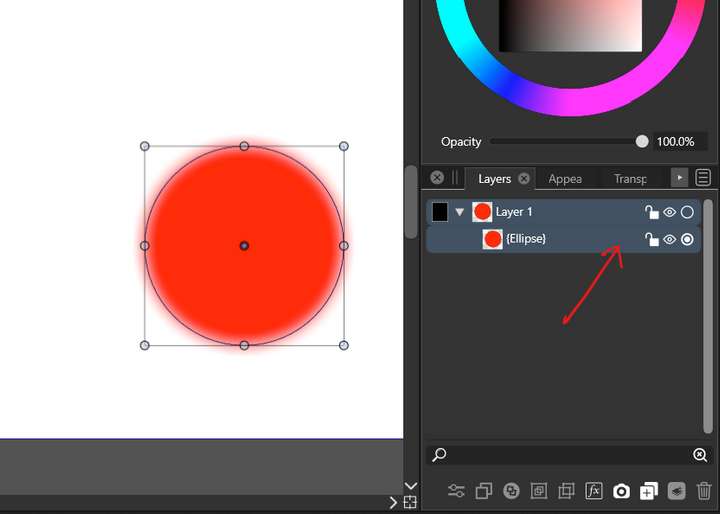
      Adjustment effect applied to a shape from appearance panel doesn't show any icon in layer panel.
      0_1649926492369_Screenshot 2022-04-14 142416.png

      Mac Mini M4 Pro | 24Gb
      WIndows 11 | Intel i5 11Gen
      Wacom Intuos Pro

      VectorStylerV 1 Reply Last reply Reply Quote 0
      • VectorStylerV Offline
        VectorStyler @Jayanta Das
        last edited by

        @Jayanta-Das Was it applied on the "Fill" of the object, or on the object itself.
        These are different, and the Layers panel shows only the ones that are on the "object".

        J 1 Reply Last reply Reply Quote 0
        • J Offline
          Jayanta Das @VectorStyler
          last edited by

          @vectoradmin its applied on the object itself.

          Mac Mini M4 Pro | 24Gb
          WIndows 11 | Intel i5 11Gen
          Wacom Intuos Pro

          VectorStylerV 1 Reply Last reply Reply Quote 0
          • VectorStylerV Offline
            VectorStyler @Jayanta Das
            last edited by

            @Jayanta-Das Send me the file by email.

            J 1 Reply Last reply Reply Quote 0
            • J Offline
              Jayanta Das @VectorStyler
              last edited by

              @vectoradmin Done.

              Mac Mini M4 Pro | 24Gb
              WIndows 11 | Intel i5 11Gen
              Wacom Intuos Pro

              VectorStylerV 1 Reply Last reply Reply Quote 1
              • VectorStylerV Offline
                VectorStyler @Jayanta Das
                last edited by

                @Jayanta-Das Checked the file, and everything is alright.
                The adjustment effect was added to the Layer 1, but not as an effect over the layer, but as an adjustment effect "content".
                These are shown in the Appearance panel, when "Layer 1" is selected using the small circle next to the layer name.

                J 1 Reply Last reply Reply Quote 0
                • J Offline
                  Jayanta Das @VectorStyler
                  last edited by

                  @vectoradmin I got it. Thanks for explaining.

                  Mac Mini M4 Pro | 24Gb
                  WIndows 11 | Intel i5 11Gen
                  Wacom Intuos Pro

                  J 1 Reply Last reply Reply Quote 0
                  • J Offline
                    Jayanta Das @Jayanta Das
                    last edited by

                    @vectoradmin
                    While applying inner shadow this happens.

                    Mac Mini M4 Pro | 24Gb
                    WIndows 11 | Intel i5 11Gen
                    Wacom Intuos Pro

                    VectorStylerV 1 Reply Last reply Reply Quote 0
                    • VectorStylerV Offline
                      VectorStyler @Jayanta Das
                      last edited by

                      @Jayanta-Das Send me the file with this example.
                      In Preferences -> Performance -> Compute Engine try all the options.
                      What is the GPU type you use?

                      J 1 Reply Last reply Reply Quote 1
                      • J Offline
                        Jayanta Das @VectorStyler
                        last edited by

                        @vectoradmin Thank you. Solved by changing to software.

                        Mac Mini M4 Pro | 24Gb
                        WIndows 11 | Intel i5 11Gen
                        Wacom Intuos Pro

                        1 Reply Last reply Reply Quote 0
                        • First post
                          Last post