VectorStyler
    • Categories
    • Unread
    • Recent
    • Tags
    • Popular
    • Register
    • Login

    Erasing section of Vector shape alters red dot rotation point

    Scheduled Pinned Locked Moved Resolved Issues
    3 Posts 2 Posters 3.6k Views 1 Watching
    Loading More Posts
    • Oldest to Newest
    • Newest to Oldest
    • Most Votes
    Reply
    • Reply as topic
    Log in to reply
    This topic has been deleted. Only users with topic management privileges can see it.
    • BoldlineB Offline
      Boldline
      last edited by Boldline

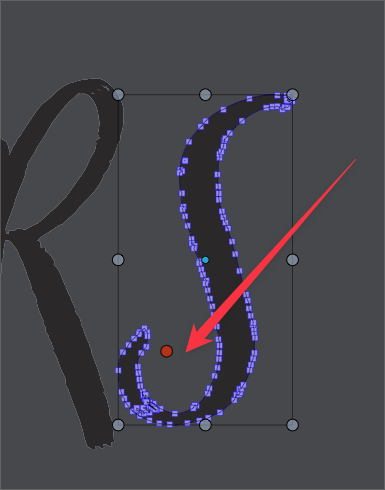
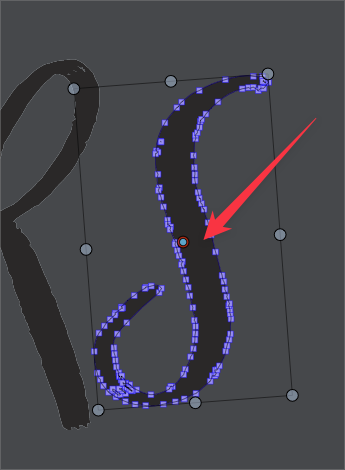
      I've noticed this recently in VS - this example is from build 34. If I erase a section of a vector shape, the red circle rotation point moves. I would expect if I erased from an edge or something, then the shape would be noticeably shorter in height or width and the middle would be different as expected.
      In this example, I am erasing part of the "S" that does not affect the overall size and yet the red dot is not still in the center.
      What's interesting is if I click away from the selection and re-select it - the red dot goes back to the center again.
      Before erasing the section
      0_1650677215902_df7fdc40-d3e9-4f5e-bd95-8575b7f5b048-BLD 2022-04-22 at 21.25.55.png
      After erasing a section of the "S"
      0_1650677272587_93514339-32a7-41fb-aedd-4a9a8c4b8e76-BLD 2022-04-22 at 21.27.26.png

      🍎 macOS Tahoe 26.2, Mac mini (M1, 2020), Chip Apple M1, Memory 16 GB
      Cintiq 27QHD Display and LG Ultra HD Display

      VectorStylerV 1 Reply Last reply Reply Quote 0
      • VectorStylerV Offline
        VectorStyler @Boldline
        last edited by

        @Boldline Yes, this happens now (can be replicated), because a Separate Path step was automatically added to the erase (and knife) tools, and separate path resets the transform center.

        The separate path step can be disabled in the Preferences -> Editing Options 2 section.

        BoldlineB 1 Reply Last reply Reply Quote 1
        • BoldlineB Offline
          Boldline @VectorStyler
          last edited by

          @vectoradmin ok thanks - I like and prefer the added function, so for now I'll leave it and see how things go


          🍎 macOS Tahoe 26.2, Mac mini (M1, 2020), Chip Apple M1, Memory 16 GB
          Cintiq 27QHD Display and LG Ultra HD Display

          1 Reply Last reply Reply Quote 1
          • First post
            Last post