VectorStyler
    • Categories
    • Unread
    • Recent
    • Tags
    • Popular
    • Register
    • Login

    Copy and Pasting of Text on a Path Not working

    Scheduled Pinned Locked Moved Resolved Issues
    3 Posts 2 Posters 5.0k Views 1 Watching
    Loading More Posts
    • Oldest to Newest
    • Newest to Oldest
    • Most Votes
    Reply
    • Reply as topic
    Log in to reply
    This topic has been deleted. Only users with topic management privileges can see it.
    • BoldlineB Online
      Boldline
      last edited by Boldline

      I was attempting to copy the existing text on a path and paste it again along the same path and it would not paste. I tried every conceivable option in terms of tools for that with no luck
      Here is a video of my attempt

      This was the result I was trying to achieve:
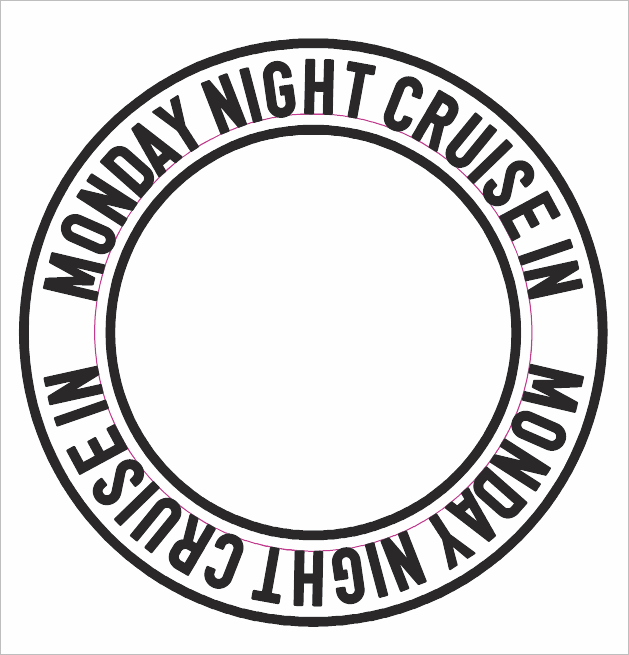
      0_1651101496972_be3f6c63-371a-4e1f-a927-5c2895b6171d-BLD 2022-04-27 at 19.17.55.png

      Update: Seems to be working now. Not sure what was happening before

      🍎 macOS Tahoe 26.2, Mac mini (M1, 2020), Chip Apple M1, Memory 16 GB
      Cintiq 27QHD Display and LG Ultra HD Display

      VectorStylerV 2 Replies Last reply Reply Quote 0
      • VectorStylerV Offline
        VectorStyler @Boldline
        last edited by

        @Boldline When copying a text on a path, both the text and the path are copied to the clipboard. So when pasting, both are pasted and the new text is linked to the new path, all overlapping the previous text / path.

        It is better to duplicate the text before linking it to a path, or if already copied, then release the copy and link it to the original path (and remove the copied path).

        1 Reply Last reply Reply Quote 1
        • VectorStylerV Offline
          VectorStyler @Boldline
          last edited by

          @Boldline Is this problem still persists?

          1 Reply Last reply Reply Quote 0
          • First post
            Last post
