VectorStyler
    • Categories
    • Unread
    • Recent
    • Tags
    • Popular
    • Register
    • Login

    Changing the colour palette, bug?

    Scheduled Pinned Locked Moved VectorStyler 1.1 Bugs
    4 Posts 2 Posters 4.7k Views 2 Watching
    Loading More Posts
    • Oldest to Newest
    • Newest to Oldest
    • Most Votes
    Reply
    • Reply as topic
    Log in to reply
    This topic has been deleted. Only users with topic management privileges can see it.
    • B Offline
      B-Vs-V
      last edited by B-Vs-V

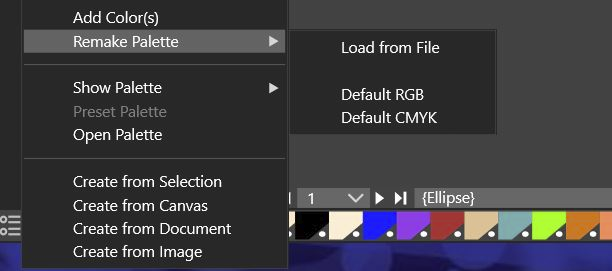
      I don't know if it's a bug but I try to modify/replace the colour palette by the default rgb one but nothing changes.
      0_1651132959900_cea8633c-5c6b-4313-a310-a0a767d13988-image.png

      W11 Pro 25H2 - 12th Gen Intel(R) i7-12700K 3.61 GHz - RAM 64 Go - NVIDIA GF GTX 4070 Ti - Intuos - Dell UP3216Q / Eizo ColorEdge
      W11 Pro 25H2 - 12th Gen Intel(R) i7-12700KF 3.60 GHz -RAM 64 Go - NVIDIA GF GTX 3080 - IntuosPro- ProArt PA329C

      VectorStylerV 1 Reply Last reply Reply Quote 0
      • VectorStylerV Offline
        VectorStyler @B-Vs-V
        last edited by

        @PatrickM I tried to replicate this, but it seems to be working here.
        If you have an example file where the palette cannot be changed, please send it to me by email, it might help replicating the issue. Thanks!

        B 1 Reply Last reply Reply Quote 0
        • B Offline
          B-Vs-V @VectorStyler
          last edited by B-Vs-V

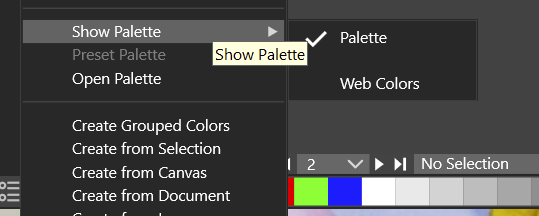
          @vectoradmin by continuing to test, I found: it is not a bug but I had to select "palette" first instead of "Web palette". I thought that choosing the default rgb palette (or cmyk) was sufficient.
          0_1651133875049_3cd2284f-fe53-4ff2-9e09-50047270fbb6-image.png

          Edit: besides, shouldn't it be enough to choose a default palette to force the change of palettes? one click instead of two?

          W11 Pro 25H2 - 12th Gen Intel(R) i7-12700K 3.61 GHz - RAM 64 Go - NVIDIA GF GTX 4070 Ti - Intuos - Dell UP3216Q / Eizo ColorEdge
          W11 Pro 25H2 - 12th Gen Intel(R) i7-12700KF 3.60 GHz -RAM 64 Go - NVIDIA GF GTX 3080 - IntuosPro- ProArt PA329C

          VectorStylerV 1 Reply Last reply Reply Quote 0
          • VectorStylerV Offline
            VectorStyler @B-Vs-V
            last edited by

            @PatrickM I think the issue here is that Remake Palette should be inactive (not visible) when the color panel or color bar is showing another palette than the document palette.
            "Remake Palette" is available for the document palette only.

            1 Reply Last reply Reply Quote 0
            • First post
              Last post