VectorStyler
    • Categories
    • Unread
    • Recent
    • Tags
    • Popular
    • Register
    • Login

    Abnormal pop-up and freezing
    Scheduled Pinned Locked Moved VectorStyler 1.1 Bugs
    5 Posts 2 Posters 5.3k Views 1 Watching
    Loading More Posts
    • Oldest to Newest
    • Newest to Oldest
    • Most Votes
    Reply
    • Reply as topic
    Log in to reply
    This topic has been deleted. Only users with topic management privileges can see it.
    • W Offline
      William Kansepa
      last edited by

      Hi
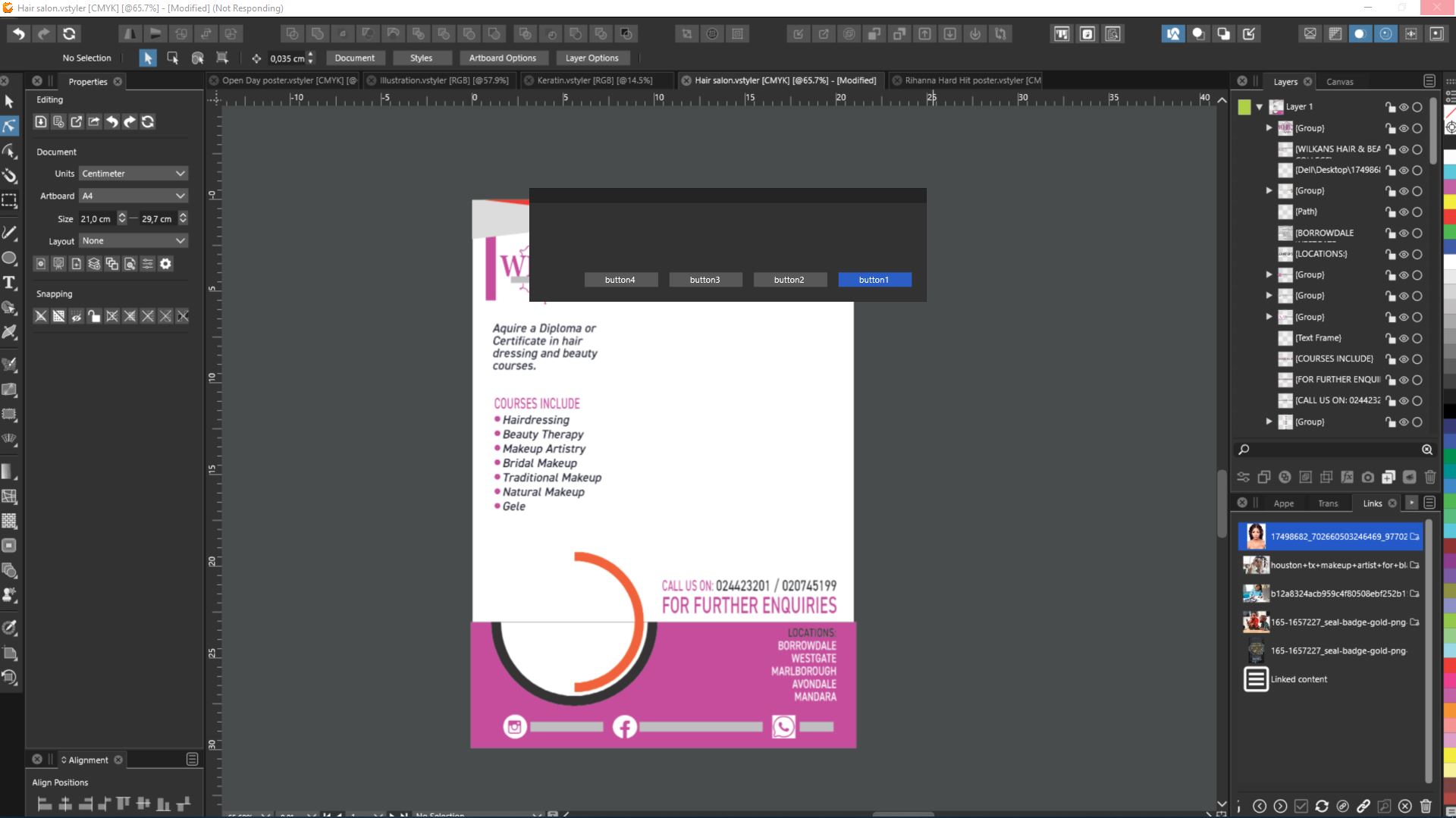
      I have just updated to VS1.1.037 and am repeatedly encountering a very unusual behaviour in this version when editing or exporting artwork *(to .Pdf). The application pops up some box with buttons (refer to attached image) and automatically freezes. I am then forced to restart the program. I have tested random files and most of the time am getting this pop-up behaviour.

      I am on a fully updated Windows 10 platform.
      0_1651225576662_pop-up in VectorStyler 1.1.jpg

      HP•Windows 11 Pro•11th Gen Intel(R) Core(TM) i7-1165G7 @ 2.80GHz 2.70 GHz• RAM: 16.0 GB (DDR4)

      VectorStylerV 2 Replies Last reply Reply Quote 0
      • VectorStylerV Offline
        VectorStyler @William Kansepa
        last edited by

        @William-Kansepa What kind of action is taken before this popup shows?

        W 1 Reply Last reply Reply Quote 0
        • VectorStylerV Offline
          VectorStyler @William Kansepa
          last edited by

          @William-Kansepa It could be that something causes a break in the resources (settings or workspace). If nothing else works, remove the c:\Users<user name>\NumericPath folder, while VS is not running. This will also delete the custom presets (if there are any), so you may want to back it up.

          W 1 Reply Last reply Reply Quote 1
          • W Offline
            William Kansepa @VectorStyler
            last edited by

            @vectoradmin Just some simple and common everyday editing or when exporting to pdf. I have never encountered this kind of behaviour in VS before.

            HP•Windows 11 Pro•11th Gen Intel(R) Core(TM) i7-1165G7 @ 2.80GHz 2.70 GHz• RAM: 16.0 GB (DDR4)

            1 Reply Last reply Reply Quote 0
            • W Offline
              William Kansepa @VectorStyler
              last edited by

              @vectoradmin Thank you so much. I did as you suggested and it appears the problem is gone!
              I will give you an update if I come across any hiccups pertaining to this issue, but so far so good.

              HP•Windows 11 Pro•11th Gen Intel(R) Core(TM) i7-1165G7 @ 2.80GHz 2.70 GHz• RAM: 16.0 GB (DDR4)

              1 Reply Last reply Reply Quote 1
              • First post
                Last post