VectorStyler
    • Categories
    • Unread
    • Recent
    • Tags
    • Popular
    • Register
    • Login

    Offset Path - How To:

    Scheduled Pinned Locked Moved General Discussion
    1 Posts 1 Posters 3.4k Views
    Loading More Posts
    • Oldest to Newest
    • Newest to Oldest
    • Most Votes
    Reply
    • Reply as topic
    Log in to reply
    This topic has been deleted. Only users with topic management privileges can see it.
    • BoldlineB Offline
      Boldline
      last edited by

      With the goal of taking the initiative to get topics discussed in detail, I wanted to start adding main feature topic threads to the general discussion for people to chime in with specific questions as well as contributing tips and methods and ideas and solutions to the threads. everything from identifying all the options and what they do to ways to get the best results in the specific tools and features.

      Starting with the "offset path" object>shape>offset path

      One of the best small features of this tool is the ability to click the preview button at the bottom left twice to see a lowered opacity preview of what the offset path will look like.
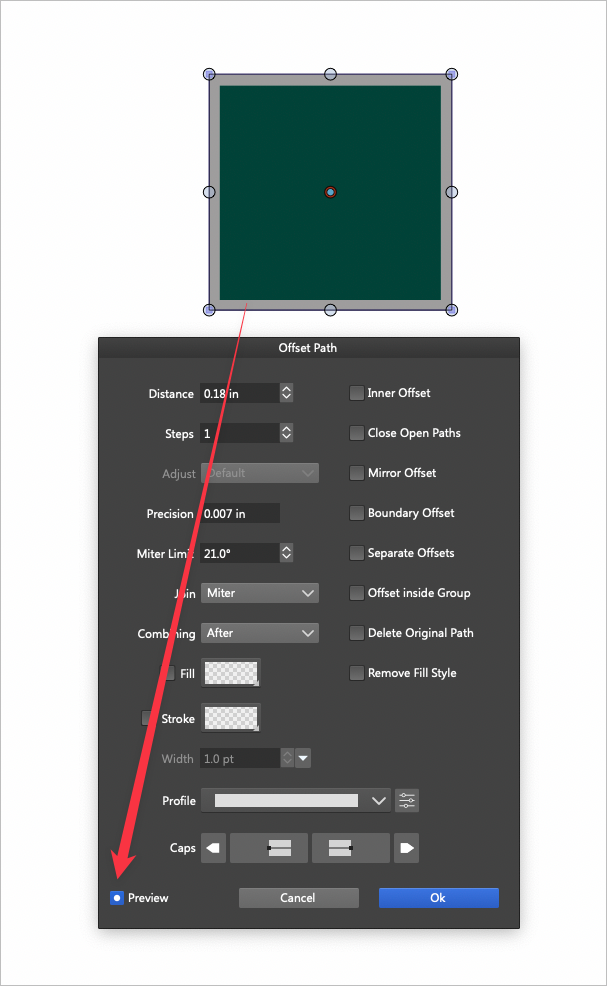
      0_1652802840934_a98d7d34-5ed1-4ac3-a14f-4c6f0f75deaa-BLD 2022-05-17 at 11.52.15.png

      🍎 macOS Tahoe 26.2, Mac mini (M1, 2020), Chip Apple M1, Memory 16 GB
      Cintiq 27QHD Display and LG Ultra HD Display

      1 Reply Last reply Reply Quote 1
      • First post
        Last post