VectorStyler
    • Categories
    • Unread
    • Recent
    • Tags
    • Popular
    • Register
    • Login

    VS randomly switches to pixel view

    Scheduled Pinned Locked Moved Resolved Issues
    5 Posts 3 Posters 5.6k Views 2 Watching
    Loading More Posts
    • Oldest to Newest
    • Newest to Oldest
    • Most Votes
    Reply
    • Reply as topic
    Log in to reply
    This topic has been deleted. Only users with topic management privileges can see it.
    • BoldlineB Offline
      Boldline
      last edited by Boldline

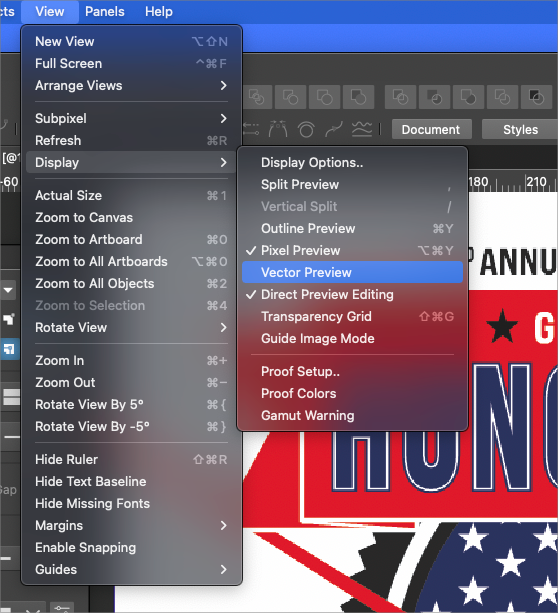
      I've been running into an issue lately where VS randomly jumps to pixel view as I am zooming in and out of a vector design and I have to go in to display and turn off pixel view and turn on vector view. It's occurred on 2 different files so far, both since the update to build 42. I'm trying to figure out what is happening prior to make it do this.

      UPDATE: It seems to be defaulting to pixel view for every new document I create.
      I'm not sure how or why that is happening or how to default it back to vector preview. I tried refreshing and restarting VS and neither fixed the issue - every new file defaults to pixel view and I need to manually switch it over to vector.
      I am having this issue on the M1 version of VS, I am not running into this issue on the intel version.
      0_1653851407148_793fbec8-992a-424e-88fc-f894f7f2cc24-BLD 2022-05-29 at 15.08.56.png

      🍎 macOS Tahoe 26.2, Mac mini (M1, 2020), Chip Apple M1, Memory 16 GB
      Cintiq 27QHD Display and LG Ultra HD Display

      b77B 1 Reply Last reply Reply Quote 1
      • b77B Offline
        b77 @Boldline
        last edited by b77

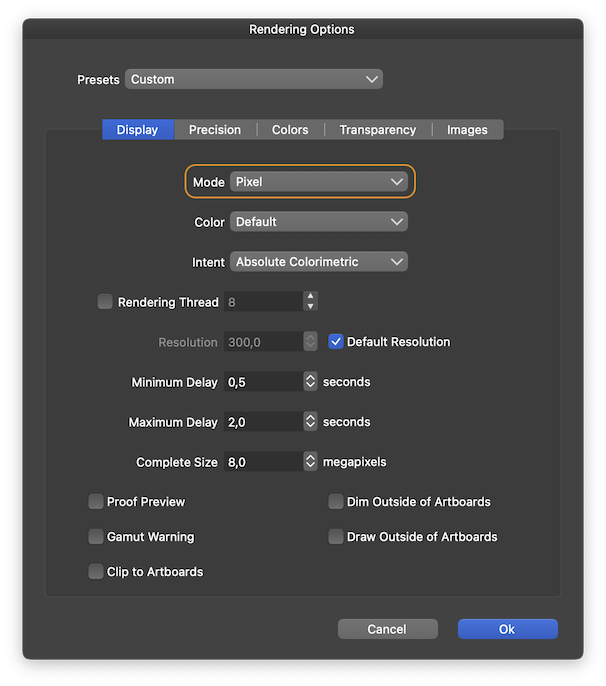
        @Boldline Maybe the Document viewing mode is set to 'Pixels' instead of 'Vectors' on the M1 Mac? Go to View menu > Display > Display Options to check:
        0_1653856208998_Screenshot 2022-05-29 at 23.27.31.png

        MacBook Pro (Intel) running Monterey 12.6.4

        BoldlineB 1 Reply Last reply Reply Quote 2
        • BoldlineB Offline
          Boldline @b77
          last edited by

          @b77 Thanks! That seems to have been the issue. I'm not sure how that got switched. All new files made seem to be defaulting to vector again. I appreciate it

          🍎 macOS Tahoe 26.2, Mac mini (M1, 2020), Chip Apple M1, Memory 16 GB
          Cintiq 27QHD Display and LG Ultra HD Display

          b77B VectorStylerV 2 Replies Last reply Reply Quote 0
          • b77B Offline
            b77 @Boldline
            last edited by

            @Boldline Great! 👍

            MacBook Pro (Intel) running Monterey 12.6.4

            1 Reply Last reply Reply Quote 0
            • VectorStylerV Offline
              VectorStyler @Boldline
              last edited by

              @Boldline @b77 Since 2 releases ago when the Display settings are changed, the changes are used as defaults for a new document.

              1 Reply Last reply Reply Quote 1
              • First post
                Last post
