Pen tool improvements
-
Yes, as metal does not work on my iMac.
-
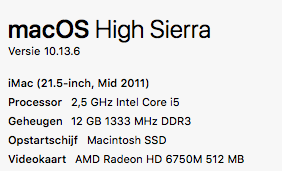
@postdes Could you send me your Mac spec. I will try to replicate these issues.
-
-
I agree with @postdes on the ease of use in Affinity Designer with the pen tool compared to VS. I've only just begun digging in to the pen tool and all it can do in VS and so far there's a LOT to be impressed with. There are far more options available in VS than I've found in either illustrator or Designer. I like for example, that pressing the plus key adds a new node in the middle of the next segment. I like the way the corner editor can round all node paths or select ones... The pen tool can switch to edit mode of a path while the command key is depressed - I like that I can click on a segment and adjust the curve that way - these are great...
I noticed what when I use the cursor to click on an existing path, it adds a triangle arrow shape at that location, but it doesn't appear to have a lasting effect. If I click elsewhere, the arrow shape triangle moves to that new location. Unless I'm missing something, could that click on the path be better used as a method to add a node in that very location? I can see the value in the plus key adding one exactly center automatically. I wouldn't get rid of that feature. Also, is there a way to gain access to handles on a node not showing them? In illustrator that would be shift-c and then click and drag.
I am going through the existing documentation on the VS pen and pencil tools at the moment. Trying to find the balance between taking the time to study all of it first myself and just asking questions here so the potential improvement process can be expedited🍎 macOS Tahoe 26.2, Mac mini (M1, 2020), Chip Apple M1, Memory 16 GB
Cintiq 27QHD Display and LG Ultra HD Display -
@Boldline Double-clicking a path when in path editing mode (shortcut: A) should add a node where the triangle-shaped node is displayed under the cursor.
-
@b77 oh ok! - that works! I also like that if I double-click again in the same spot, it's like the plus keyboard - it adds another node halfway on the path
-
@Boldline The triangle arrow shape at that location is a selection (a sort of marker) of an interior location of the segment.
The triangle direction indicates the path direction.With this selection, pressing the plus key adds a not at the selected location.
When this selection is missing, the new node is added in the middle.To summarize: single click highlights (selects), double click or plus adds.
There is no Shift+C option in VS, but with cmd it is possible to activate the node editor, while in the pen tool.
I will review in more details the feedback and try to improve the pen tool accordingly.
-
@postdes Build 200 contains improvements on these issues. The node editing commands should be available now, also when activated from the pen tool.
There are also improvements for OpenGL displays. -
I tried the new pen tool options, and they are an improvement. I did notice some quirky behaviour with it though. Sometimes dragging out a handle does not seem to work, and you get a weird effect. It seems to hang itself up temporarily (3rd shape in the screencapture).
https://recordit.co/GAUdTihqOD
Also the switch to the node tool with CMD does work a bit better. What I miss is the ability to change the handle going out of the last point drawn (on a non-closed path) so that I can change it's length or direction. This handle is invisible. It would also be helpful to be able to to convert a handle from smooth to cusp by dragging the handle and holding ALT while doing this.
-
@postdes I keep this issue open.
-
@vectoradmin There are additional improvements for the pen / node tool in the new build 201


