VectorStyler
    • Categories
    • Unread
    • Recent
    • Tags
    • Popular
    • Register
    • Login

    Width/Height not changing after object rotation

    Scheduled Pinned Locked Moved Resolved Issues
    12 Posts 4 Posters 10.5k Views 4 Watching
    Loading More Posts
    • Oldest to Newest
    • Newest to Oldest
    • Most Votes
    Reply
    • Reply as topic
    Log in to reply
    This topic has been deleted. Only users with topic management privileges can see it.
    • IgullI Offline
      Igull @Igull
      last edited by

      @Igull
      Even more 🙂
      OK, rotate by 90 then flip horizontally will do it every time 🙂

      iMac 27" 2015 Catalina 32Gb, MacBook Pro 13" 2016 Monterey 8Gb, Mac Mini M2 2023 8Gb

      1 Reply Last reply Reply Quote 0
      • S Offline
        Subpath @Igull
        last edited by

        @Igull

        Press the Reset Button on the Transform Panel
        ( or use Reset Transform in Transform Panel Menu )
        or convert your Shape to curve

        VS set the Shape Effect Transform if you change size
        or rotate. I think @VectorStyler could better explain
        how this works, then i.

        Win 11
        CPU: AMD Ryzen 5 9600X, 6-core.
        GPU: Nvidia Geforce RTX 5070.

        1 Reply Last reply Reply Quote 0
        • b77B Offline
          b77 @Igull
          last edited by

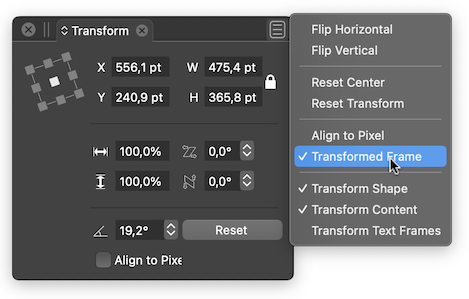
          @Igull If I understand correctly, you need to enable the 'Transform Frame' option in the Transform panel's menu:
          0_1655909228580_Screenshot 2022-06-22 at 17.46.04.png

          MacBook Pro (Intel) running Monterey 12.6.4

          S IgullI 2 Replies Last reply Reply Quote 2
          • S Offline
            Subpath @b77
            last edited by

            @b77

            thanks, did not know that too

            Win 11
            CPU: AMD Ryzen 5 9600X, 6-core.
            GPU: Nvidia Geforce RTX 5070.

            1 Reply Last reply Reply Quote 0
            • IgullI Offline
              Igull @b77
              last edited by

              @b77
              Great, thanks for that, Transformed Frame does the job - surprised that's not switched on by default ? 🙂

              iMac 27" 2015 Catalina 32Gb, MacBook Pro 13" 2016 Monterey 8Gb, Mac Mini M2 2023 8Gb

              b77B 1 Reply Last reply Reply Quote 0
              • b77B Offline
                b77 @Igull
                last edited by

                @b77
                Great, thanks for that, Transformed Frame does the job - surprised that's not switched on by default ? 🙂

                @VectorStyler Is this setting somewhere in Preferences and we can't find it?

                MacBook Pro (Intel) running Monterey 12.6.4

                1 Reply Last reply Reply Quote 0
                • VectorStylerV Offline
                  VectorStyler @Igull
                  last edited by

                  @Igull When rotating an object, the width / height will be the object size before rotation. As mentioned, Reset Transform will restart the transformation values from default.

                  "Transformed Frame" is off by default because the width / height is intended to be the original size (for example images).

                  Convert to Curves will also reset all transformations and editable shape effects and bake it into curves.

                  IgullI 1 Reply Last reply Reply Quote 0
                  • IgullI Offline
                    Igull @VectorStyler
                    last edited by

                    @VectorStyler said in Width/Height not changing after object rotation:

                    Transformed Frame" is off by default because the width / height is intended to be the original size (for example images).

                    OK, I can understand where you're coming from (just 🙂 ), but in that case, the dimension should always remain constant and not flip-flop when mirrored and rotated ?
                    Thanks
                    Neil

                    iMac 27" 2015 Catalina 32Gb, MacBook Pro 13" 2016 Monterey 8Gb, Mac Mini M2 2023 8Gb

                    VectorStylerV 1 Reply Last reply Reply Quote 1
                    • VectorStylerV Offline
                      VectorStyler @Igull
                      last edited by

                      @Igull said in Width/Height not changing after object rotation:

                      OK, I can understand where you're coming from (just 🙂 ), but in that case, the dimension should always remain constant and not flip-flop when mirrored and rotated ?

                      When a rotated object is mirrored, the new transform (flipping) resets the previous transform. This resets the bounding box, which in turn now will show the new sizes.

                      IgullI 1 Reply Last reply Reply Quote 0
                      • IgullI Offline
                        Igull @VectorStyler
                        last edited by

                        @VectorStyler
                        OK, understood - I'm just happy that I can set it to my liking 🙂

                        iMac 27" 2015 Catalina 32Gb, MacBook Pro 13" 2016 Monterey 8Gb, Mac Mini M2 2023 8Gb

                        1 Reply Last reply Reply Quote 1
                        • First post
                          Last post
