Artboard Export Filetypes Ordering
-
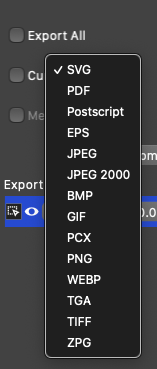
Minor issue - Seems like the Artboard export filetypes should be in alphabetical order like elsewhere?
-
@badcat They are however grouped into vector-based formats at the top and bitmap formats at the bottom.
How about a separator between these, instead of alphabetical sorting?
Then put PDF at the top of the vector-based ones (or keep SVG, it's fine with me), and PNG and JPEG at the top of the bitmaps? I don't like hunting for PNG in the list.
-
@b77 Yes, that does sort of appear to be the case for vector / raster grouping. However it's inconsistent just with the rest of the app. Since SVG, PDF, PS and EPS can all include raster data along with the vector, I'd vote to keep it Alphabetical as it is in the regular export options.
-
@badcat I don’t think I will ever export as PostScript, BMP, TGA, PCX, and I never even heard of ZPG, to be honest
 , that’s why having the most used formats placed at the top of each section makes more sense to me.
And since I guess the list of export formats will only expand with each major update of the app, if the most common formats are mixed with the others alphabetically you’ll always need to squint a bit when selecting PNG from four other formats starting with ‘P’, or JPEG from three formats starting with ‘J’.
So that’s why i think simple alphabetical sorting is good but not great. IMO, of course, and YMMV.
(Btw, I hope that sometime in the future the developer will consider implementing a way to export multiple formats with one click. If you make a minor edit and you need to re-export everything as PNG, PDF and also JPEG, having the last export settings stored per document would help with this a lot. A list with checkboxes for each format on the left side instead of choosing just one from a list? Something like that, I guess).
-
@b77 ZPG is an internal vector icon format, left there by mistake.
There are three automated export options Slices, Artboards and Objects:
- Slices: mark regions of the canvas (the slice tool in the artboard tool group), and setup multiple formats per each region (slices panel).
- Artboards: use with the Export Artboards command and setup multiple formats there, and select which artboards to export.
- Object Export panel: drag & drop objects into this panel for exporting. can create multiple export collections each with multiple file formats.
Aftter exporting with any of these (or the default export command), saving the vstyler document will also save the export options with the document.
Then using the Export Again command will repeat the last exporting (fourth button in context panel, for one click). -
@vectoradmin 'Export Artboards' doesn't work (on Big Sur) if I check the 'Export All' option. A bug?
-
@b77 Yes it is a bug. You must also check the Current Canvas and Member Canvas options (cannot find where to take the artboards from). Fix will be in the next build.
-
@vectoradmin Thanks.

-
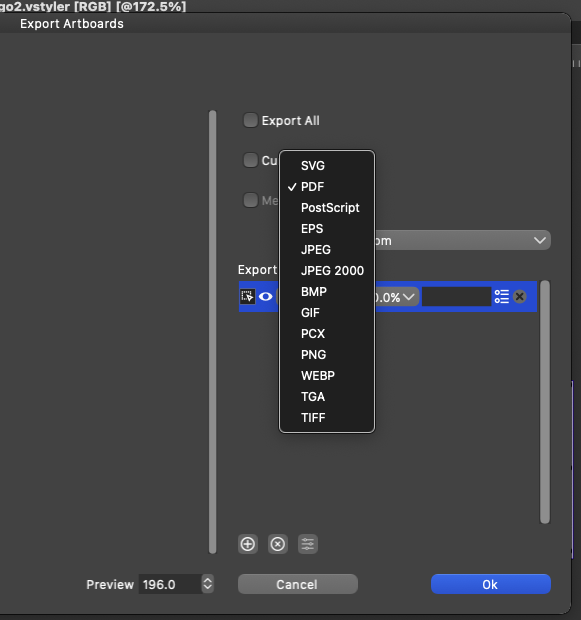
In the new build (200), export formats are shown in alphabetical order.
-
@vectoradmin This is correct in the File > Export format dialog, but still not alphabetically listed in the Export Artboards - Export Profiles dropdown.
-
@badcat I will keep this issue open.
-
@badcat This should be fixed in the build 201


