VectorStyler
    • Categories
    • Unread
    • Recent
    • Tags
    • Popular
    • Register
    • Login

    unexpected blend results

    Scheduled Pinned Locked Moved VectorStyler 1.1 Bugs
    4 Posts 2 Posters 4.3k Views 1 Watching
    Loading More Posts
    • Oldest to Newest
    • Newest to Oldest
    • Most Votes
    Reply
    • Reply as topic
    Log in to reply
    This topic has been deleted. Only users with topic management privileges can see it.
    • BoldlineB Offline
      Boldline
      last edited by Boldline

      I know there are some blend issues previously addressed that are on the list for improvements - this may be the same thing.
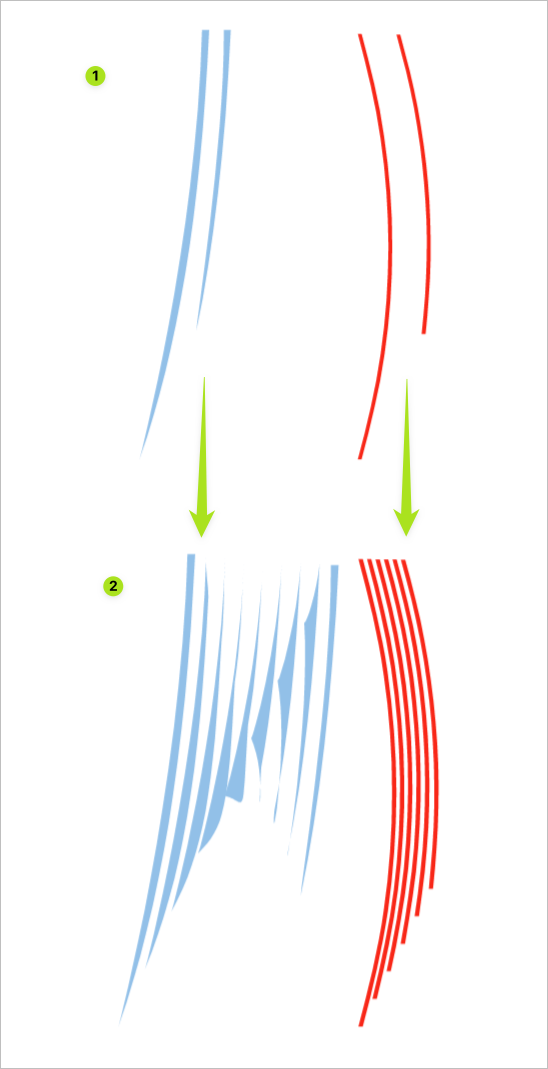
      IN group 1 - I made the blue shapes and wanted to blend between them - the orange set on the right are two rectangle shapes I expanded and bent with warp and am testing the blend between - Here is the video demonstrating the blend issue - (sorry for my fumbling around a little)
      The result of blending in section 2 - the orange set blended perfectly and the blue set went all funky (i stretched out the end shapes to better show what happened in between)
      the two samples appear almost identical to my untrained eyes, yet one works and one does not when blending... I'm guessing it all has to do with not having tapering points?
      0_1657805419104_9a2741e9-4ac8-4fce-9be4-1def46c4abb1-BLD 2022-07-14 at 09.28.30.png

      Here is the file: 0_1657805688529_blend2.vstyler

      🍎 macOS Tahoe 26.2, Mac mini (M1, 2020), Chip Apple M1, Memory 16 GB
      Cintiq 27QHD Display and LG Ultra HD Display

      b77B 1 Reply Last reply Reply Quote 0
      • b77B Offline
        b77 @Boldline
        last edited by

        @Boldline You just need to change the location of the start node so it's similar with the start node of the other shape: https://recordit.co/xmdGyxp1V6

        MacBook Pro (Intel) running Monterey 12.6.4

        BoldlineB 1 Reply Last reply Reply Quote 3
        • BoldlineB Offline
          Boldline @b77
          last edited by

          @b77 oh cool! thanks - I never thought about that but I can now understand why VS would get confused. I appreciate you showing me how to fix it

          🍎 macOS Tahoe 26.2, Mac mini (M1, 2020), Chip Apple M1, Memory 16 GB
          Cintiq 27QHD Display and LG Ultra HD Display

          b77B 1 Reply Last reply Reply Quote 1
          • b77B Offline
            b77 @Boldline
            last edited by

            @Boldline For more complex shapes where the blending is not exactly right due to node count differences sometimes adding a node or two is needed.

            MacBook Pro (Intel) running Monterey 12.6.4

            1 Reply Last reply Reply Quote 1
            • First post
              Last post