VectorStyler
    • Categories
    • Unread
    • Recent
    • Tags
    • Popular
    • Register
    • Login

    Erase blend mode causes VS crash each time selected

    Scheduled Pinned Locked Moved VectorStyler 1.1 Bugs
    6 Posts 2 Posters 5.8k Views 1 Watching
    Loading More Posts
    • Oldest to Newest
    • Newest to Oldest
    • Most Votes
    Reply
    • Reply as topic
    Log in to reply
    This topic has been deleted. Only users with topic management privileges can see it.
    • BoldlineB Offline
      Boldline
      last edited by

      Testing out the new "erase" blend mode, it would crash VS each time I attempted to use it. Seems to happen with any kind of shape. I tested it three times with different objects and each time it crashed - I did not check the other blend modes to see if they also have a problem

      Here is a video of that

      🍎 macOS Tahoe 26.2, Mac mini (M1, 2020), Chip Apple M1, Memory 16 GB
      Cintiq 27QHD Display and LG Ultra HD Display

      VectorStylerV 2 Replies Last reply Reply Quote 0
      • VectorStylerV Offline
        VectorStyler @Boldline
        last edited by

        @Boldline Could not replicated here. Tried with CMYK on MacMini also.

        1 Reply Last reply Reply Quote 0
        • VectorStylerV Offline
          VectorStyler @Boldline
          last edited by

          @Boldline There are also some other issues found with the Eraser mode. Will be fixed ASAP.

          BoldlineB 1 Reply Last reply Reply Quote 1
          • BoldlineB Offline
            Boldline @VectorStyler
            last edited by

            @VectorStyler I'm glad you were able to solve my issue and other issues as well!

            🍎 macOS Tahoe 26.2, Mac mini (M1, 2020), Chip Apple M1, Memory 16 GB
            Cintiq 27QHD Display and LG Ultra HD Display

            VectorStylerV 1 Reply Last reply Reply Quote 1
            • VectorStylerV Offline
              VectorStyler @Boldline
              last edited by

              @Boldline The Erase mode crash occurs when the Transparent Backdrop is disabled in the Display Options

              This will be fixed, but without Transparent Backdrop, the non-isolated layers / groups will not render the Eraser blend mode in the future (transparent backdrop is needed for this feature).

              BoldlineB 1 Reply Last reply Reply Quote 1
              • BoldlineB Offline
                Boldline @VectorStyler
                last edited by Boldline

                @VectorStyler I'm glad you found the issue! I'm trying to remember why I turned off the transparency backdrop. You mentioned its in the display options - but what section is that? I am looking in the preferences for it now

                Ok I remember now - I was thinking of the preferences section because it related to my custom preferences, but it's tied to the display options panel
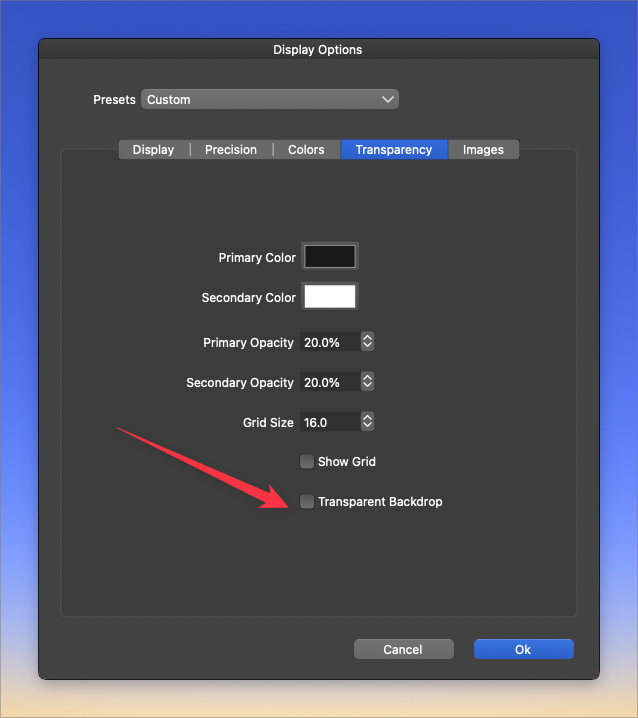
                0_1658234681439_2829052a-5632-4d41-aee0-045ccad73861-BLD 2022-07-19 at 08.44.28.png
                I had turned this feature off because of the white outlines it was creating when I was working on designs - vectors that sat over the top of others would have that thin white unwanted line....


                🍎 macOS Tahoe 26.2, Mac mini (M1, 2020), Chip Apple M1, Memory 16 GB
                Cintiq 27QHD Display and LG Ultra HD Display

                1 Reply Last reply Reply Quote 1
                • First post
                  Last post