VectorStyler
    • Categories
    • Unread
    • Recent
    • Tags
    • Popular
    • Register
    • Login

    Bitmaps

    Scheduled Pinned Locked Moved Implemented Features
    8 Posts 3 Posters 10.9k Views 1 Watching
    Loading More Posts
    • Oldest to Newest
    • Newest to Oldest
    • Most Votes
    Reply
    • Reply as topic
    Log in to reply
    This topic has been deleted. Only users with topic management privileges can see it.
    • BoldlineB Offline
      Boldline
      last edited by

      I was giving thought today to the possibilities with a bmp file in VS. Often I use Photoshop to create a bitmap file with halftones I can then place into Illustrator and edit the color of to create a halftone pattern in a vector file I typically use for shirt designs.
      I did some research in the VS documentation and found the pixelation section with tons of great features and controls... saw I could even just make the selection at hand a bitmap and not be forced to convert the full document. I exported as a bitmap file and then opened it in Illustrator to test it and it didn't look right....
      I assume I'm missing some settings - but this could be a really huge feature set for designers like me who don't want to rely on Photoshop to make bitmaps that need to act like vectors - thanks!
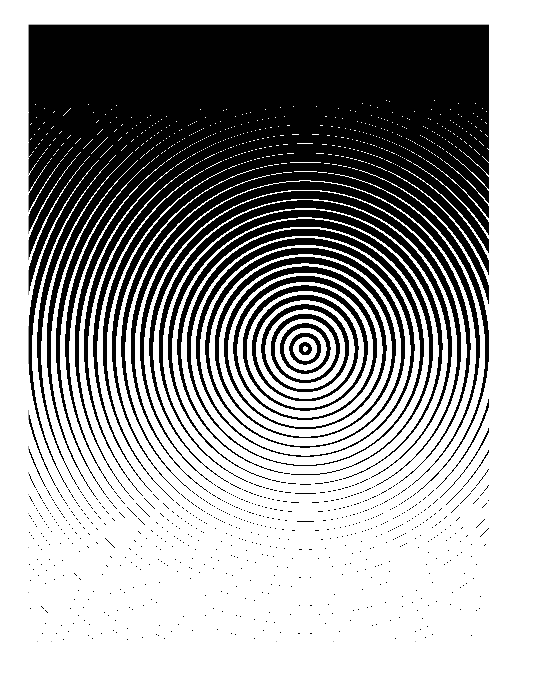
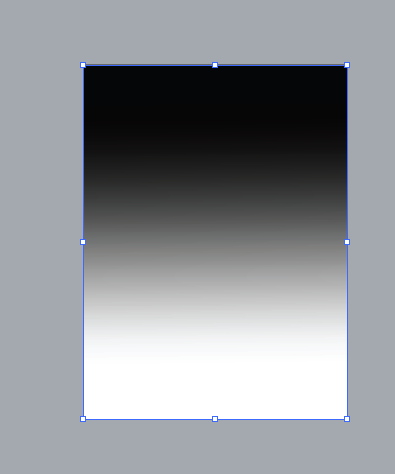
      1_1609874824436_BLD 2021-01-05 at 14.26.22.png 0_1609874824435_BLD 2021-01-05 at 14.26.34.png

      🍎 macOS Tahoe 26.2, Mac mini (M1, 2020), Chip Apple M1, Memory 16 GB
      Cintiq 27QHD Display and LG Ultra HD Display

      VectorStylerV 1 Reply Last reply Reply Quote 1
      • VectorStylerV Offline
        VectorStyler @Boldline
        last edited by

        @Boldline When exporting, the image effects should be flattened into bitmaps.
        If it would be possible to share an example which does not look right in AI, it would help.

        Are these attached images captured in VS or AI?

        1 Reply Last reply Reply Quote 0
        • BoldlineB Offline
          Boldline
          last edited by

          Sorry for not clarifying. The circular bitmap was inside VS and the gray background image was the same file after exporting as a bmp and placing inside Illustrator. I will attempt to flatten it and see if that helps

          🍎 macOS Tahoe 26.2, Mac mini (M1, 2020), Chip Apple M1, Memory 16 GB
          Cintiq 27QHD Display and LG Ultra HD Display

          1 Reply Last reply Reply Quote 0
          • BoldlineB Offline
            Boldline
            last edited by

            Not trying to make you do all the work for me but I'm not seeing where I need to flatten.
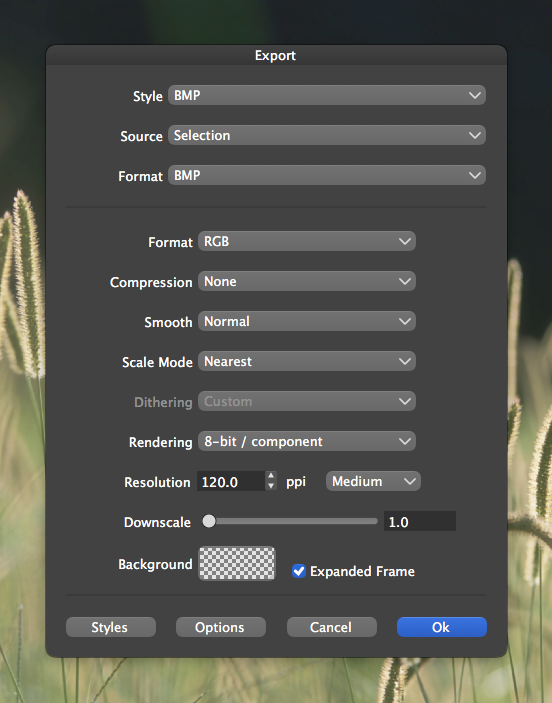
            0_1609887487982_BLD 2021-01-05 at 17.56.28.png

            🍎 macOS Tahoe 26.2, Mac mini (M1, 2020), Chip Apple M1, Memory 16 GB
            Cintiq 27QHD Display and LG Ultra HD Display

            b77B VectorStylerV 2 Replies Last reply Reply Quote 0
            • b77B Offline
              b77 @Boldline
              last edited by b77

              @Boldline There's no 'Flatten' option in the Export window — VS should automatically flatten the entire artwork when exporting in any to the bitmap-based formats (PNG, JPEG, BMP, etc).

              Did you…

              • place the resulting bitmap image in AI (with drag-and-drop, or File > Place…), or…
              • you copied the object from VS to the clipboard and pasted it in AI?

              I guess it's the latter, that's why only the gradient fill transfers correctly to AI.

              MacBook Pro (Intel) running Monterey 12.6.4

              BoldlineB 1 Reply Last reply Reply Quote 2
              • BoldlineB Offline
                Boldline @b77
                last edited by

                @b77 thanks for replying - I had saved out the selection from VS as a bitmap and then placed it into Illustrator actually. I tried to add the file I made in VS to this post but it told me I lacked the privileges.

                🍎 macOS Tahoe 26.2, Mac mini (M1, 2020), Chip Apple M1, Memory 16 GB
                Cintiq 27QHD Display and LG Ultra HD Display

                b77B 1 Reply Last reply Reply Quote 1
                • b77B Offline
                  b77 @Boldline
                  last edited by

                  @Boldline Send the VS file to the developer's email. 👍

                  MacBook Pro (Intel) running Monterey 12.6.4

                  1 Reply Last reply Reply Quote 1
                  • VectorStylerV Offline
                    VectorStyler @Boldline
                    last edited by

                    @Boldline I tested this and could not replicate it.

                    1 Reply Last reply Reply Quote 0
                    • First post
                      Last post
