VectorStyler
    • Categories
    • Unread
    • Recent
    • Tags
    • Popular
    • Register
    • Login

    Offset path preview seems to default to lowered opacity on first click
    Scheduled Pinned Locked Moved VectorStyler 1.1 Bugs
    1 Posts 1 Posters 2.8k Views
    Loading More Posts
    • Oldest to Newest
    • Newest to Oldest
    • Most Votes
    Reply
    • Reply as topic
    Log in to reply
    This topic has been deleted. Only users with topic management privileges can see it.
    • BoldlineB Online
      Boldline
      last edited by

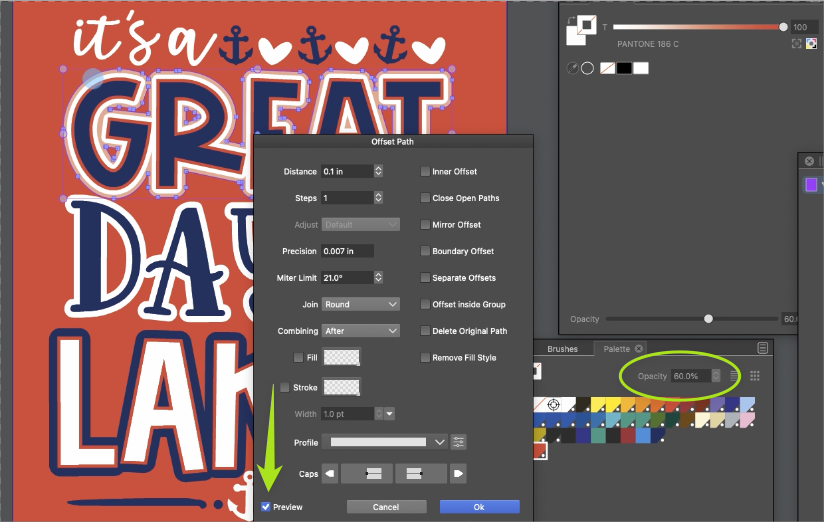
      When I went to use the offset path, the first click of the preview gave me a lowered opacity preview instead of a 100% opacity preview - the second click should give the lowered opacity option normally.
      Pressing the opacity button a second time does not further alter the opacity from the already lowered state of 60%
      The offset path also remains at 60% opacity after I commit to the results and I have to manually edit the opacity each time after, whether i do the preview in the offset panel or not
      I went back and tried again with the mouse and had the same unwanted result.
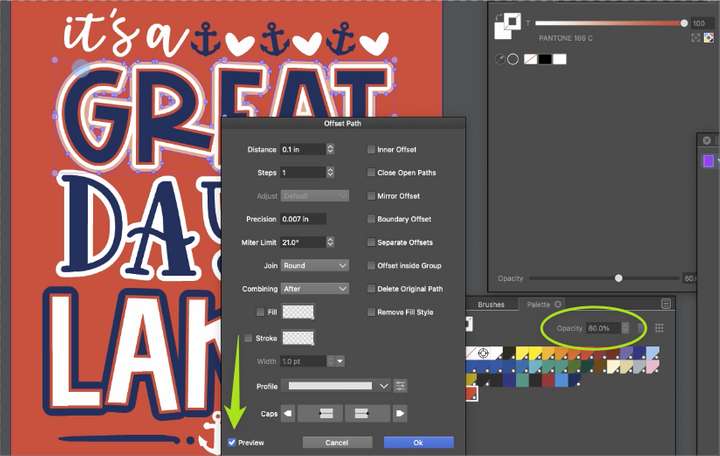
      0_1659101559076_7676cc7e-71ec-432d-9f73-fa19f055c6dc-BLD 2022-07-29 at 09.29.00.png

      🍎 macOS Tahoe 26.2, Mac mini (M1, 2020), Chip Apple M1, Memory 16 GB
      Cintiq 27QHD Display and LG Ultra HD Display

      1 Reply Last reply Reply Quote 0
      • First post
        Last post