Unable to change colour profiles
-
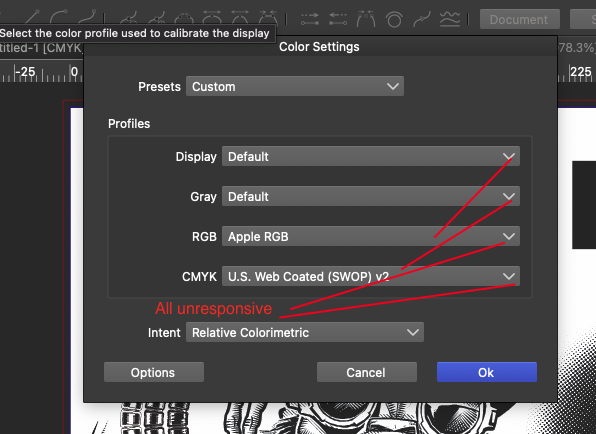
In colour settings, the profile tabs appear to be locked for me and just unresponsive - is there any way of re-gaining access to colour profiles?
-
@Dazmondo yes, this happens here too, and it is a regression.
As a workaround, go to Preferences -> Folders and in the "Folder Mode" drop down select "Color Profile Folders", then "Add Folder" and select where the color profiles are. -
@VectorStyler said in Unable to change colour profiles:
@Dazmondo yes, this happens here too, and it is a regression.
As a workaround, go to Preferences -> Folders and in the "Folder Mode" drop down select "Color Profile Folders", then "Add Folder" and select where the color profiles are.Brilliant stuff
-
@VectorStyler Can you please clarify what is the difference between the Color Settings and Document Colors under the Styles menu and the color settings in Document Setup?
-
@b77 said in Unable to change colour profiles:
"Color Settings" are global application level color settings. These include Display (not in document) but also RGB and CMYK in case the document does not contain these.
These will be common through multiple documents."Document Colors" are color settings stored with the document. These are specific to each document.
-
@VectorStyler Yes, I figured out that "Document Colors" must be color settings stored with the document.
Are you saying that it is possible for a VS document to have no color settings, in which case these global settings come into play — the app uses them when it loads the file?
MacBook Pro (Intel) running Monterey 12.6.4
-
OK, I guess it's when the ICC profiles specified in the file are not found on your computer, the app loads the file with the global color settings?
-
@b77 said in Unable to change colour profiles:
Are you saying that it is possible for a VS document to have no color settings, in which case these global settings come into play
yes
-
@VectorStyler So if in Document Setup > Color tab you leave the 'Color' option at 'Default CMYK' there is no profile assigned and the app uses the profile set in 'Styles > Color Settings?
And if you choose 'CMYK' instead and one of the available profiles from the 'CMYK' menu that pops up under it, that one will be used and not whatever is set in Styles > Color Settings?
Sorry for insisting on these details, but I want to make sure I understand.
-
@b77 said in Unable to change colour profiles:
@VectorStyler So if in Document Setup > Color tab you leave the 'Color' option at 'Default CMYK' there is no profile assigned and the app uses the profile set in 'Styles > Color Settings?
And if you choose 'CMYK' instead and one of the available profiles from the 'CMYK' menu that pops up under it, that one will be used and not whatever is set in Styles > Color Settings?
Yes, that is how it supposed to be.


