Preset manager bit of a nightmare
-
It seems that exporting a preset group, doesn't export a group, but exports the presets in a group as individual presets, making it impossible to import the preset group you've just exported, or maybe I'm missing something?
-
@Dazmondo I think the terminology here might be a bit confusing:
A preset group is a folder containing preset type files. A preset type file contains a hierarchy of presets of a single type. For example Gradients and Patterns are stored in separate preset type files.When exporting a whole preset group, it will copy all the preset type files of that preset folder (group) to a selected folder (that is why it is not possible to set file name when exporting a group).
To export only a few selected presets, click on the Options button and choose "Save Selected". This will create a single preset type file with the selected presets (of course, these can only be of the same type).
-
@VectorStyler I'm confused, as there's the option to import a group, how do you import a group when you can't export a group even though these options are available? other than that, how do I get my exported presets into presets? also, due to me messing around trying to get a grasp on getting my presets into presets all of the standard Repeater and Pattern presets are no longer available - how do I get them back?
-
@Dazmondo The standard presets can be restored either by an app reset (Shift+Option+Command at start), or by just removing the files in the ~/Library/NumericPath/VectorStyler1.0/vector/data/presets/ folder (maybe back these up first).
I recommend to create a different preset group (MacOS folder) for experimentation. Here are some important points:
- the content of a MacOS folder can be loaded as a "preset group".
- it is possible to define multiple new preset groups, associated with different MacOS folders.
- when creating new presets, the preset group can be selected in the "Groups" drop down of the preset name input view.
- a preset group will contain one file for each preset type (color, shape, gradient, pattern, etc).
- a preset file (.preset extension) will contain a collection of presets of the same type (can be organized into a hierarchy).
- "exporting a preset group" means copying all these files into an other folder (backup, reuse, etc).
- "importing a preset group" means adding the content of a folder into the ".preset" files of the current preset group (shown in the "Groups" field)
- there are 2 preset groups by default: "Presets" and "Document"
- the "Presets" contains all the predefined presets, and probably this was edited now. These are visible in the application, in all documents.
- the "Document" group can be used to save presets with the edited document. These are visible only if the document is active.
-
@VectorStyler said in Preset manager bit of a nightmare:
~/Library/NumericPath/VectorStyler1.0/vector/data/presets/
All I have in the NumericPath folder is an empty backups folder no sign of /VectorStyler1.0/vector/data/presets/
-
@Dazmondo I have managed to find via:
~/Library/Application Support/NumericPath/vectorStyler1.0/vector/data/presets but these appear to be only the presets I've been trying to get into VS - no sign of the standard Pattern and Repeater presets -
@Dazmondo Were these presets created with the Mac App Store version. That has a different folder.
-
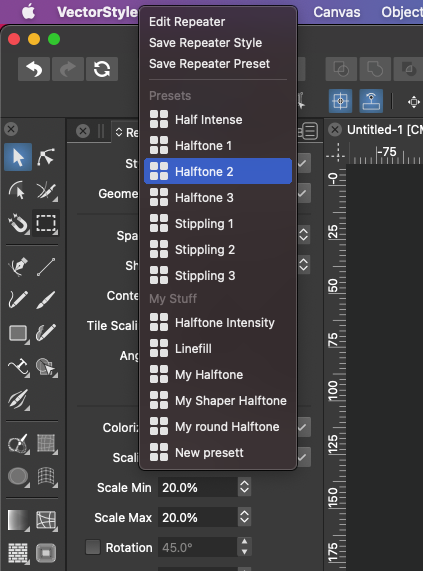
@Dazmondo Really confused --- after quitting and re-starting VS I now have the original presets, but still have my pattern presets showing up along side the original presets -- the repeater presets only showed the original stock presets - After placing my presets which I originally exported as group (which exported as separate presets to the desktop) I put those presets into a folder then from the preset manager, went to My Stuff preset group (which was empty) imported the group (the folder on the desktop which now contains the separate presets) which didn't add anything so switched to standard preset group then back to My Stuff and now my presets are showing - I now have two sets of my presets which show along side the original Pattern presets (not a problem) and repeater now shows: (see pic) ---- great --- just wondering, if I now delete or move the folder containing my presets from the desktop, will I again lose my presets?
-
@Dazmondo said in Preset manager bit of a nightmare:
now delete or move the folder containing my presets from the desktop, will I again lose my presets
Yes. Do not delete.
But you can move, and then add it again from the new folder/location as a new preset group.
-
@Dazmondo In important thing to know:
The presets in the "My Stuff" group are now stored in that folder. There is no "internal" copy of them. Whenever VS accesses these presets, it will be from the file in this folder.This also makes it possible to organize your presets into these type of groups, back them up, or replace the files.
-
@VectorStyler Great - now getting my head around it


